Back to the main page Back to category Live and Studio Mixers
musical instrument details
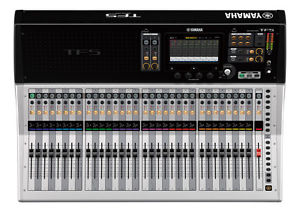
YAMAHA TF5 DIGITAL MIXER 32CH 48IN MOTORFADERS CUBASE RECORDING $200 INSTANT OFF
Estimated price for orientation: 3 499 $
Category: Live and Studio Mixers
Class:
Description Condition: New: A brand-new, unused, unopened, undamaged item in its original packaging (where packaging is applicable). Packaging should be the same as what is found in a retail store, unless the item is handmade or was packaged by the manufacturer in non-retail packaging, such as an unprinted box or plastic bag. See the seller's listing for full details. See all condition definitions- opens in a new window or tab ... Read moreabout the condition Brand: Yamaha Number of Line Inputs: 32 Analog/Digital: Digital Number of Phono Inputs: 4 Powered/Non-Powered: Powered MPN: TF5 Suited For: Recording & Live Sound Model: TF5 Features: 1 Knob EQ, 33 Motorized Faders, Effects Processor, Faders, Phantom Powered, Send/Return I/O, MP3/CD Player Compatible, PC/Mac Compatible Country/Region of Manufacture: Mexico Inputs/Outputs: XLR, 48 Inputs, Headphone TRS 1/4" Out, RJ-45 Interface, S/PDIF RCA Out, TRS 1/4" In, TRS 1/4" Out, USB Interface Number of Mic/Preamp Inputs: 32 Number of Channels: 32 UPC: 086792992877
TF5 YAMAHA Digital 32 Channel Motorized Mixer The Yamaha TF5 is 48 input digital mixing console with 33 motorized faders and 32 XLR-1/4" combo inputs that is part of Yamaha's TF Series of live digital mixing consoles. In developing the TF series Yamaha built from their existing base of acclaimed high-end mixer interfaces, adding intuitive control in an interface optimized for the type of touch panel control that has become a familiar feature in a wide range of applications. Allowing most operations to be carried out via the touch panel alone, the innovative TF series interface will quickly become second nature to a broad spectrum of users. Whether you have experience with Yamaha digital consoles, work with other digital consoles, operate analog consoles, or have never operated a mixer before, TF consoles will lead you to the desired results quickly through a smooth, efficient workflow. The availability of physical controls surrounding the touch panel further enhances control versatility and precision. Touch Operation for Intimate Control
Refined for the best possible operation via touch-panel control, the TF user interface offers a smooth workflow that can be an advantage in any mixing situation. The display content has been specifically designed for easy, direct accessibility, with a layout that promotes the most natural, efficient mixing. Touch panel operation is as easy as shaping the sound with your fingertips. Touch & Turn Knob Offers Extra Control Precision
When you need extra precision for a fine EQ or other adjustment, the physical Touch & Turn knob is always available right beside the touch panel. There are also four User Defined Knobs below the panel that can be assigned to control compressor threshold, EQ gain, or other parameters you need fast, direct access to while mixing. The knobs always affect the currently selected channel. Traditional Overview and Selected Channel Interfaces
Like the CL series consoles, operation is based around Overview and Selected Channel windows. The overview display shows the parameters for eight channels at a time, while the Touch & Turn knob provides direct access to gain, 1-knob EQ™, 1-knob COMP™, gate threshold, effect send level, pan, and other parameters. Touch the highlighted parameter a second time to switch to the Selected Channel display when you need access to detailed parameters for finer control. Effective gain, compressor, and EQ setup requires a considerable degree of skill and experience. Even veteran engineers need to spend time on these important basic settings. In addition to their intuitive user interfaces, TF consoles include a number of features that contribute to faster, smoot
Description
| Condition: | New: A brand-new, unused, unopened, undamaged item in its original packaging (where packaging is applicable). Packaging should be the same as what is found in a retail store, unless the item is handmade or was packaged by the manufacturer in non-retail packaging, such as an unprinted box or plastic bag. See the seller's listing for full details. See all condition definitions- opens in a new window or tab ... Read moreabout the condition | Brand: | Yamaha |
| Number of Line Inputs: | 32 | Analog/Digital: | Digital |
| Number of Phono Inputs: | 4 | Powered/Non-Powered: | Powered |
| MPN: | TF5 | Suited For: | Recording & Live Sound |
| Model: | TF5 | Features: | 1 Knob EQ, 33 Motorized Faders, Effects Processor, Faders, Phantom Powered, Send/Return I/O, MP3/CD Player Compatible, PC/Mac Compatible |
| Country/Region of Manufacture: | Mexico | Inputs/Outputs: | XLR, 48 Inputs, Headphone TRS 1/4" Out, RJ-45 Interface, S/PDIF RCA Out, TRS 1/4" In, TRS 1/4" Out, USB Interface |
| Number of Mic/Preamp Inputs: | 32 | Number of Channels: | 32 |
| UPC: | 086792992877 |
TF5 YAMAHA Digital 32 Channel Motorized Mixer The Yamaha TF5 is 48 input digital mixing console with 33 motorized faders and 32 XLR-1/4" combo inputs that is part of Yamaha's TF Series of live digital mixing consoles. In developing the TF series Yamaha built from their existing base of acclaimed high-end mixer interfaces, adding intuitive control in an interface optimized for the type of touch panel control that has become a familiar feature in a wide range of applications. Allowing most operations to be carried out via the touch panel alone, the innovative TF series interface will quickly become second nature to a broad spectrum of users. Whether you have experience with Yamaha digital consoles, work with other digital consoles, operate analog consoles, or have never operated a mixer before, TF consoles will lead you to the desired results quickly through a smooth, efficient workflow. The availability of physical controls surrounding the touch panel further enhances control versatility and precision. Touch Operation for Intimate Control
Refined for the best possible operation via touch-panel control, the TF user interface offers a smooth workflow that can be an advantage in any mixing situation. The display content has been specifically designed for easy, direct accessibility, with a layout that promotes the most natural, efficient mixing. Touch panel operation is as easy as shaping the sound with your fingertips. Touch & Turn Knob Offers Extra Control Precision
When you need extra precision for a fine EQ or other adjustment, the physical Touch & Turn knob is always available right beside the touch panel. There are also four User Defined Knobs below the panel that can be assigned to control compressor threshold, EQ gain, or other parameters you need fast, direct access to while mixing. The knobs always affect the currently selected channel. Traditional Overview and Selected Channel Interfaces
Like the CL series consoles, operation is based around Overview and Selected Channel windows. The overview display shows the parameters for eight channels at a time, while the Touch & Turn knob provides direct access to gain, 1-knob EQ™, 1-knob COMP™, gate threshold, effect send level, pan, and other parameters. Touch the highlighted parameter a second time to switch to the Selected Channel display when you need access to detailed parameters for finer control. Effective gain, compressor, and EQ setup requires a considerable degree of skill and experience. Even veteran engineers need to spend time on these important basic settings. In addition to their intuitive user interfaces, TF consoles include a number of features that contribute to faster, smoot
Refined for the best possible operation via touch-panel control, the TF user interface offers a smooth workflow that can be an advantage in any mixing situation. The display content has been specifically designed for easy, direct accessibility, with a layout that promotes the most natural, efficient mixing. Touch panel operation is as easy as shaping the sound with your fingertips. Touch & Turn Knob Offers Extra Control Precision
When you need extra precision for a fine EQ or other adjustment, the physical Touch & Turn knob is always available right beside the touch panel. There are also four User Defined Knobs below the panel that can be assigned to control compressor threshold, EQ gain, or other parameters you need fast, direct access to while mixing. The knobs always affect the currently selected channel. Traditional Overview and Selected Channel Interfaces
Like the CL series consoles, operation is based around Overview and Selected Channel windows. The overview display shows the parameters for eight channels at a time, while the Touch & Turn knob provides direct access to gain, 1-knob EQ™, 1-knob COMP™, gate threshold, effect send level, pan, and other parameters. Touch the highlighted parameter a second time to switch to the Selected Channel display when you need access to detailed parameters for finer control. Effective gain, compressor, and EQ setup requires a considerable degree of skill and experience. Even veteran engineers need to spend time on these important basic settings. In addition to their intuitive user interfaces, TF consoles include a number of features that contribute to faster, smoot