Back to the main page Back to category Digidesign Pro T
musical instrument details
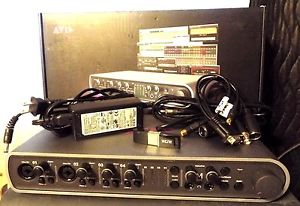
Avid Digidesign Mbox 3 Pro 24-bit 192 kHz FireWire / PT perpetual 12/11/10 ilok
Estimated price for orientation: 599 $
Category: Digidesign Pro T
Class:
Description Brand: Digidesign Model: Pro Tools Mbox 3 Pro Additional Inputs/Outputs: Analog In Tracks: 16 Features: Software Included Type: FireWire Audio Interface Inputs/Outputs: MIDI I/O Form Factor: Console/Tabletop Max. Number of Channels: 2 MPN: Does Not Apply Max. Sampling Rate: 24 Bit (48kHz) Interface Type: used Pro tools 12/ 11 and 10 ilok 2, FireWire Interface, MIDI Interface Mic/Line Input: Line XLR Suited For: Pro and Home Studio recording UPC: 612391830137
This is used a Excellent Condition Avid Mbox 3" PRO Firewire Interface" with all the factory firewire cables ,a breakout word clock cable , power supply and a used ilok with Pro tools 10/11/ and 12 non hd "" license Ilok. Again it will come with a used ilok with Pro tools 10/11/ and 12 non hd forever license Ilok 2.
The ilok can not be re-registered, upgraded in the future or transferred to your ilok.com or Avid account. I will allow the buyer to download pro tools from my company's Avid account. You will be able to download pro tools 12.6, 11 and 10 software from this account.The buyer will need the new ilok managed on their computer. After you download pro tools and install it, you will have to go the the Avid website below and download the driver for the Mbox Pro Firewire mac or windows. Then you just plugin the ilok, let your computer install the ilok driver and it will activate pro tools as long as you have it plugged into your computer.The Mbox 3 PRO "firewire" interface is a Pro Recorder. This mbox can be a little complex to use. This mbox has two 6 pin firewireports. The cable that will come with it is a 6 to 6 pin 400 firewire cable. It can also be connected with a 6 pin 400 to 800 firewire cable , that we do not supply.
Make sure you know how to hook this unit up , your computer is compatible and has the right firewire ports to connect to this unit before you bid or buy. We are not responsible for any lack of knowledge or your computer not having the correct firewire ports to use this unit.
See all the pictures of the actual unit and the firewire ports on the back of the unit and the 6 to 6 pin cable that is supplied .The Mbox 3 Pro from Avid is a high-quality audio interface that delivers premium-quality audio in a sleek and durable design, ideal for home and project studios. The interface is designed by the same engineering team behind Pro Tools|HD systems to ensure excellent performance and connects to a Mac or PC via a FireWire connection for fast data transfer. It supports audio rates up to 24-bit/192 kHz. Connectivity provides four microphone inputs with 48V phantom power and high-pass filters. The box also has four 1/4" line inputs, as well as two RCA and a single 1/8" (3.5 mm) stereo mini Alt line input for added versatility. A set of six 1/4" line outputs lets you connect up to three pairs of monitor speakers. Using a breakout cable, stereo S/PDIF digital I/O connectors allow you to connect digital audio devices, MIDI I/O connectors provide compatibility with a variety of controllers and devices, while Wordclock I/O connectors let you connect to an external clock device for perfect syncing. The front panel offers a monitor control section with mono, mute, dim, source, and speaker switching controls, as well as gain controls. A pair of 1/4" headphone jacks with volume control knobs allow two users to monitor audio privately. A large dedicated monitor volume knob gives you easy control over master volume. Additional features include integrated DSP for flexible cue mixing and reverb effects, a soft-clip limiter that lets you track hot signals without clipping, and a built-in guitar tuner. It also comes loaded with drivers that provide compatibility with Logic, Live, Record, Reason, Fruity Loops, Cubase, Nuendo, Sonar, and more, allowing you to use your favorite DAW solution. The Avid third generation Mbox Family products (Mbox Mini, Mbox, Mbox Pro) were announced on September 14, 2010.
Standalone driver installers for these interfaces are available for download (below) and include the device control panel. Note that Pro Tools 9 or later requires the Mac or Win driver to use the Mbox Pro.If the Mbox control panel is already installed on your system, click the About button to view the Package version. Once installed, you can find the control panel in: Apple Menu > System Preferences (Mac)Start Menu > All Programs > Avid (Windows)IMPORTANT: An Mbox Pro with Firmware v1.0.3 can take 10 seconds or more to boot up, so please be patient when powering on the unit. Firmware v1.0.4 significantly improves the boot time. Pro Tools 12 - Create even bigger mixes with support for up to 128 simultaneous audio tracks and 512 instrument tracks
- Mix and control groups of tracks faster and easier with VCA Masters
- Mix with confidence using 17 advanced metering options, including K-system, VU, and other professional standards
- Get gain reduction metering on every channel to gauge dynamics
- Experience smoother performance and highly responsive recording and playback with the extended disk cache, which loads entire sessions into RAM--no matter how large
- Rehearse and record more easily with track input monitoring
- Dial in cue mixes in a snap by copying fader settings to sends
- Solo tracks in PFL (pre-fader listen) or AFL (after-fader listen) mode for optimal recording
- Get access to Space, a high-quality convolution reverb plug-in, plus 16 jaw-dropping stompbox effects emulations--free for the first year
- Unleash your creativity with multiple times more processing power than ever before
- Add epic numbers of virtual instruments and effects to create richer sounding mixes
- Get unrivaled sound quality and powerful 64-bit performance to handle bigger mixes
- Play HD video right in the Pro Tools timeline--without transcoding
- Polish mixes with over 75 64-bit AAX virtual instrument and effects plug-ins Mac Releasesversion release date info link 1.3.2 Dec 16, 2014 1.3.1 Mar 24, 2014 Fixed: Tuner & DSP Effects stop working after updating firmware (note that if Tuner & DSP Effects are not restored, the unit may require a repair)Fixed: Input and Outputs Clip lights not working in horizontal viewFixed: Mbox Pro takes 10 seconds or more to power upUpdates Mbox Pro Firmware to v1.0.4Mac OS X 10.9-10.9.3 Mavericks support onlyMac OS X 10.9 Requires Pro Tools 11.0.3 or higherMac OS X 10.9.1 Requires Pro Tools 11.1.2 or higherMac OS X 10.9.4 Requires Pro Tools 11.2.1 or higherTested with Core 2 Duo Mac users read 1.3 Nov 12, 2013 Mac OS X 10.9, 10.9.1 Mavericks support onlyMac OS X 10.9 Requires Pro Tools 11.0.3 or higherMac OS X 10.9.1 Requires Pro Tools 11.1.2 or higherTested with Core 2 Duo Mac users read 1.2.2 Sep 25, 2013 Fixed: Mbox Pro Control Panel would become unresponsive if it was launched before Pro ToolsFixed: Low Latency Monitoring would duplicate signalFixed: Pro Tools would not take proper control over Stereo Mix controls in Mbox Control PanelFixed: Monitoring of record-enabled channels in Pro Tools with Low Latency Monitoring enabled would not function until a recording was made 1.2.0 Jun 20, 2013 Support for Pro Tools 10.3 – Pro Tools 11Fixed: Multiple Mbox Pro devices would populate in Audio MIDI Setup each time the interface was connected to the computer 1.1.5 Nov 30, 2012 Core Audio no longer stops working when switching between client apps or iTunes radio stations on latest Apple MacBook Pros with USB 3.0.Fixed: Pro Tools used an incorrect method to launch Mbox Control Panels. 1.1.3 Oct 30, 2012 Fixed: Control Panel unexpectedly quits when launching it on a non-English Mac OSFixed: Text display in Clock Source menu is cut off 1.1.2 Sep 25, 2012 Added support for Mac OS X Mountain Lion 1.0.16 Jun 29, 2012 Improves reliability of audio streamingFixed: Mac audio output stopped after quitting Pro ToolsFixed: Intermittent loss of headphone outputFixed: Mute and Speaker Switch buttons not working on Mac OS X LionUpdates Mbox Pro Firmware to v1.0.3 1.0.14 Aug 17, 2011 Added support for Mac OS X Lion 1.0.8 Sep 14, 2010
Windows Releasesversion release date info link 1.1.10 Apr 30, 2014 Fixed: Tuner & DSP Effects stop working after updating firmware (note that if Tuner & DSP Effects are not restored, the unit may require a repair)Updates Mbox Pro Firmware to v1.0.4Windows 7, 8, 8.1 & Windows 10 1.1.9 Sep 25, 2013 Fixed problem where Mbox Pro Control Panel reset Preferred Buffer Size when launchedWindows 7, 8, 8.1 1.1.8 Jun 20, 2013 Added Windows 8 supportSupport for Pro Tools 10.3 – Pro Tools 11Hardware latency values are now reported with far greater accuracy, allowing host applications to perform the best possible hardware latency compensationImproved performanceImproved multi-client supportMiscellaneous bug fixes 1.0.19 May 31, 2012 Updated the Mbox Pro firmware to version 1.0.3, allowing standalone firmware updates going forwardFixed Control Panel Text (Truncated/aligned-right in Setup > Output Setup)Fixed "Not enough space on my DVD drive" error during installation 1.0.11 Oct 11, 2010 Fixed an issue with launching the control panel on non-English systems 1.0.10 Sep 14, 2010
Description
| Brand: | Digidesign | Model: | Pro Tools Mbox 3 Pro |
| Additional Inputs/Outputs: | Analog In | Tracks: | 16 |
| Features: | Software Included | Type: | FireWire Audio Interface |
| Inputs/Outputs: | MIDI I/O | Form Factor: | Console/Tabletop |
| Max. Number of Channels: | 2 | MPN: | Does Not Apply |
| Max. Sampling Rate: | 24 Bit (48kHz) | Interface Type: | used Pro tools 12/ 11 and 10 ilok 2, FireWire Interface, MIDI Interface |
| Mic/Line Input: | Line XLR | Suited For: | Pro and Home Studio recording |
| UPC: | 612391830137 |
This is used a Excellent Condition Avid Mbox 3" PRO Firewire Interface" with all the factory firewire cables ,a breakout word clock cable , power supply and a used ilok with Pro tools 10/11/ and 12 non hd "" license Ilok. Again it will come with a used ilok with Pro tools 10/11/ and 12 non hd forever license Ilok 2.
The ilok can not be re-registered, upgraded in the future or transferred to your ilok.com or Avid account. I will allow the buyer to download pro tools from my company's Avid account. You will be able to download pro tools 12.6, 11 and 10 software from this account.The buyer will need the new ilok managed on their computer. After you download pro tools and install it, you will have to go the the Avid website below and download the driver for the Mbox Pro Firewire mac or windows. Then you just plugin the ilok, let your computer install the ilok driver and it will activate pro tools as long as you have it plugged into your computer.The Mbox 3 PRO "firewire" interface is a Pro Recorder. This mbox can be a little complex to use. This mbox has two 6 pin firewireports. The cable that will come with it is a 6 to 6 pin 400 firewire cable. It can also be connected with a 6 pin 400 to 800 firewire cable , that we do not supply.
Make sure you know how to hook this unit up , your computer is compatible and has the right firewire ports to connect to this unit before you bid or buy. We are not responsible for any lack of knowledge or your computer not having the correct firewire ports to use this unit.
See all the pictures of the actual unit and the firewire ports on the back of the unit and the 6 to 6 pin cable that is supplied .The Mbox 3 Pro from Avid is a high-quality audio interface that delivers premium-quality audio in a sleek and durable design, ideal for home and project studios. The interface is designed by the same engineering team behind Pro Tools|HD systems to ensure excellent performance and connects to a Mac or PC via a FireWire connection for fast data transfer. It supports audio rates up to 24-bit/192 kHz. Connectivity provides four microphone inputs with 48V phantom power and high-pass filters. The box also has four 1/4" line inputs, as well as two RCA and a single 1/8" (3.5 mm) stereo mini Alt line input for added versatility. A set of six 1/4" line outputs lets you connect up to three pairs of monitor speakers. Using a breakout cable, stereo S/PDIF digital I/O connectors allow you to connect digital audio devices, MIDI I/O connectors provide compatibility with a variety of controllers and devices, while Wordclock I/O connectors let you connect to an external clock device for perfect syncing. The front panel offers a monitor control section with mono, mute, dim, source, and speaker switching controls, as well as gain controls. A pair of 1/4" headphone jacks with volume control knobs allow two users to monitor audio privately. A large dedicated monitor volume knob gives you easy control over master volume. Additional features include integrated DSP for flexible cue mixing and reverb effects, a soft-clip limiter that lets you track hot signals without clipping, and a built-in guitar tuner. It also comes loaded with drivers that provide compatibility with Logic, Live, Record, Reason, Fruity Loops, Cubase, Nuendo, Sonar, and more, allowing you to use your favorite DAW solution.
The Avid third generation Mbox Family products (Mbox Mini, Mbox, Mbox Pro) were announced on September 14, 2010.
Standalone driver installers for these interfaces are available for download (below) and include the device control panel. Note that Pro Tools 9 or later requires the Mac or Win driver to use the Mbox Pro.If the Mbox control panel is already installed on your system, click the About button to view the Package version. Once installed, you can find the control panel in: Apple Menu > System Preferences (Mac)Start Menu > All Programs > Avid (Windows)IMPORTANT: An Mbox Pro with Firmware v1.0.3 can take 10 seconds or more to boot up, so please be patient when powering on the unit. Firmware v1.0.4 significantly improves the boot time. Pro Tools 12 - Create even bigger mixes with support for up to 128 simultaneous audio tracks and 512 instrument tracks
- Mix and control groups of tracks faster and easier with VCA Masters
- Mix with confidence using 17 advanced metering options, including K-system, VU, and other professional standards
- Get gain reduction metering on every channel to gauge dynamics
- Experience smoother performance and highly responsive recording and playback with the extended disk cache, which loads entire sessions into RAM--no matter how large
- Rehearse and record more easily with track input monitoring
- Dial in cue mixes in a snap by copying fader settings to sends
- Solo tracks in PFL (pre-fader listen) or AFL (after-fader listen) mode for optimal recording
- Get access to Space, a high-quality convolution reverb plug-in, plus 16 jaw-dropping stompbox effects emulations--free for the first year
- Unleash your creativity with multiple times more processing power than ever before
- Add epic numbers of virtual instruments and effects to create richer sounding mixes
- Get unrivaled sound quality and powerful 64-bit performance to handle bigger mixes
- Play HD video right in the Pro Tools timeline--without transcoding
- Polish mixes with over 75 64-bit AAX virtual instrument and effects plug-ins Mac Releases
Windows Releases
Standalone driver installers for these interfaces are available for download (below) and include the device control panel. Note that Pro Tools 9 or later requires the Mac or Win driver to use the Mbox Pro.If the Mbox control panel is already installed on your system, click the About button to view the Package version. Once installed, you can find the control panel in: Apple Menu > System Preferences (Mac)Start Menu > All Programs > Avid (Windows)IMPORTANT: An Mbox Pro with Firmware v1.0.3 can take 10 seconds or more to boot up, so please be patient when powering on the unit. Firmware v1.0.4 significantly improves the boot time. Pro Tools 12 - Create even bigger mixes with support for up to 128 simultaneous audio tracks and 512 instrument tracks
- Mix and control groups of tracks faster and easier with VCA Masters
- Mix with confidence using 17 advanced metering options, including K-system, VU, and other professional standards
- Get gain reduction metering on every channel to gauge dynamics
- Experience smoother performance and highly responsive recording and playback with the extended disk cache, which loads entire sessions into RAM--no matter how large
- Rehearse and record more easily with track input monitoring
- Dial in cue mixes in a snap by copying fader settings to sends
- Solo tracks in PFL (pre-fader listen) or AFL (after-fader listen) mode for optimal recording
- Get access to Space, a high-quality convolution reverb plug-in, plus 16 jaw-dropping stompbox effects emulations--free for the first year
- Unleash your creativity with multiple times more processing power than ever before
- Add epic numbers of virtual instruments and effects to create richer sounding mixes
- Get unrivaled sound quality and powerful 64-bit performance to handle bigger mixes
- Play HD video right in the Pro Tools timeline--without transcoding
- Polish mixes with over 75 64-bit AAX virtual instrument and effects plug-ins Mac Releases
| version | release date | info | link |
| 1.3.2 | Dec 16, 2014 | ||
| 1.3.1 | Mar 24, 2014 | Fixed: Tuner & DSP Effects stop working after updating firmware (note that if Tuner & DSP Effects are not restored, the unit may require a repair)Fixed: Input and Outputs Clip lights not working in horizontal viewFixed: Mbox Pro takes 10 seconds or more to power upUpdates Mbox Pro Firmware to v1.0.4Mac OS X 10.9-10.9.3 Mavericks support onlyMac OS X 10.9 Requires Pro Tools 11.0.3 or higherMac OS X 10.9.1 Requires Pro Tools 11.1.2 or higherMac OS X 10.9.4 Requires Pro Tools 11.2.1 or higherTested with Core 2 Duo Mac users read | |
| 1.3 | Nov 12, 2013 | Mac OS X 10.9, 10.9.1 Mavericks support onlyMac OS X 10.9 Requires Pro Tools 11.0.3 or higherMac OS X 10.9.1 Requires Pro Tools 11.1.2 or higherTested with Core 2 Duo Mac users read | |
| 1.2.2 | Sep 25, 2013 | Fixed: Mbox Pro Control Panel would become unresponsive if it was launched before Pro ToolsFixed: Low Latency Monitoring would duplicate signalFixed: Pro Tools would not take proper control over Stereo Mix controls in Mbox Control PanelFixed: Monitoring of record-enabled channels in Pro Tools with Low Latency Monitoring enabled would not function until a recording was made | |
| 1.2.0 | Jun 20, 2013 | Support for Pro Tools 10.3 – Pro Tools 11Fixed: Multiple Mbox Pro devices would populate in Audio MIDI Setup each time the interface was connected to the computer | |
| 1.1.5 | Nov 30, 2012 | Core Audio no longer stops working when switching between client apps or iTunes radio stations on latest Apple MacBook Pros with USB 3.0.Fixed: Pro Tools used an incorrect method to launch Mbox Control Panels. | |
| 1.1.3 | Oct 30, 2012 | Fixed: Control Panel unexpectedly quits when launching it on a non-English Mac OSFixed: Text display in Clock Source menu is cut off | |
| 1.1.2 | Sep 25, 2012 | Added support for Mac OS X Mountain Lion | |
| 1.0.16 | Jun 29, 2012 | Improves reliability of audio streamingFixed: Mac audio output stopped after quitting Pro ToolsFixed: Intermittent loss of headphone outputFixed: Mute and Speaker Switch buttons not working on Mac OS X LionUpdates Mbox Pro Firmware to v1.0.3 | |
| 1.0.14 | Aug 17, 2011 | Added support for Mac OS X Lion | |
| 1.0.8 | Sep 14, 2010 |
| version | release date | info | link |
| 1.1.10 | Apr 30, 2014 | Fixed: Tuner & DSP Effects stop working after updating firmware (note that if Tuner & DSP Effects are not restored, the unit may require a repair)Updates Mbox Pro Firmware to v1.0.4Windows 7, 8, 8.1 & Windows 10 | |
| 1.1.9 | Sep 25, 2013 | Fixed problem where Mbox Pro Control Panel reset Preferred Buffer Size when launchedWindows 7, 8, 8.1 | |
| 1.1.8 | Jun 20, 2013 | Added Windows 8 supportSupport for Pro Tools 10.3 – Pro Tools 11Hardware latency values are now reported with far greater accuracy, allowing host applications to perform the best possible hardware latency compensationImproved performanceImproved multi-client supportMiscellaneous bug fixes | |
| 1.0.19 | May 31, 2012 | Updated the Mbox Pro firmware to version 1.0.3, allowing standalone firmware updates going forwardFixed Control Panel Text (Truncated/aligned-right in Setup > Output Setup)Fixed "Not enough space on my DVD drive" error during installation | |
| 1.0.11 | Oct 11, 2010 | Fixed an issue with launching the control panel on non-English systems | |
| 1.0.10 | Sep 14, 2010 |