Back to the main page Back to category Live and Studio Mixers
musical instrument details
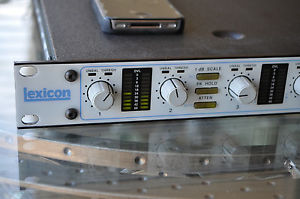
Lexicon 20/20 AD 20 Bit analog - digital converter compressor
Estimated price for orientation: 689 $
Category: Live and Studio Mixers
Class:
Description Condition: Used: An item that has been used previously. The item may have some signs of cosmetic wear, but is fully operational and functions as intended. This item may be a floor model or store return that has been used. See the seller’s listing for full details and description of any imperfections. See all condition definitions- opens in a new window or tab ... Read moreabout the condition Analog/Digital: Analog & Digital
New Page 1
LEXICON 20/20 AD Great unit in great shape and working order. clean tested working Digital Audio Inputs and Outputs Frequency Response (relative to 1kHz)
+0.1, -0.15dB, 10Hz to -20 kHz MAX Input Level Specifications Signal Delay 112 samples
(2.54 ms at 44.1kHz 2.33 ms at 48kHz) RFI Shielding Complies with FCC Rules Part 15 Class A requirements for computer equipment Power Requirements 100/120/220/240 VAC (+5%, -10%) 50-60 Hz 30W Dimensions 19.0"W x 1.75"H x 13.9"D (483 x 45 x 353mm) Conforms to 19" rack mount standard, 1U high Weight 11 lbs 2 oz (5 kg) Shipping materials meet or exceed Proj- ect 1A of the National Safe Transit Asso- ciation (NST A) packaged-product specifications: vibration test, drop test, static compression test. Environment Operating T emperature: 32° to 95°F (0° to 35° C)
Storage Temperature: -22° to 167°F (-30° to 75°C) Humidity: 95% maximum without condensation Safety Approvals UL, TUV *Units with Serial #'s <1215 do not have this option installed. Upgrades are avail- able from Lexicon. XLR, 3-wire balanced RCA, 2-wire unbalanced coaxial line Optical, optical fiber BNC, 75Ω, unbalanced Balanced: Attenuator Off: Attenuator On: Unbalanced: Attenuator Off: +0 to +22 dBu +8 to +28 dBu -6 to +16 dBu (-8 to +14 dBV) Front Panel Controls Converter Gain (4) 1dB SCALE/ALT PK HOLD
A TTEN/MUTE 4 CHAN/~
EMPH
DISPLAY/RMT
LINK/ tone burst
ON/VID
Compressor Gain Compressor Threshold Compressor Release DITHER (3 types, and OFF) FORMAT Dynamic Range 4-channel mode: 100dB typ, 98dB min @ 1kHz 2-channel mode: 112dB typ,
110dB min @ 1kHz THD+N (at -2dBfs) 1kHz: <-94dB (0.002%) SAMPLE RATE (2)
EXT SYNC (2 types, and none) POWER Attenuator Off:
>60dB below 1kHz, >40dB above 1kHz Attenuator On: >40dB Crosstalk -80dB typ, 0-20kHz Sample Rates 44.1 kHz, 48 kHz Sync Sources Internal
External AES (Digital Input*) External Word Clock
(TTL level square wave)
Video (with optional daughter- board) Lock Range +5% Rear Panel Controls BAL/UNBAL switch Front Panel Indicators UNBAL
THRESH
Input level
Dither selection
Format selection
Sample Rate selection External source selection, presence and lock Button lights indicate: 1dB SCALE on
PK HOLD on ATTEN on 4-CHAN on
EMPH on DISPLAY on
LINK on COMP/LIMITER on The 20/20 AD has four analog inputs: CH1, CH2, CH3 and CH4. In two-channel mode, only CH1 and CH2 are used, and the dynamic range of the unit is extended. If you have two stereo pairs, one of which is used more often than the other, the most often used pair should be assigned to CH1 and CH2, and the other pair to CH3 and CH4. This allows you to take advantage of the extended dynamic range of two-channel mode when using only a single stereo pair. When digitizing stereo pairs, the left channel of each pair should be sent to CH1 and CH3; the right to CH2 and CH4. The 20/20 AD accepts balanced or unbalanced signals with the following peak input levels: * Unbalanced signals cannot be correctly attenuated with the front panel ATTEN button. Input levels of unbalanced signals must be lowered before entering the 20/20 AD. The analog XLR connectors should be wired as follows: Signal Type Attenuator dBu dBV balanced OFF balanced ON unbalanced OFF* +2 to +22 +8 to +28 -4 to +16 0 to +20 +6 to +26 -6 to +14
Signal Type Pin 1 Pin 2 Pin3 balanced screen (shield) unbalanced screen and return positive polarity positive polarity
Introduction Controls and Connectors ...................................................................... 1 Unpacking • Power • Mounting .......................................................... 1 Front Panel Controls .......................................................................... 2 The Converter • The Level Meters • The Compressor Synchronization and Output Formatting • Alternate Modes
Rear Panel Connectors ..................................................................... 5 Audio Connections ............................................................................ 6 Connectors • Cables Using the 20/20 AD ................................................................................. 9 Analog Inputs ..................................................................................... 9 Termination and Grounding via Internal Jumpers ............................. 9 Balanced and Unbalanced Input Signals ......................................... 12 Front Panel Adjustments ................................................................. 13 Synchronization and Sample Rate .................................................. 14 AES Sync • Word Clock • Internal and External Modes
About Dither ..................................................................................... 16 Psychoacoustically Optimized Noise Shaping (PONS)
Automatic Offset Removal ............................................................... 18 Compressor Modes ......................................................................... 18 Dynamic Range Compression • Non-Linear Transfer Functions • Overload Protection • Digitizing Analog Tape Link • Display Digital Audio Outputs ....................................................................... 23 Realigning Two DAT Recordings .................................................... 24 Digital Sinewave Generator ............................................................. 24 Operating the 20/20 AD in the Digitial Mode ................................... 25 Specifications ....................................................................................... 27 Definition of Terms .............................................................................. 29 The 20/20 AD is an analog-to-digital converter which can be configured for two 20-bit channels, or four 18-bit channels. Twin on-board signal processors provide 20-bit to 16-bit compression in the digital domain, as well as DC removal and a choice of four dither types. The compressor allows leeway in setting levels and provides insurance against clipping in the digital domain. In addition, it provides 195 soft compression curves and 13 time constants to allow for more creative functions, such as emulation of tape saturation or analog compression. This manual provides some basic information on conversion, but assumes the user will be familiar with the principles of analog-to-digital conversion, as well as with the digital audio interface formats output by the 20/20 AD. Information on specific data which may be required by any target device should be obtained from the manufacturer. Lexicon has attempted to provide correct information and functional capability corresponding to digital audio standards known and available to us at the time of publication of this document and manufacture of this instrument. As standards evolve, Lexicon may make updates to documentation and/or system software available for purchase. Lexicon's warranty on this product excludes consequential damages resulting from the use of this product. Local jurisdiction may extend the user additional rights. AES/EBU Interface (Professional) The AES/EBU interface conforms to both the AES3-1992 (ANSI S4.40-1992) specification and the EBU document, Tech 3250-E. Both inputs and outputs are balanced, transformer-coupled designs, with a female XLR input and a male XLR output, conforming to the standard convention of IEC 268, Part 12. Input and output levels comply with CCITT V.11. On this device, the professional form of the digital audio and auxiliary data has been labeled "AES" in accordance with general usage. S/PDIF – Sony/Phillips Digital Interface Format (Consumer) The S/PDIF interface conforms to the Channel Status Type II format, as specified in the EIAJ CP-340 Digtial Audio Interface Standard, dated September, 1987, and to IEC 958, First Edition 1989-03. As of November 20, 1991, amendments to IEC 958, which include specifications for the implementation of auxiliary data for the consumer format, were under review. Until new specifications are published, this device must conform to currently approved specifications. On this device, the consumer form of the digital audio and auxiliary data has been labeled "SPDIF" in accordance with general usage. After unpacking the 20/20 AD, save all packing materials in case you ever need to ship the unit. Thoroughly inspect the 20/20 AD and packing materials for signs of damage. Report any shipment damage to the carrier at once. The following accessories are included with the 20/20 AD: Power Cable User Guide Quick Reference Guide The 20/20 AD is equipped with a 3-pin IEC connector and detachable line cord. Connect the cable end of the 20/20 AD line cord to the 20/20 AD power connector. Then plug the line cord into an AC wall socket providing voltage corresponding to the data plate on the unit. The 20/20 AD measures 19"W x 1.75"H x 13.9"D (483 x 45 x 353 mm). Make sure that the 20/20 AD is securely screwed into the rack, and that support is provided for the rear of the chassis during transport to avoid possible damage from severe mechanical shock. The maximum ambient operating temperature is 95°F (35°C). Provide adequate ventilation if the 20/20 AD is mounted in a closed rack with heat-producing equipment. When the compressor is off, the behavior of the level meters is determined by the settings of the 1dB SCALE, and PK HOLD switches. When the compressor is on, pressing DISPLAY will cause gain reduction (in dB) to be displayed on the two right hand meters (2-channel mode) or on all four meters (4-channel mode). The following charts show all of the possible states of the level meter and the value in decibels for each state. DISPLAY Press to cause gain reduc- tion to be displayed on the level meters — In 2-channel mode, only the right two level meters are activated; in 4- channel mode, all four level meters display compression. Press again to deactivate. LINK In 2-channel mode, links the left and right compressors ; in 4-channel mode, where 1,2 and 3,4 are already linked, this control links the two pairs. ON Turns the compressor on and off. THRESHOLD RELEASE THRESHOLD Sets the level at which com- pression starts. Adjusts the gain of low level signals (below the compres- sion threshold) between the converter and the compres- sor. RELEASE This control allows adjust- ment of the release time of the compressor. Release times from 0mS to ∞ are available. The attack time of the compressor is automati- cally set as a function of the signal rise time. Synchronization and Output Formatting DITHER Selects the type of dither: wide bandwidth, 20 bit, or High Frequency . FORMAT Selects the format to be available at the output con- nectors, AES or S/PDIF. Note: The format selected here will be sent to all out- puts. SAMPLE RATE Selects the sample rate of the A/D conversion. This switch should be set to the same sample rate as your sync source. When Word Clock is selected as an exter- nal sync source, the AES Channel Status Sample Rate bit will be set to the sample rate value you have selected here. (The PL DN setting of this switch is reserved for future enhancements.) EXT SYNC This switch allows selection of: Internal mode (unlit), Word Clock source, or AES source. This is for sync source only. See ALT-EXT SYNC below for digital audio input. ALT - ON Reserved for future en- hancements. ALT - DITHER Activates psychoacousti- cally optimized noise shap- ing. When activated, WIDE, 20BIT and HF will be lighted. Note that this type of dither can only be used in 2-chan- nel mode; activating will dis- able 4-channel mode and compressor functions. ALT - EXT SYNC Enables the digital audio in- put. See Operating the 20/20 AD in the Digital Mode. DITHER FORMAT AES / WC: In internal sync mode, PRES indicates that either WC or AES is available at the inputs as a sync source. In external sync mode, PRES indicates that the selected sync source is present at the input connectors. Alternate Modes SAMPLE RATE EXT SYNC LOCK lights in external sync mode to indicate the unit has successfully locked to the in- coming signal (WC or AES). ALT - ATTEN Mutes the outputs. Note that the level meters still work. To unmute, hold ALT and press ATTEN again. ALT - 4 CHAN Activates output of a digital sinewave at the AES ports. ALT - DISPLAY Activates remote mode/front panel lockout. When acti- vated, the 1dB SCALE and DISPLAY LEDs flash and front panel controls are locked into their current set- tings. To unlock, hold ALT and press DISPLAY again. ALT - LINK Only active in 4-channel mode. Activates a short tone burst. See Realigning Two DAT Recordings. AC Power Standard 3-pin IEC power connector. V~ Digital Output Two 3-pin XLR connectors, professional format AES bal- anced digital outputs. Two consumer format optical (fiber-optic) outputs.
Two consumer format unbalanced coaxial RCA outputs. Note: In 2-channel mode 3 & 4 and 1 & 2 are identical. The input and output connectors conform to published stan- dards for professional and consumer formats. The 20/20 AD, however, provides the user-selected format at all connectors, e.g. the AES format, if selected, will be available at the consumer-type outputs, as well as at the XLR outputs. Analog Input 3-pin XLR connectors. In 2- channel mode, only inputs 1 and 2 are active. 20/20 AD Rear Panel Connectors BAL/UNBAL Push on/push off switch. Set button to correspond to input signal type. A mismatch be- tween the input signal and the setting of this switch, will be indicated on the front panel by the BAL LED. 3+4 1+2 PUSH WORDCLOCK PUSH 4 IN 3 PUSH PUSH 2 IN 1 PUSH Sync/Digital Audio Input 3-pin XLR connector, professional format AES/EBU balanced digital input. 75Ω, unbalanced BNC connectors for word clock in/out. Audio Connections Connectors Signal Mating Connector Description S/PDIF Consumer Digital Output S/PDIF Consumer Digital Audio Optical Output
This interface requires balanced connections using high-quality, low-capaci- tance, controlled-impedance, data communication, twisted-shielded pair cable. Microphone cable may introduce a significant amount of jitter into the signal, causing distortion. Use commercially-available, consumer audio optical cable assemblies. This interface is unbalanced but, because it carries digital signals, it requires the use of 75Ω RG-59 coaxial cable. Below are recommended cable and cable assemblies. Similar cables from sources other than those listed here may be appropriate. AES/EBU Belden 9271 (foil shielded twisted pair, 124Ω, 12.2 pF/ft) Gotham Audio GAC-2 (shielded twisted pair) S/PDIF Consumer Digital Audio Belden 9259 (RG-59/U: 22 AWG conductor, .242 O.D., 75Ω, 17.3 pF/ft) Belden 8218 (27 AWG conductor, .150 O.D., 75Ω, 20.5 pF/ft) Maximum recommended length: 32 ft. (10M) S/PDIF Consumer Digital Audio Optical Toshiba TOCP174y
Sony POC-15
Maximum recommended length: 16 ft. (5M) Word Clock Belden 9259 (RG-59/U: 22 AWG conductor, .242 O.D., 75Ω, 17.3 pF/ft) Belden 8218 (27 AWG conductor, .150 O.D., 75Ω, 20.5 pF/ft) Maximum recommended length: 32 ft. (10M) Cables AES/EBU Digital Output S/PDIF
Consumer Digital Audio Output Word Clock I/O Using theUs2ing0t-h/e220/2A0 ADD The 20/20 AD has four analog inputs: CH1, CH2, CH3 and CH4. In two-channel mode, only CH1 and CH2 are used, and the dynamic range of the unit is extended. If you have two stereo pairs, one of which is used more often than the other, the most often used pair should be assigned to CH1 and CH2, and the other pair to CH3 and CH4. This allows you to take advantage of the extended dynamic range of two-channel mode when using only a single stereo pair. When digitizing stereo pairs, the left channel of each pair should be sent to CH1 and CH3; the right to CH2 and CH4. The 20/20 AD accepts balanced or unbalanced signals with the following peak input levels: * Unbalanced signals cannot be correctly attenuated with the front panel ATTEN button. Input levels of unbalanced signals must be lowered before entering the 20/20 AD. The analog XLR connectors should be wired as follows: Signal Type Attenuator dBu dBV balanced OFF balanced ON unbalanced OFF* +2 to +22 +8 to +28 -4 to +16 0 to +20 +6 to +26 -6 to +14
Signal Type Pin 1 Pin 2 Pin3 balanced screen (shield) unbalanced screen and return positive polarity positive polarity
In a typical studio environment, each piece of equipment is connected to a “star ground” through the safety ground on the AC connector, or through a ground strap tied to the chassis. In these cases, connecting the shield of the audio cable(s) to pin 1 at both ends of the cable will cause the 20/20 AD to be grounded to the audio source through two paths: the shield of the audio cable and the safety ground or ground strap. This will result in a “ground loop” which manifests itself as hum at the power line frequency. A common solution to this problem is to connect the cable shields only at the source end, and to leave pin 1 of the 20/20 AD end floating. If this is not practical, you can open the ground jumpers (W1, W9, W11 and W13) on the 20/20 AD’s analog inputs. Termination and Grounding via Internal Jumpers These instructions are for use by qualified personnel only. Before opening the 20/20 AD, REMOVE THE POWER CORD. You may be exposed to hazardous voltages even if power to the unit is turned off. Turn off power and REMOVE THE POWER CORD before opening the unit. Take a moment to study the figure below. This diagram shows the terminating and grounding of input signals for the unit, and explains the function of most of the jumpers on the 20/20 AD Main pc board. The configuration shown illustrates the jumper settings when the 20/20 AD is shipped from the factory. Jumper settings
(as set at the factory) The following figure indicates the locations and factory settings of these jumpers on the board. In their closed positions, the jumpers have their right two (or lower two) pins shunted together. To open a jumper, move the shunting block to the left (or upper) two pins. (Note that the jumpers in J13 have only two pins; to open, simply remove the shunting block.) Jumper locations
(shown with factory settings) Note that the 20/20 AD’s analog inputs are not transformer isolated. It is, therefore, necessary to have one ground connection between the 20/20 AD and the audio source. In addition to the ground lift jumpers, each analog input has a 600Ω termination jumper. If the analog source expects to see a 600Ω load, these jumpers should be closed. Balanced and Unbalanced Input Signals Make sure the BALANCE switches located on the rear panel are set to match the type of input. (OUT=balanced , IN=unbalanced). The red UNBAL lights on the front panel will indicate an error if there is a mismatch between the switch setting and the signal type. Note that when an UNBAL light goes on, there is a good chance that the input signal has been audibly clipped, even if the level meter does not indicate an overload. If it is necessary to mismatch the switch settings to the signals (for example, when switching quickly between balanced and unbalanced inputs) you can avoid clipping by setting the peak input levels about 3dB below full scale. Under some conditions, the UNBAL light may remain on, even though the source and the 20/20 AD are both set for unbalanced operation. The source has a pin-3-high unbalanced signal. Try swapping pins 2 and 3. The source is floating (transformer-isolated). Tie pin 3 to pin 1 at either end of the cable. Non-linearity of the potentiometer can cause the signal to become unbal- anced when the level knob is set to 11:30. To correct this, turn the knob slightly in either direction until the UNBAL light goes out. The UNBAL light may also flash intermittently if the source is balanced and transformer-isolated, and the 20/20 AD shares the source with another con- verter or an amplifier. The other box may be unequally loading the positive and negative source signals, causing them to become unbalanced. Some solutions to this problem are: Drive the 20/20 AD by itself. This will ensure a balanced signal and minimize common mode noise. If the source's isolation transformer has a center-tapped output, ground the center tap. Reduce the signal level into the 20/20 AD and make it up with the front panel gain control(s). Remove the power cord, open the 20/20 AD, and short out R4, R28, R54 and R95. These are 10 K resistors (brown, black, black, red) located near the input relays. Note that this change may degrade the 20/20 AD's CMRR. Equalize the load resistances of the other box with the following procedure: a) With the 20/20 AD and the other box connected, send a high level tone through the source so that the 20/20 AD's UNBAL light goes on. b) Connect a 1-Meg potentiometer (set at maximum resistance) between the pin 2 signal and ground. c) Gradually reduce the resistance until the UNBAL light goes out. (If the UNBAL light does not go out, reconnect the pot between pin 3 and ground, and repeat.) d) Once the UNBAL light goes out, continue reducing the resistance until the light comes on again. Set the pot so that it is in the middle of the range where the UNBAL light is out. e) Remove the pot and measure the resistance. Solder a resistor of that value between the correct pin and ground. Adjust the front panel Gain knobs until the peak input levels are balanced and come within a few dB of clipping. For now, make sure that the DISPLAY switch in the DIGITAL COMP/LIMITER section is set to OFF. In normal operation, each level meter will indicate the level at the output of the converter in dB referenced to digital full scale (dBfs). A lighted green or yellow LED indicates that the signal has exceeded the level printed next to it. The red 0dB LED lights when the signal exceeds -0.5dBfs. The red OVL LED indicates audible clipping, (clipping which lasts for several samples). I dB SCALE Turning on the 1dB SCALE switch increases the resolution of the top end of the scale shown on the level meters. In this mode, each LED corresponds to 1dB. Meter Ballistics Each meter consists of a peak meter (indicated by an isolated LED) and an average meter (indicated by a growing and shrinking bar). The peak meter's attack time constant is instantaneous, and its decay time constant is roughly 1 second. The average meter's time constants approximate those of a VU meter, with attack and delay time constants of 10 mS. PK HOLD When you press PK HOLD, the meters will indicate the highest level received after PK HOLD was pressed. To reset the peak, turn PK HOLD off and then on again. Remember that the level meters will display either the normal scale or the 1dB scale, dependent on the setting of the1 dB SCALE switch. A TTEN The ATTEN button should only be used on balanced input signals. If a Gain knob is turned completely counter clockwise and the level meter still indicates an overload, you must either press the ATTEN button (which reduces the input level by 6dB), or reduce the signal level at its source. Note that ATTEN should not be used unnecessarily as it causes a slight reduction in the Common Mode Rejection Ratio (CMRR) and thereby increases the potential for hum. 4-CHAN When the 4 CHAN switch is on, the 20/20 AD converts four channels from analog to digital, with a dynamic range of better than 16 bits. When the 4 CHAN switch is off, the 20/20 AD only converts CH1 and CH2, buts adds 12dB (2 bits) to the dynamic range. Your selection of mode depends primarily on how many channels you need to digitize, and on whether or not you need the extra dynamic range. If you plan to record to 16-bit media without using the on-board digital compressor, 2-channel mode will give you duplicate digital outputs. EMPH The EMPH switch adds CD-standard 15/50μsec pre-emphasis to each input signal before digitization. Synchronization and Sample Rate AES Sync The 20/20 AD can synchronize to its internally derived sample clock at 44.1kHz or 48kHz, or to an external AES or Word Clock signal, in the range of 41-51kHz. The EXT SYNC switch allows you to select external Word Clock (WC), external AES (AES), or internal source (WC and AES off). Before switching between Internal and External modes, be sure to reduce monitor volume as some D/A converters do not mute when they lose lock. The AES SYNC IN signal can be any AES3-compatible signal running at the correct sample rate — It does not require a Digital Audio Reference Signal (DARS). The 20/20 AD is shipped with a 110 ohm termination resistor across pins 2 and 3 of the XLR connector, as required by the AES3 specification. If you intend to daisy chain several 20/20 ADs from the same AES source, you will have to open jumper W17 on all units except the last one in the chain. Jumper W18 connects the cable shield to system ground. The 20/20 AD is shipped with W18 open, assuming that ground is supplied from the generator of the sync signal. Note that, unlike the analog inputs, the AES SYNC input is transformer isolated; it is not necessary to have a ground connection between the 20/20 AD and the sync source. All AES connections require twisted -shielded pair cable with a controlled impedance between 100 and 125Ω, and less than 15 pF/ft of capacitance. Microphone cable will not work reliably. Refer to Page 7 for recommended cables. The WORD CLOCK IN signal should be a logic-level (logic high=3V-5V) square wave. When shipped, the 20/20 AD terminates the signal with a 75Ω resistor through the leftmost jumper in J13. If the clock source is not capable of driving high through 75Ω (most TTL and CMOS drivers are not), it may be necessary to open this jumper. In this case, it is important that the cable be kept as short as possible. As with AES SYNC, if you intend to daisy chain several 20/20 ADs from the same Word Clock, you should open the leftmost jumper on J13 on all units except the last one in the chain. If an alternative ground path exists between the word clock generator and the 20/20 AD,W16 can be opened to prevent a ground loop. Note that, unlike the analog and AES SYNC inputs, the Word Clock input is not transformer isolated, and requires a ground connection between the 20/20 AD and the signal source. The Word Clock input requires a 75Ω RG-59/U coaxial cable. Use of ordinary audio-quality cable may distort the edges of the Word Clock. This will add jitter to the sample rate, which will, in turn, add noise and distortion to the analog/ digital converter. Refer to Page 7 for recommended cables. The WORD CLOCK OUT signal is a logic-level square wave at the sample frequency. It is capable of driving a 75Ω load, and is always available, even when an internal sync source is selected. This output may be used to synchronize one or more slave 20/20 ADs to a master. As with the Word Clock input, use only 75Ω RG-59/U or similar cable. The 20/20 AD is shipped configured for Internal mode. To operate in External mode, press EXT SYNC until the desired sync source (WC or AES) lights. If the selected sync source light flashes and the PRES light is not on, it indicates that there is no signal present as a sync source. If the selected sync source and PRES lights are on, but the LOCK light is off, the selected sync source is present, but is not within the 41-51kHz lock range. With WC selected as the external sync source, the front panel SAMPLE RATE switch determines the setting of the AES and S/PDIF Channel Status sample rate bits, not the actual sample rate, which tracks the external sync source. It is important to make sure that the sample rate selected at the front panel agrees with the external sync source, as some digital tape recorders determine sample rate from the Channel Status bits rather than from the actual sample rate. Internal and External modes
External Mode Error States
To operate in Internal mode, press EXT SYNC until the WC and AES lights are both off. Then press SAMPLE RATE until the desired sample rate lights. In Internal mode, the PRES light indicates that either WC or AES is available as an external sync source.
Dither is a low-level pseudo-random signal which is added to digital audio to reduce quantization noise, in effect, by replacing it with a “nicer sounding” noise. If the recorder or workstation which follows the 20/20 AD is capable of recording or processing 20 bits, the DITHER switch should be set to 20 BIT. If, however, the equipment can only record or process a 16-bit signal, either WIDE or HF dither should be selected. This is true even if the compressor is on; the dither generator always sends the appropriate signal for a 16-bit recorder, regardless of the compressor settings. All three of these basic dither types have the same quantization noise reducing effect, but differ in the spectral distribution of the “replacement” noise. WIDE dither produces white noise. HF (high frequency) dither produces noise whose amplitude is lower than WIDE at low frequencies, but higher at high frequencies. Theoretically, this is less audible than WIDE dither, but just as effective. 20 BIT dither has the same spectrum as HF dither, but with a lower amplitude. This setting should be used when recording to 20-bit media. It is possible to filter the quantization noise in such a way that almost all of the noise within the frequency range where human hearing is most acute is shifted to higher frequencies. This is called psychoacoustically optimized noise shaping (PONS) because it takes advantage of the variations in the ear's sensitivity to noise within the 20 Hz - 20 kHz range. To activate this dither, press and hold the ALT button, then press DITHER. The three dither lights will go on (WIDE, 20BIT and HF) to indicate that you are in PONS mode. Note that, due to limitations in processing power, the compressor, 4-channel mode and the ALT-MUTE function are disabled while PONS mode is active. To deactivate PONS, simply press DITHER. Psychoacoustically Optimized Noise Shaping (PONS) -60.00 -70.00 -80.00 -90.00 -100.0 -110.0 -120.0 -130.0 -140.0 -150.0 -160.0 Plot of noise + distortion vs. frequency for the 20/20 AD in 2- channel mode with a -60dBfs sinewave at 1kHz. -60.00 -70.00 -80.00 -90.00 -100.0 -110.0 -120.0 -130.0 -140.0 -150.0 -160.0 20/20 AD in 2-channel mode, truncated to 16 bits without dither. Note harmonic distortion (spikes at multiples of 1kHz) and elevated noise floor. -60.00 -70.00 -80.00 -90.00 -100.0 -110.0 -120.0 -130.0 -140.0 -150.0 -160.0 0.0 2.00k 4.00k 6.00k 8.00k 10.0k 12.0k 14.0k 16.0k 18.0k 20.0k 0.0 2.00k 4.00k 6.00k 8.00k 10.0k 12.0k 14.0k 16.0k 18.0k 20.0k -60.00 -70.00 -80.00 -90.00 -100.0 -110.0 -120.0 -130.0 -140.0 -150.0 -160.0 0.0 2.00k 4.00k 6.00k 8.00k 10.0k 12.0k 14.0k 16.0k 18.0k 20.0k 0.0 2.00k 4.00k 6.00k 8.00k 10.0k 12.0k 14.0k 16.0k 18.0k 20.0k 22.0k 24.0k WIDE dither is added before truncation. Noise floor is ele- vated further, but harmonic distortion is removed. HF dither is added before truncation. Noise floor in audio range is lowered by 3dB — at the expense of increased noise above 20kHz. -60.00 -70.00 -80.00 -90.00 -100.0 -110.0 -120.0 -130.0 -140.0 -150.0 -160.0 -60.00 -70.00 -80.00 -90.00 -100.0 -110.0 -120.0 -130.0 -140.0 -150.0 -160.0 0.0 2.00k 4.00k 6.00k 8.00k 10.0k 12.0k 14.0k 16.0k 18.0k 20.0k 0.0 2.00k 4.00k 6.00k 8.00k 10.0k 12.0k 14.0k 16.0k 18.0k 20.0k 22.0k 24.0k PONS dither. Noise floor is down almost to the untruncated level in the critical band (2-4kHz), but significantly increased at high frequencies. 20BIT dither is added before truncation. This is similar to HF dither, but at a lower level. The dither reduces spurious tones (low-level spikes visible in the first plot) at the expense of a slightly elevated noise floor. DC offsets are created by input amplifiers and A/D converters for a number of reasons. In the 20/20 AD, these typically include temperature changes, changes between 2-channel and 4-channel mode, change of sample rate or sync source, or large adjustments of input level controls. The DSP chips in the 20/20 AD automatically remove these DC offsets by passing data from the converters through a digital high pass filter with a corner frequency of less than 0.1 Hz. This high pass filter will reduce output offsets to less than -80dB within one minute of a change in input offsets. In order to minimize output offsets, wait at least one minute after any of the above changes before recording. DC offsets created outside the 20/20 AD are removed by blocking capacitors located between the analog input connectors and the first amplifier stage. These capacitors have a corner frequency of less than 1 Hz, which guarantees less than 0.1dB of loss at 10 Hz (referenced to 1 kHz). It is possible to extend the low frequency response down to less than 1 Hz by shorting these blocking capacitors. This should only be done if the offset of the input signal is relatively constant, and less than 1% of full scale (approximately 150 mV with a 22 dBu input). Transformer-isolated sources are generally safe, but non-isolated sources should be checked with a voltmeter. Offsets greater than 1% may take several minutes for the digital high pass filter to remove. To short out the blocking capacitors, remove C5, C6, C30, C31, C51, C52, C80 and C81. These are upright tubular capacitors located near the analog input connectors. Solder short lengths of wire in place of each. Alternatively, you can leave the capacitors installed, and solder short lengths of wire across the pins of each on the solder side of the board. Until you become comfortable with the operation of the rest of the 20/20 AD, you should keep the compressor turned off. Make sure that the DISPLAY, LINK and ON buttons in the compressor block are all off (unlighted) and the compressor gain knob is set to 0dB. Although the function of the digital compressor is similar to that of a standard analog compressor, its intended uses are somewhat different. Three of the more common uses (Dynamic Range Compression, Non-Linear Transfer Functions and Overload Protection) are described below. This mode is primarily useful when recording program material with a wide dynamic range onto 16-bit media in 2-channel mode. (Although the compressor will work in 4-channel mode, the dynamic range of 4-channel mode is so close to the 16-bit level that any further compression will only raise the noise floor.) This use of the compressor requires a bit of artistry, because all settings must be optimized to the program material. With the compressor on, set compressor GAIN to 6dB. This will increase the gain of low level signals (below the THRESHOLD setting) by 6dB, effectively squeezing the dynamic range of the converter in 2-channel mode from 110dB to 104dB. The DITHER switch automatically adds just enough dither to squeeze the remaining dynamic range into the 96dB dynamic range of 16-bit media. Dynamic Range Compression Note that the 6dB GAIN setting is given only as an example. Feel free to experiment with any level in this mode. (GAIN settings above 12dB are not available because at that point practically all of the dynamic range of the converter will fit onto 16-bit media. ) Set THRESHOLD to -24dB. Now, when the signal level exceeds -24dB, the gain is gradually reduced until, at 0dB signal level, the compression gain is also at 0dB (unity). The graph below shows a plot of gain vs. input level with compressor GAIN at 6dB and THRESHOLD set to -24dB. Note that, unlike some compressors, the gain curve is not linear, but changes smoothly. This reduces high-frequency artifacts which can result from aggressive compression. The settings of the GAIN and THRESHOLD knobs determine the compression ratio, according the formula: ratio = ___| threshold |___ | threshold| – gain In our example, the compression ratio is 24÷(24 – 6) = 1.33:1. This is not a very intense compression by most standards but, remember, the point is to pack as much music onto the recording media as possible without introducing audible artifacts. As the following table of compression ratios shows, most of the ratios are below 2:1. In order to minimize the audibility of compression artifacts, use ratios from the unshaded portion of the table. Setting the threshold at any level higher than a 4:1 ratio will force the ratio to 4:1.
As both the formula and the table show, raising the threshold increases the ratio — making the compression more audible above the THRESHOLD setting. However, because signals below the threshold are boosted linearly through the compressor, raising the threshold may decrease the amount of time the compressor is reducing gain. This may decrease the audible artifacts. Conversely, if you lower the threshold all the way to -36dB, you will pretty much guarantee that all but the quietest signals will experience some amount of gain reduction, but the ratio will be so small (1.2:1) that the total effect may be less noticeable than a higher threshold setting. Start with RELEASE time set to about 180 mS, then shorten the time for percussive program material and lengthen it for material such as voice. RELEASE times of 0mS to ∞ are available. Attack time of the compression is automatically set as a function of the signal rise time. Note that changing the settings of GAIN and THRESHOLD while recording may produce audible clicks. If, for artistic reasons, you wish to turn the compressor off during a recording, do so by increasing the release time to ∞. (Using the compressor on/off switch may produce a click.) When RELEASE is set to 0, the compressor acts like an amplifier with a non- linear transfer function. For example, setting GAIN to 6dB and THRESHOLD to -14dB produces a close approximation of a generic tape saturation curve. This mode is also useful for overload protection of some types of percussive instruments. Note: This function is not available in 4-channel mode. When recording live music onto 16-bit media, the recording engineer tries to maximize dynamic range by keeping the signal as close as possible to full scale without actually clipping. Peak levels are typically set a few dB below full scale, because losing a few dB of dynamic range is far preferable to clipping. The digital compressor eliminates this tradeoff. To use it, first set the input levels to give yourself a comfortable margin between peak level and clipping. For example, to give yourself 4dB of margin, push 1db SCALE and PK HOLD and adjust the input level until the peak reads -4dB (the LED labeled 18). Now, turn on the compressor . Set GAIN to 4dB. This increases the signal level by 4dB (restoring 0dB peak level ). Set THRESHOLD to 0dB to automatically select the maximum practical ratio. When an input signal exceeds the peak level by 4dB or less, the compressor gain is automatically reduced just enough to assure that the compressor output never exceeds 0dB. After the overload has passed, the compressor gradually brings the gain back up to 4dB. The RELEASE knob determines the speed of this recovery. Non-linear Transfer Functions Overload Protection Note: This automatic gain reduction can add considerable distortion to the leading edge of the overload signal. With THRESHOLD set at 0dB (or at any value less than or equal to the GAIN setting), gain reduction will not start until the signal is about to clip — too late to prevent leading edge distortion. If this distortion is unacceptable, try lowering the THRESHOLD setting so that compression starts before the signal clips. If, for example, THRESHOLD is lowered to -8dB, compressor gain reduction will be gradual, instead of being reduced all at once at -4dB. It is important to remember that the lower you set THRESHOLD, the sooner compression will start, and the more likely you are to color signals which were not in any danger of clipping. Note: The compressor can only prevent clipping if the analog/digital converter does not overload. Any signal which overloads the converter will also overload the compressor. To summarize: Set the input levels so that the peak level is a few dB below clipping. Turn on the compressor. Set compressor GAIN to the input level safety margin, and THRESHOLD to 0dB. Adjust RELEASE to suit the program material. The faster the expected clipping source, the faster the release time should be. Adjust THRESHOLD to suit the program material. If the expected source material is percussive, the chance of clipping is relatively slim, and you don’t want to color the rest of the music, leave THRESHOLD at 0dB. Otherwise, it may be necessary to lower the THRESHOLD setting until the clipped signal sounds acceptable. Although the compressor works in both 4-channel and 2-channel mode, the available dynamic range in 4-channel mode is only a few dB greater than the capacity of a 16-bit recorder, so nothing is gained by setting your margin greater than a few dB — unless, of course, there is a specific audio effect you are trying to achieve. A slightly unorthodox use of the compressor allows you to automatically fine tune the level so that the highest peak will be set to exactly 0dBfs when transferring analog tape (or other repeatable source) to the digital domain. To do this: Do a dry run of the loudest section(s) of the tape through the 20/20 AD to check the level. Using 1dB SCALE and PK HOLD, adjust the input level until the peak comes within 6dB of clipping. Turn on the compressor. Set GAIN to 6dB, THRESHOLD to 0dB, and RELEASE to infinity. Do another dry run of the loudest section(s) of the tape. If you turn on DISPLAY, you will see the gain reduction meter grow down during the peaks and stay down. Rewind the tape, turn on the digital recorder, and play the tape all the way through. The compressor will add just enough fixed gain to boost the peak to 0dBfs. Because the gain doesn't change, there are no compression artifacts. If you are in 4-channel mode, remember that you have less dynamic range available, so you should try harder to set the input levels as close to 0dBfs as practical, only relying on the 20/20 AD for the last 2 or 3dB. In 2-channel mode, when the LINK switch is off, each of the two channels is LINK compressed independently. When the LINK switch is on, the louder of the two channels sets the amount of compression. This serves the same function as
“stereo link” in analog compressors. When you are recording a stereo signal and want to maintain the stereo image, LINK should be on. However, if you have the compressor set up to protect against short overloads, or if you have the release time set to 0, keeping LINK off will probably sound better. When recording two mono signals, LINK should be off. In 4-channel mode, when the LINK switch is off, channels 1 and 2 and channels 3 and 4 are linked in stereo pairs. When the link switch is on, all four channels are linked. (There is no way to compress four mono signals.) When the DISPLAY switch is on, the level meters indicate the amount of DISPLAY compressor gain reduction in each channel. This shows the amount that gain (in
dB) which is being reduced as the input level exceeds the threshold. The 20/20 AD provides two sets of digital audio output connectors with three connectors in each set. In four-channel mode, the first set contains digitized CH1 and CH2, the second set contains CH3 and CH4. In two-channel mode, both sets contain identical copies of digitized CH1 and CH2. The unused set may be used to drive a backup recorder or to synchronize another 20/20 AD. Each set of digital outputs contains three connectors: an XLR connector which transmits AES3 digital audio, an RCA connector which transmits an S/PDIF- compatible digital audio signal, and a TOSLINK-compatible optical transmitter. All outputs are always active. The front panel FORMAT switch selects between AES and S/PDIF-compatible Channel Status bits, but it doesn’t enable or disable the actual transmitters. Make sure that the FORMAT setting is set for AES when using the XLR connector and S/PDIF when using the RCA or optical connectors. Pin 1 of the AES outputs is connected to system ground through jumpers W26 and W27. If the shield is connected to ground at the receiver end, these jumpers should be opened. Note that, because of the transformer or optical isolation, it is not necessary to connect the ground between the 20/20 AD and the equipment receiving the digital audio data, regardless of which output type you choose. As mentioned above, only appropriate high-frequency cables should be used for digital audio. Refer to Page 7 for recommended cables. Realigning Two DAT Recordings Digital Sinewave Generator When recording in 4-channel mode to two DAT recorders, it may be useful to record a "clapper" signal to both DATs to facilitate realignment during post- production. When you press ALT-LINK, the 20/20 AD will generate 8mS of silence, followed by an 8-cycle 1 kHz square wave burst at -12dBfs This signal is time-aligned on all four output channels. You can align the two DAT tapes on a disk audio production system by visually lining up the first edge of the burst, or you can align them audibly by subtracting channel 3 from channel 1 and adjusting the offset until the click disppears. The 20/20 AD includes a digital sinewave generator which is accurate to 20 bits, with a dynamic range of more than 120dB. This generator is useful in testing the digital outputs. To use it: Use the SAMPLE RATE, FORMAT and 4-CHAN buttons to select the output mode. (These controls are locked out in sinewave generator mode.) Press and hold down 1dB SCALE (ALT)and press the 4-CHAN button. 1dB SCALE and 4-CHAN will flash to indicate that the unit will now generate digital sinewaves. The compressor GAIN knob adjusts the frequency of the sine- wave and the THRESHOLD knob adjusts the amplitude, as shown below. 3. To turn off the sinewave generator, press and hold down 1dB SCALE (ALT) and press 4-CHAN. The 20/20 AD will resume normal operation. Note that in sinewave generator mode, only the compressor GAIN and THRESHOLD knobs have any effect. Pressing any dual-key combinations other than ALT—4-CHAN may invoke undocumented diagnostics routines. If you accidentally get into diagnostics mode, the best way to exit is to turn the power off, then on again. The 20/20 AD's Digital Input mode can be used to make use of the digital compressor, or to noise shape the dither spectra before recording 20-bit source material to a 16-bit recording device*. First, turn down your audio monitors. As the 20/20 AD will be connected in the digital audio path, interconnects in the digital domain may disrupt any D/ As downstream. Connect your digital audio source to the 20/20 AD rear panel AES/SYNC input. The front panel PRES indicator should light. Connect the 20/20 AD digital output to your recording device. Press and hold down 1dB SCALE (ALT)and press the EXT SYNC button. The 20/20 AD will mute analog audio at the input, disable word clock on the BNC connector, and lock onto the incoming AES signal. Once the 20/20 AD locks, all four digital mode indicators will light. Once the 20/20 AD is configured for digital audio, the analog inputs are disabled. In conformance with AES standards, only two channels of digital audio can be processed through the digital input. All six digital outputs are active. The left front panel meters show digital audio input. The right meters show 1dB scale (if selected), or gain reduction when the compression function is selected. To return to analog input operation, turn down your monitors and press EXT SYNC while holding down the 1dB SCALE button. This will reinitialize the unit with the analog inputs active. Recalibration of the converters will take approxi- mately one minute. Note that powering off will also return the unit to analog input mode, which is the default state of the 20/20 AD. If you want to operate in the digital input mode, you must reconfigure the unit each time the unit is powered on. SHIPPING CANADA $ 55 or USA $ 65 USD Canadian Customers will be added taxes to total sales 13%US customers are not charged taxes by us , but will be responsible for any taxes duties on delivery based on local US state laws.
Description
| Condition: | Used: An item that has been used previously. The item may have some signs of cosmetic wear, but is fully operational and functions as intended. This item may be a floor model or store return that has been used. See the seller’s listing for full details and description of any imperfections. See all condition definitions- opens in a new window or tab ... Read moreabout the condition | Analog/Digital: | Analog & Digital |
New Page 1
| ||||||||||||||||||||||||||||||||||||||||||||||||||||||||||||||||||||||||||||||||||||||||||||||||||||||||||||||||||||||||||||||||||||||||||||||||||||||||||||||||||||||||||||||||||||||||||||||||||||||||||||||||||||||||||||||||||||||||||||||