Back to the main page Back to category Stage Lighting Controllers
musical instrument details
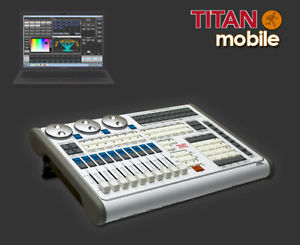
Avolites Titan Mobile Consola de Iluminación Concierto, Clubs, Dmx 30-01-9800
Estimated price for orientation: 3 200 $
Category: Stage Lighting Controllers
Class:
Description Condition: New: A brand-new, unused, unopened, undamaged item in its original packaging (where packaging is applicable). Packaging should be the same as what is found in a retail store, unless the item is handmade or was packaged by the manufacturer in non-retail packaging, such as an unprinted box or plastic bag. See the seller's listing for full details. See all condition definitions- opens in a new window or tab ... Read moreabout the condition Brand: Avolite MPN: 30-01-9800 Type: Control Console Bundled Items: Cable Model: Titan Mobile Country/Region of Manufacture: United Kingdom UPC: Does not apply
Avolite Titan Mobile Console - Concert, Event, Church, Club Lighting and more...Titan Mobile Wing20 smooth playback Faders30 programmable ExecutorsLocal, Independent Paging ControlUSB Powered - no need for a separate PSURobust Construction, built for the life on the roadTITAN Mobile – the awesome power of Titan in it's most concentrated form!Avolites TITAN Mobile binds the awesome power of TITAN software with a compact and lightweight unit that connects to your laptop to produce a fully featured moving light control system.As our industry 'greens up' and wises up, many shows have become 'festival tours' where the only things to be freighted around are the band, designers and flexible control systems.The control surface of TITAN Mobile coupled with Avolites touring experience enables designers to 'keep it live' while preserving their shows visual integrity.Live Playbacks, Solo and Flash buttons, user programmable buttons and Attribute controllers enable fast and accurate show programming in a flight friendly package. Avolites TITAN Mobile – catering to the needs of our ever changing industry.FEATURESMain programming windowOffering access to fixture Groups with Position, Colour, and Beam Palettes. For increased flexibility, Macros for commonly needed functions or button sequences maybe placed onto unused Group or Palette buttons. Scroll or page the window to access up to 1,000 entries per window.Attribute Control – Colour MixThis "Colour Selection" Attribute Controller gives instant access to Hue, Saturation, and Luminosity. Quite simply, the fastest way to choose colours on moving lights, RGB LED's and video.Attribute Control – Zoom, Focus, Iris and FrostThe 'Attribute View Window' control gives a fast and intuitive alternative to editing with the encoder wheels or key pad. Select the attribute to be controlled and all associated attributes and their functions will be presented on screen. Simply touch the desired function or use the virtual slider to control linear functions.Shape and Effect WindowThe powerful Shape Engine 'Primitives' are offered here. Simply and quickly build beautifully complex effects in seconds. Shapes may control intelligent fixtures, colour mixing LED Luminares and Video Media Servers. Once a 'Primitive' has been applied the user has control over the Speed, Size, and Repeat Phasing of the effect. Once programmed, the shape's Size, Speed and Morphing may be controlled with the fader or using Fade In/Out times.Attribute Control Window – Video Media Server ControlBoth Tiger Touch and Expert Touch consoles incorporate CITP - Media Server Control protocol. CITP not only offers instant and automatic patching of media server layers, but also enables operators to choose the required video clip directly from the on screen thumbnail. The fast and friendly method to work with video.Attribute Control Window – Video Media Server Control 2Video Media Server Playback and Transition functions are grouped logically and may be directly controlled from the console.VisualiserAlways ready for use as visualiser is patched automatically as you assign fixtures to the console. The visualiser system is far more informative than merely numbers on the screen and can be used to set and review movement, colour fade and Iris times. Visualiser is optimised for fast, smooth accurate response without compromising console speed. Visualiser may be used as powerful pre production programming tool or as a useful training tool.Cue List View and Channel Grid ViewTapping once on the Playback area for any cue list opens the 'Cue List View'. Tapping a second time on the display opens the 'Channel Grid View' for the currently 'Live' cue. Both views are programmer interactive where fade times, attribute times, playback properties and channel levels may be quickly and easily edited and updated. Spreadsheet functions such as copy, paste and 'select range to edit' provide a powerful editing tool for cues, pallets and chase steps.What is a workspace view?The consoles and touch screen interface is used in conjunction with 'Operator Workspace Views'. These workspace views are set-up and stored by the operator and can be switched instantly as needed. Workspace views are populated with up to 4 workspace windows and window choices include; Groups, Colour
Description
| Condition: | New: A brand-new, unused, unopened, undamaged item in its original packaging (where packaging is applicable). Packaging should be the same as what is found in a retail store, unless the item is handmade or was packaged by the manufacturer in non-retail packaging, such as an unprinted box or plastic bag. See the seller's listing for full details. See all condition definitions- opens in a new window or tab ... Read moreabout the condition | Brand: | Avolite |
| MPN: | 30-01-9800 | Type: | Control Console |
| Bundled Items: | Cable | Model: | Titan Mobile |
| Country/Region of Manufacture: | United Kingdom | UPC: | Does not apply |
Avolite Titan Mobile Console - Concert, Event, Church, Club Lighting and more...Titan Mobile Wing20 smooth playback Faders30 programmable ExecutorsLocal, Independent Paging ControlUSB Powered - no need for a separate PSURobust Construction, built for the life on the roadTITAN Mobile – the awesome power of Titan in it's most concentrated form!Avolites TITAN Mobile binds the awesome power of TITAN software with a compact and lightweight unit that connects to your laptop to produce a fully featured moving light control system.As our industry 'greens up' and wises up, many shows have become 'festival tours' where the only things to be freighted around are the band, designers and flexible control systems.The control surface of TITAN Mobile coupled with Avolites touring experience enables designers to 'keep it live' while preserving their shows visual integrity.Live Playbacks, Solo and Flash buttons, user programmable buttons and Attribute controllers enable fast and accurate show programming in a flight friendly package. Avolites TITAN Mobile – catering to the needs of our ever changing industry.FEATURESMain programming windowOffering access to fixture Groups with Position, Colour, and Beam Palettes. For increased flexibility, Macros for commonly needed functions or button sequences maybe placed onto unused Group or Palette buttons. Scroll or page the window to access up to 1,000 entries per window.Attribute Control – Colour MixThis "Colour Selection" Attribute Controller gives instant access to Hue, Saturation, and Luminosity. Quite simply, the fastest way to choose colours on moving lights, RGB LED's and video.Attribute Control – Zoom, Focus, Iris and FrostThe 'Attribute View Window' control gives a fast and intuitive alternative to editing with the encoder wheels or key pad. Select the attribute to be controlled and all associated attributes and their functions will be presented on screen. Simply touch the desired function or use the virtual slider to control linear functions.Shape and Effect WindowThe powerful Shape Engine 'Primitives' are offered here. Simply and quickly build beautifully complex effects in seconds. Shapes may control intelligent fixtures, colour mixing LED Luminares and Video Media Servers. Once a 'Primitive' has been applied the user has control over the Speed, Size, and Repeat Phasing of the effect. Once programmed, the shape's Size, Speed and Morphing may be controlled with the fader or using Fade In/Out times.Attribute Control Window – Video Media Server ControlBoth Tiger Touch and Expert Touch consoles incorporate CITP - Media Server Control protocol. CITP not only offers instant and automatic patching of media server layers, but also enables operators to choose the required video clip directly from the on screen thumbnail. The fast and friendly method to work with video.Attribute Control Window – Video Media Server Control 2Video Media Server Playback and Transition functions are grouped logically and may be directly controlled from the console.VisualiserAlways ready for use as visualiser is patched automatically as you assign fixtures to the console. The visualiser system is far more informative than merely numbers on the screen and can be used to set and review movement, colour fade and Iris times. Visualiser is optimised for fast, smooth accurate response without compromising console speed. Visualiser may be used as powerful pre production programming tool or as a useful training tool.Cue List View and Channel Grid ViewTapping once on the Playback area for any cue list opens the 'Cue List View'. Tapping a second time on the display opens the 'Channel Grid View' for the currently 'Live' cue. Both views are programmer interactive where fade times, attribute times, playback properties and channel levels may be quickly and easily edited and updated. Spreadsheet functions such as copy, paste and 'select range to edit' provide a powerful editing tool for cues, pallets and chase steps.What is a workspace view?The consoles and touch screen interface is used in conjunction with 'Operator Workspace Views'. These workspace views are set-up and stored by the operator and can be switched instantly as needed. Workspace views are populated with up to 4 workspace windows and window choices include; Groups, Colour