Back to the main page Back to category Stage Lighting Single Units
musical instrument details
Pangolin QuickShow 2.0 FB3 Laser Show Designer Software
Estimated price for orientation: 509 $
Category: Stage Lighting Single Units
Class:
Description Condition: New: A brand-new, unused, unopened, undamaged item in its original packaging (where packaging is applicable). Packaging should be the same as what is found in a retail store, unless the item is handmade or was packaged by the manufacturer in non-retail packaging, such as an unprinted box or plastic bag. See the seller's listing for full details. See all condition definitions- opens in a new window or tab ... Read moreabout the condition Brand: djslighting MPN: Does not apply UPC: Does not apply
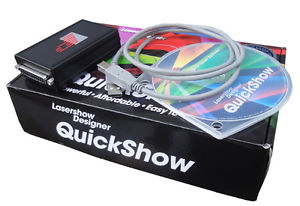
QuickShow comes from Pangolin, makers of the top selling and most awarded laser software. It is based on Pangolin’s over 20 years of programming experience. QuickShow makes it easier than ever to do high-quality laser shows. QuickShow is especially designed for first-time an part-time laserists but powerful enough to satisfy experienced professionals. The QuickShow design goal was “quick”: the ability to easily make a high-quality show. It's perfect for DJs, VJs, club owners, and others who art full-time laserists. As your experience increases, you can begin to use the more advanced features in QuickShow. QuickShow is a complete laser system. It is capable of graphics as well as beam and atmospherics effects. It has everything you need for a modern laser light show with both live and pre-programmed elements. You can start your lasershow right out of the box, QuickShow comes with nearly 2000 pre-loaded graphics, animations, beam effects and abstracts. What you get:---- Flashback FB3-QS interface box: 4.2x2.8x1.3 inch (110x71x33 mm)
---- Latest version of QuickShow on DVD including tutorial videos
---- USB cable, to connect your computer to the Flashback FB3 box
---- Nearly 2000 pre-loaded cues
HARDWARE REQUIREMENTS:Computer requirements
PC notebook or desktop with dual-core processor such as Intel Centrino Duo, Core 2 Duo, or AMD equivalent
Operating system: Windows XP, Windows Vista or Windows 7
Monitor: Minimum resolution of 1024 x 768
At least one available USB portProjector requirements
A lasershow projector with ILDA-standard input connector
Any speed scanners, from 10K to 60K+
Any color, from single-color to full-color RGBOptional devices
Touchscreen QuickShow is designed so it can be used with a touchscreen notebook or monitor
MIDI controller Trigger cues using MIDI devices such as keyboards. A MIDI interface may be required to connect to computer’s USB port.
DMX interface Required for DMX input (a console triggers QuickShow cues) and for DMX output (QuickShow cues trigger external devices such as lights and foggers).
Optional control for up to six projectors
QuickShow specifications: No dongles!
Never worry about forgetting or losing a dongle. You can work on, and display, shows without needing a dongle. Cues
Nearly 2000 graphics, animations, beam effects and abstracts are included. Abstract frames
Make planetarium-style abstract shapes, such as flowers or spirograph geometric figures. Live controls
For a cue or the entire display, adjust size, position, rotation angle, rotation speed, color, color cycling, scan speed and animation rate. QuickTools for creation and editing
QuickText, QuickShape, QuickTrace, QuickTargets, QuickTimeline, QuickDMX Display methods
Single cue, multi-track cue, sequence cues, timeline show programming Display timing
Manual (mouse/keyboard), automatic to beat (BPM), autorun for sequences and timeline. Preview
On-screen preview of all graphics and beams using Windows OpenGL. BPM methods
Timed, audio beat detect, manual. Background work mode
Create/edit cues on-screen without affecting laser output. Only show your cues when you are done. The audience never sees your background work. Autotrace bitmaps
Import GIF, JPG, BMP files and convert instantly to laser. Outline and centerline tracing modes. Control DMX devices
Set up to 512 DMX channels per cue. Unlimited number of cues or “looks”. Custom effects
Apply one or more effects to a cue, a sequence or a timeline event. Effects include colors (preset and changing), pulse/flash/strobe, trace, chop, ripple, mirror, double, scroll, rock, throb, zoom and bounce. Projector correction and zones
Full geometric correction for off-axis scanning. HIt multiple screens from one projector, using projection zones (cues are positioned and scaled to appear in part of the scan area).
Description
| Condition: | New: A brand-new, unused, unopened, undamaged item in its original packaging (where packaging is applicable). Packaging should be the same as what is found in a retail store, unless the item is handmade or was packaged by the manufacturer in non-retail packaging, such as an unprinted box or plastic bag. See the seller's listing for full details. See all condition definitions- opens in a new window or tab ... Read moreabout the condition | Brand: | djslighting |
| MPN: | Does not apply | UPC: | Does not apply |
| ||||
QuickShow specifications: No dongles!
Never worry about forgetting or losing a dongle. You can work on, and display, shows without needing a dongle. Cues
Nearly 2000 graphics, animations, beam effects and abstracts are included. Abstract frames
Make planetarium-style abstract shapes, such as flowers or spirograph geometric figures. Live controls
For a cue or the entire display, adjust size, position, rotation angle, rotation speed, color, color cycling, scan speed and animation rate. QuickTools for creation and editing
QuickText, QuickShape, QuickTrace, QuickTargets, QuickTimeline, QuickDMX Display methods
Single cue, multi-track cue, sequence cues, timeline show programming Display timing
Manual (mouse/keyboard), automatic to beat (BPM), autorun for sequences and timeline. Preview
On-screen preview of all graphics and beams using Windows OpenGL. BPM methods
Timed, audio beat detect, manual. Background work mode
Create/edit cues on-screen without affecting laser output. Only show your cues when you are done. The audience never sees your background work. Autotrace bitmaps
Import GIF, JPG, BMP files and convert instantly to laser. Outline and centerline tracing modes. Control DMX devices
Set up to 512 DMX channels per cue. Unlimited number of cues or “looks”. Custom effects
Apply one or more effects to a cue, a sequence or a timeline event. Effects include colors (preset and changing), pulse/flash/strobe, trace, chop, ripple, mirror, double, scroll, rock, throb, zoom and bounce. Projector correction and zones
Full geometric correction for off-axis scanning. HIt multiple screens from one projector, using projection zones (cues are positioned and scaled to appear in part of the scan area).