Back to the main page Back to category Audio or MIDI Interfaces
musical instrument details
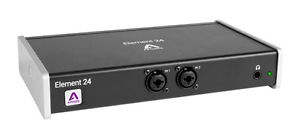
Apogee Element 24 Thunderbolt Audio Interface (NEW)
Estimated price for orientation: 510 $
Category: Audio or MIDI Interfaces
Class:
Description Condition: New: A brand-new, unused, unopened, undamaged item in its original packaging (where packaging is applicable). Packaging should be the same as what is found in a retail store, unless the item is handmade or was packaged by the manufacturer in non-retail packaging, such as an unprinted box or plastic bag. See the seller's listing for full details. See all condition definitions- opens in a new window or tab ... Read moreabout the condition Mic/Line Input: Line TRS 1/4", Mic/Preamp XLR Max. Sampling Rate: 24 Bit (192 kHz) Additional Inputs/Outputs: Analogue Out, World Clock I/O MPN: APO0057 Max. Number of Channels: 22 Model: Element 24 Interface Type: Thunderbolt Interface Brand: Apogee EAN: 0805676301815
Apogee's Element 24 is a Thunderbolt audio I/O box made for creating music on your Mac.Apogee Element 24 Thunderbolt Audio Interface Main Features10 IN x 12 OUT Thunderbolt Audio I/O boxAD/DA conversion for recording up to 192kHz/24-bit2 analogue inputs with world-class mic preamps and selectable 48v phantom power2 balanced L/R XLR outputs and 1 1/4 inch stereo headphone outputWord Clock IN/OUT via BNC connections for syncing with other digital audio gearElement Control Software for Mac provides all control of hardware parametersElement Control Mobile App provides wireless remote control of hardware via iPhone, iPad or iPod touch
Element 24 takes the best of cutting-edge Apogee gear like Symphony I/O Mk II, Ensemble Thunderbolt and Groove and puts it into a simple form factor. With streamlined hardware features and advanced software control, Element 24 delivers ultimate recording quality and performance at an unprecedented price. Element 24 is perfect for the independent musician recording with 1 or 2 inputs at a time.The Elements of Excellent AudioAnalogue to Digital Conversion
A high-quality A/D converter is critical for capturing every detail of your recordings into your computer. The Element series features some of the best Apogee A/D conversion. Recording through an Element ensures you will minimise unwanted noise and maximise the signal quality. Your tracks will sound amazing and mixing your project will be easier.Microphone Preamps
Whether you are recording powerful drums, dynamic vocals or delicate strings, you need a premium mic preamp to capture the finest details of the performance. The Element Series mic preamps feature Apogee's Advanced Stepped Gain Architecture™. This analogue circuit is designed to dynamically optimise across a gain range of 0-75dB to provide superior bandwidth and low distortion.Digital to Analogue Conversion
With a high-quality D/A converter, you will hear more definition in each track and virtual instrument. This clarity makes it easier for you to make precise adjustments and achieve the ideal balance when mixing your music. When you listen to your sessions through an Element, tracks will blend more harmoniously and mixing will be easier. The high end will sound crisp and clear and the low end will be tight and well defined.Clocking
An audio interface relies on a clock source like an orchestra relies on a conductor. A digital audio clock provides a timing signal to all the parts of a digital audio system so that each part of the AD/DA process may be synchronised. Element has its own built-in clock source and provides professional Word Clock IN and OUT for syncing with other digital audio gear. Use Element as the master clock to take advantage of Apogee's superior built-in clocking technology.Thunderbolt Connectivity
The Element Series Thunderbolt driver offers incredible low-latency performance (1.41 ms round-trip) and rock-solid stability. Apogee's custom driver uses less of your computer's CPU power with the help of Direct Memory Access (DMA) technology. This allows you to run more plugins and monitor through your DAW at a low buffer setting. Element's low latency driver means you don't have to choose between power and speed.Control the Elements
Element 24 is built to be controlled by a powerful software eco-system. With the Element series you have more control options than ever before.Element Control App for Mac
Access all I/O controls and settings for your Element hardware with Element Control, Apogee's software control application for Mac. Use the app to select your input type, adjust input/output levels, configure up to 3 different low-latency mixers and more. You can also use the arrow keys on your keyboard to quickly select any input or output and adjust the level.Element Essentials Windows
With Element Control's Essentials window, you'll see just the hardware settings you need in a form that requires minimal screen space. Move the Essentials window under, over or to the side of your DAW window for lightning access and total control. Your workflow will be uninterrupted as you keep your focus on the computer screen.Element Control Mobile for iOS
Element Control Mobile for iOS provides you with wireless control of the hardware settings included in the Element Essentials Window. Download the iOS App from the App store to your iPad, iPhone or iPod touch.Logic Pro X integration
When you're using Logic Pro X, you can set Element input settings like gain, input source and more directly from with Logic's Channel Strip, for the ultimate integrated system. Element's I/O settings are saved with each Logic session, for instant and effortless recall.Combine the Elements
Element 24, 46 and 88 are built to work together. Connect any two Elements directly to a Thunderbolt port on your computer and increase the number of analogue I/O in your recording system. When using multiple Elements, the Optical I/O is for the low latency mixer internal bussing.Connectivity
Single port Thunderbolt connectivity to Mac for ultra-low latency performance 1.41ms round-trip at 96kHz with a 32 buffer settingAnalogue
2 balanced combination inputs
2 balanced L/R XLR outputs
1 1/4 inch stereo headphone outputOptical IN: Supports ADAT, SMUX & S/PDIF ADAT: 8 channels 44.1-48 kHz on 1 Toslink connector SMUX: 4 channels 88.2-96 kHz on 1 Toslink connector S/PDIF: 2 channels, up to 192 kHz on 1 Toslink connectorOptical OUT: Supports ADAT, SMUX & S/PDIF ADAT: 8 channels 44.1-48 kHz on 1 Toslink connector SMUX: 4 channels 88.2-96 kHz on 1 Toslink connector S/PDIF: 2 channels, up to 192 kHz on 1 Toslink connectorWord Clock IN/OUT via BNC connections for syncing with other digital audio gearSystem RequirementsMac OS:
Computer: Thunderbolt-equipped Mac (iMac, Macbook Pro, Macbook Air, Mac Pro)
Memory: 4 GB RAM minimum, 8 GB recommended
OS: 10.10 or greater
Connection: Any available Thunderbolt port (Thunderbolt cable not included)
Power: DC Power supply includedCompatible Software:
Any Mac Core Audio compatible application
Recommended apps: Logic Pro, Pro Tools, Ableton Live, GarageBand, MainStage, Final Cut, Digital Performer, Studio One, Cubase, and NuendoIn The Box
Element 24
Universal Power Supply with standard 3 pin-IEC cable
Quick Start Guide
Warranty Booklet Listing correct at time of upload errors and omissions excepted.
Description
| Condition: | New: A brand-new, unused, unopened, undamaged item in its original packaging (where packaging is applicable). Packaging should be the same as what is found in a retail store, unless the item is handmade or was packaged by the manufacturer in non-retail packaging, such as an unprinted box or plastic bag. See the seller's listing for full details. See all condition definitions- opens in a new window or tab ... Read moreabout the condition | Mic/Line Input: | Line TRS 1/4", Mic/Preamp XLR |
| Max. Sampling Rate: | 24 Bit (192 kHz) | Additional Inputs/Outputs: | Analogue Out, World Clock I/O |
| MPN: | APO0057 | Max. Number of Channels: | 22 |
| Model: | Element 24 | Interface Type: | Thunderbolt Interface |
| Brand: | Apogee | EAN: | 0805676301815 |
Apogee's Element 24 is a Thunderbolt audio I/O box made for creating music on your Mac.Apogee Element 24 Thunderbolt Audio Interface Main Features10 IN x 12 OUT Thunderbolt Audio I/O boxAD/DA conversion for recording up to 192kHz/24-bit2 analogue inputs with world-class mic preamps and selectable 48v phantom power2 balanced L/R XLR outputs and 1 1/4 inch stereo headphone outputWord Clock IN/OUT via BNC connections for syncing with other digital audio gearElement Control Software for Mac provides all control of hardware parametersElement Control Mobile App provides wireless remote control of hardware via iPhone, iPad or iPod touch
Element 24 takes the best of cutting-edge Apogee gear like Symphony I/O Mk II, Ensemble Thunderbolt and Groove and puts it into a simple form factor. With streamlined hardware features and advanced software control, Element 24 delivers ultimate recording quality and performance at an unprecedented price. Element 24 is perfect for the independent musician recording with 1 or 2 inputs at a time.The Elements of Excellent AudioAnalogue to Digital Conversion
A high-quality A/D converter is critical for capturing every detail of your recordings into your computer. The Element series features some of the best Apogee A/D conversion. Recording through an Element ensures you will minimise unwanted noise and maximise the signal quality. Your tracks will sound amazing and mixing your project will be easier.Microphone Preamps
Whether you are recording powerful drums, dynamic vocals or delicate strings, you need a premium mic preamp to capture the finest details of the performance. The Element Series mic preamps feature Apogee's Advanced Stepped Gain Architecture™. This analogue circuit is designed to dynamically optimise across a gain range of 0-75dB to provide superior bandwidth and low distortion.Digital to Analogue Conversion
With a high-quality D/A converter, you will hear more definition in each track and virtual instrument. This clarity makes it easier for you to make precise adjustments and achieve the ideal balance when mixing your music. When you listen to your sessions through an Element, tracks will blend more harmoniously and mixing will be easier. The high end will sound crisp and clear and the low end will be tight and well defined.Clocking
An audio interface relies on a clock source like an orchestra relies on a conductor. A digital audio clock provides a timing signal to all the parts of a digital audio system so that each part of the AD/DA process may be synchronised. Element has its own built-in clock source and provides professional Word Clock IN and OUT for syncing with other digital audio gear. Use Element as the master clock to take advantage of Apogee's superior built-in clocking technology.Thunderbolt Connectivity
The Element Series Thunderbolt driver offers incredible low-latency performance (1.41 ms round-trip) and rock-solid stability. Apogee's custom driver uses less of your computer's CPU power with the help of Direct Memory Access (DMA) technology. This allows you to run more plugins and monitor through your DAW at a low buffer setting. Element's low latency driver means you don't have to choose between power and speed.Control the Elements
Element 24 is built to be controlled by a powerful software eco-system. With the Element series you have more control options than ever before.Element Control App for Mac
Access all I/O controls and settings for your Element hardware with Element Control, Apogee's software control application for Mac. Use the app to select your input type, adjust input/output levels, configure up to 3 different low-latency mixers and more. You can also use the arrow keys on your keyboard to quickly select any input or output and adjust the level.Element Essentials Windows
With Element Control's Essentials window, you'll see just the hardware settings you need in a form that requires minimal screen space. Move the Essentials window under, over or to the side of your DAW window for lightning access and total control. Your workflow will be uninterrupted as you keep your focus on the computer screen.Element Control Mobile for iOS
Element Control Mobile for iOS provides you with wireless control of the hardware settings included in the Element Essentials Window. Download the iOS App from the App store to your iPad, iPhone or iPod touch.Logic Pro X integration
When you're using Logic Pro X, you can set Element input settings like gain, input source and more directly from with Logic's Channel Strip, for the ultimate integrated system. Element's I/O settings are saved with each Logic session, for instant and effortless recall.Combine the Elements
Element 24, 46 and 88 are built to work together. Connect any two Elements directly to a Thunderbolt port on your computer and increase the number of analogue I/O in your recording system. When using multiple Elements, the Optical I/O is for the low latency mixer internal bussing.Connectivity
Single port Thunderbolt connectivity to Mac for ultra-low latency performance 1.41ms round-trip at 96kHz with a 32 buffer settingAnalogue
2 balanced combination inputs
2 balanced L/R XLR outputs
1 1/4 inch stereo headphone outputOptical IN: Supports ADAT, SMUX & S/PDIF ADAT: 8 channels 44.1-48 kHz on 1 Toslink connector SMUX: 4 channels 88.2-96 kHz on 1 Toslink connector S/PDIF: 2 channels, up to 192 kHz on 1 Toslink connectorOptical OUT: Supports ADAT, SMUX & S/PDIF ADAT: 8 channels 44.1-48 kHz on 1 Toslink connector SMUX: 4 channels 88.2-96 kHz on 1 Toslink connector S/PDIF: 2 channels, up to 192 kHz on 1 Toslink connectorWord Clock IN/OUT via BNC connections for syncing with other digital audio gearSystem RequirementsMac OS:
Computer: Thunderbolt-equipped Mac (iMac, Macbook Pro, Macbook Air, Mac Pro)
Memory: 4 GB RAM minimum, 8 GB recommended
OS: 10.10 or greater
Connection: Any available Thunderbolt port (Thunderbolt cable not included)
Power: DC Power supply includedCompatible Software:
Any Mac Core Audio compatible application
Recommended apps: Logic Pro, Pro Tools, Ableton Live, GarageBand, MainStage, Final Cut, Digital Performer, Studio One, Cubase, and NuendoIn The Box
Element 24
Universal Power Supply with standard 3 pin-IEC cable
Quick Start Guide
Warranty Booklet Listing correct at time of upload errors and omissions excepted.
Element 24 takes the best of cutting-edge Apogee gear like Symphony I/O Mk II, Ensemble Thunderbolt and Groove and puts it into a simple form factor. With streamlined hardware features and advanced software control, Element 24 delivers ultimate recording quality and performance at an unprecedented price. Element 24 is perfect for the independent musician recording with 1 or 2 inputs at a time.The Elements of Excellent AudioAnalogue to Digital Conversion
A high-quality A/D converter is critical for capturing every detail of your recordings into your computer. The Element series features some of the best Apogee A/D conversion. Recording through an Element ensures you will minimise unwanted noise and maximise the signal quality. Your tracks will sound amazing and mixing your project will be easier.Microphone Preamps
Whether you are recording powerful drums, dynamic vocals or delicate strings, you need a premium mic preamp to capture the finest details of the performance. The Element Series mic preamps feature Apogee's Advanced Stepped Gain Architecture™. This analogue circuit is designed to dynamically optimise across a gain range of 0-75dB to provide superior bandwidth and low distortion.Digital to Analogue Conversion
With a high-quality D/A converter, you will hear more definition in each track and virtual instrument. This clarity makes it easier for you to make precise adjustments and achieve the ideal balance when mixing your music. When you listen to your sessions through an Element, tracks will blend more harmoniously and mixing will be easier. The high end will sound crisp and clear and the low end will be tight and well defined.Clocking
An audio interface relies on a clock source like an orchestra relies on a conductor. A digital audio clock provides a timing signal to all the parts of a digital audio system so that each part of the AD/DA process may be synchronised. Element has its own built-in clock source and provides professional Word Clock IN and OUT for syncing with other digital audio gear. Use Element as the master clock to take advantage of Apogee's superior built-in clocking technology.Thunderbolt Connectivity
The Element Series Thunderbolt driver offers incredible low-latency performance (1.41 ms round-trip) and rock-solid stability. Apogee's custom driver uses less of your computer's CPU power with the help of Direct Memory Access (DMA) technology. This allows you to run more plugins and monitor through your DAW at a low buffer setting. Element's low latency driver means you don't have to choose between power and speed.Control the Elements
Element 24 is built to be controlled by a powerful software eco-system. With the Element series you have more control options than ever before.Element Control App for Mac
Access all I/O controls and settings for your Element hardware with Element Control, Apogee's software control application for Mac. Use the app to select your input type, adjust input/output levels, configure up to 3 different low-latency mixers and more. You can also use the arrow keys on your keyboard to quickly select any input or output and adjust the level.Element Essentials Windows
With Element Control's Essentials window, you'll see just the hardware settings you need in a form that requires minimal screen space. Move the Essentials window under, over or to the side of your DAW window for lightning access and total control. Your workflow will be uninterrupted as you keep your focus on the computer screen.Element Control Mobile for iOS
Element Control Mobile for iOS provides you with wireless control of the hardware settings included in the Element Essentials Window. Download the iOS App from the App store to your iPad, iPhone or iPod touch.Logic Pro X integration
When you're using Logic Pro X, you can set Element input settings like gain, input source and more directly from with Logic's Channel Strip, for the ultimate integrated system. Element's I/O settings are saved with each Logic session, for instant and effortless recall.Combine the Elements
Element 24, 46 and 88 are built to work together. Connect any two Elements directly to a Thunderbolt port on your computer and increase the number of analogue I/O in your recording system. When using multiple Elements, the Optical I/O is for the low latency mixer internal bussing.Connectivity
Single port Thunderbolt connectivity to Mac for ultra-low latency performance 1.41ms round-trip at 96kHz with a 32 buffer settingAnalogue
2 balanced combination inputs
2 balanced L/R XLR outputs
1 1/4 inch stereo headphone outputOptical IN: Supports ADAT, SMUX & S/PDIF ADAT: 8 channels 44.1-48 kHz on 1 Toslink connector SMUX: 4 channels 88.2-96 kHz on 1 Toslink connector S/PDIF: 2 channels, up to 192 kHz on 1 Toslink connectorOptical OUT: Supports ADAT, SMUX & S/PDIF ADAT: 8 channels 44.1-48 kHz on 1 Toslink connector SMUX: 4 channels 88.2-96 kHz on 1 Toslink connector S/PDIF: 2 channels, up to 192 kHz on 1 Toslink connectorWord Clock IN/OUT via BNC connections for syncing with other digital audio gearSystem RequirementsMac OS:
Computer: Thunderbolt-equipped Mac (iMac, Macbook Pro, Macbook Air, Mac Pro)
Memory: 4 GB RAM minimum, 8 GB recommended
OS: 10.10 or greater
Connection: Any available Thunderbolt port (Thunderbolt cable not included)
Power: DC Power supply includedCompatible Software:
Any Mac Core Audio compatible application
Recommended apps: Logic Pro, Pro Tools, Ableton Live, GarageBand, MainStage, Final Cut, Digital Performer, Studio One, Cubase, and NuendoIn The Box
Element 24
Universal Power Supply with standard 3 pin-IEC cable
Quick Start Guide
Warranty Booklet Listing correct at time of upload errors and omissions excepted.