Back to the main page Back to category Software Loops and Samples
musical instrument details
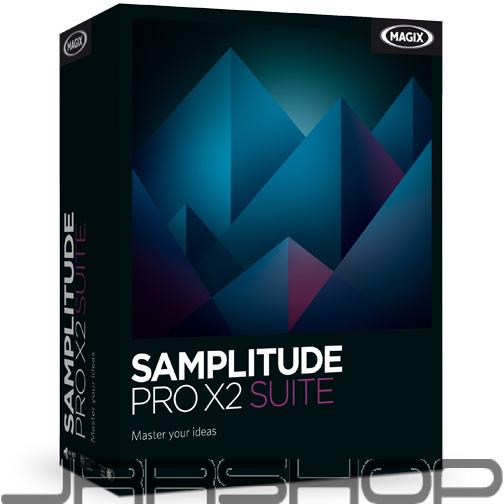
Magix Samplitude Pro X2 Suite eDelivery JRR Shop
Estimated price for orientation: 599 $
Category: Software Loops and Samples
Class:
Description Condition: New: A brand-new, unused, unopened, undamaged item in its original packaging (where packaging is applicable). Packaging should be the same as what is found in a retail store, unless the item is handmade or was packaged by the manufacturer in non-retail packaging, such as an unprinted box or plastic bag. See the seller's listing for full details. See all condition definitions- opens in a new window or tab ... Read moreabout the condition Type: DAW/Multitrack Model: samplitudeproxsuites Brand: Magix MPN: samplitudeproxsuites UPC: Does Not Apply
It combines professional tools with highly efficient work flows to achieve maximum quality in the areas of recording, arrangement band mixing, as well as post-production and mastering. Innovative algorithms coupled with high-quality effects plug-ins allow you to bring your ideas to life at the highest level and according to industry standards. Multiple outputs For even more flexible routing during mixing: Samplitude Pro X2 lets you easily add or remove additional outputs.
You can also assign no outputs to a track. Moreover, you can also view and select multiple outputs directly in the
routing manager. Different tap points downstream of the volume control (post), upstream of the volume
control (pre) or directly after the gain (direct out) make it easier to mix complex music productions. Free plug-in routing More production control: Order the application of effects and plug-ins exactly how you want. The sequence
can now even be edited for tracks as well as all objects in the arrangement. This goes for the effects
sequence during Surround editing as well. In this case, the plug-ins in the individual channels are
always calculated before the Surround effects. Most effects can now be applied multiple
times to a track or an object. VCA (Voltage Controlled Amplifiers) The VCA fader in Samplitude Pro X2, whose usability and comfort is based on large analog mixing consoles, is natively integrated in the DAW. The VCA fader allows you to control all relevant levels when mixing your project. Each existing channel strip can be easily turned into a VCA fader. You can also assign individual channels to a VCA group and control them using the VCA fader in the mixer. You can assign as many channel strips as you want to a VCA master fader. By displaying “Ghost faders”, the resulting change can also be read out in the individual channels depending on the VCA master. Automations made easy Working with track and plug-in automations is now even easier. When you delete a selected object, the corresponding automation data is saved and moved. You can also right click on curve points to edit them or transfer track automations to objects. zplane time stretching technology The new zplane time stretching and pitch shifting algorithm is one of the best algorithms in the world and provides the highest audio quality for adjusting pitch and speed in Samplitude Pro X2. This technology works impressively and artifact-free, even at large factors. Elastic Audio for multiple tracks When editing multiple track recordings, e.g. with choirs, it is often useful to apply the changes made for a track in
Elastic Audio to all tracks. With the "Synchronize tracks" option in the Elastic Audio dialog, you can now transfer
changes automatically. VST 3 interface The VST 3 interface allows you to integrate plug-ins and instruments developed according to the new VST 3 standard.
VST 3 makes it possible to infinitely automate various plug-in parameters exactly at the sample level and optimizes
the allocation of individual channels. Improved arranger The project window is now completely integrated in the Samplitude Pro X2 docking concept. You can now comfortably
switch between projects by using the tab display. It is also easier to work with multiple screens and projects now.
You can simply move project windows to different monitors and edit or compare them at the same time. Custom toolbars The toolbars in Samplitude Pro X2 can now be customized with drag & drop and assigned new buttons with their own menu features. Customizing toolbars makes using the necessary tools for various applications during the production process easier. Jump to peak value Finding extreme values: You can now jump to the peak value in a group of selected objects. This provides a huge advantage when locating and editing problematic points in an arrangement.
Description
| Condition: | New: A brand-new, unused, unopened, undamaged item in its original packaging (where packaging is applicable). Packaging should be the same as what is found in a retail store, unless the item is handmade or was packaged by the manufacturer in non-retail packaging, such as an unprinted box or plastic bag. See the seller's listing for full details. See all condition definitions- opens in a new window or tab ... Read moreabout the condition | Type: | DAW/Multitrack |
| Model: | samplitudeproxsuites | Brand: | Magix |
| MPN: | samplitudeproxsuites | UPC: | Does Not Apply |
It combines professional tools with highly efficient work flows to achieve maximum quality in the areas of recording, arrangement band mixing, as well as post-production and mastering. Innovative algorithms coupled with high-quality effects plug-ins allow you to bring your ideas to life at the highest level and according to industry standards.
Multiple outputs For even more flexible routing during mixing: Samplitude Pro X2 lets you easily add or remove additional outputs.
You can also assign no outputs to a track. Moreover, you can also view and select multiple outputs directly in the
routing manager. Different tap points downstream of the volume control (post), upstream of the volume
control (pre) or directly after the gain (direct out) make it easier to mix complex music productions.
You can also assign no outputs to a track. Moreover, you can also view and select multiple outputs directly in the
routing manager. Different tap points downstream of the volume control (post), upstream of the volume
control (pre) or directly after the gain (direct out) make it easier to mix complex music productions.
Free plug-in routing More production control: Order the application of effects and plug-ins exactly how you want. The sequence
can now even be edited for tracks as well as all objects in the arrangement. This goes for the effects
sequence during Surround editing as well. In this case, the plug-ins in the individual channels are
always calculated before the Surround effects. Most effects can now be applied multiple
times to a track or an object.
can now even be edited for tracks as well as all objects in the arrangement. This goes for the effects
sequence during Surround editing as well. In this case, the plug-ins in the individual channels are
always calculated before the Surround effects. Most effects can now be applied multiple
times to a track or an object.
VCA (Voltage Controlled Amplifiers) The VCA fader in Samplitude Pro X2, whose usability and comfort is based on large analog mixing consoles, is natively integrated in the DAW. The VCA fader allows you to control all relevant levels when mixing your project. Each existing channel strip can be easily turned into a VCA fader. You can also assign individual channels to a VCA group and control them using the VCA fader in the mixer. You can assign as many channel strips as you want to a VCA master fader. By displaying “Ghost faders”, the resulting change can also be read out in the individual channels depending on the VCA master.
Automations made easy Working with track and plug-in automations is now even easier. When you delete a selected object, the corresponding automation data is saved and moved. You can also right click on curve points to edit them or transfer track automations to objects.
zplane time stretching technology The new zplane time stretching and pitch shifting algorithm is one of the best algorithms in the world and provides the highest audio quality for adjusting pitch and speed in Samplitude Pro X2. This technology works impressively and artifact-free, even at large factors.
Elastic Audio for multiple tracks When editing multiple track recordings, e.g. with choirs, it is often useful to apply the changes made for a track in
Elastic Audio to all tracks. With the "Synchronize tracks" option in the Elastic Audio dialog, you can now transfer
changes automatically.
Elastic Audio to all tracks. With the "Synchronize tracks" option in the Elastic Audio dialog, you can now transfer
changes automatically.
VST 3 interface The VST 3 interface allows you to integrate plug-ins and instruments developed according to the new VST 3 standard.
VST 3 makes it possible to infinitely automate various plug-in parameters exactly at the sample level and optimizes
the allocation of individual channels.
VST 3 makes it possible to infinitely automate various plug-in parameters exactly at the sample level and optimizes
the allocation of individual channels.
Improved arranger The project window is now completely integrated in the Samplitude Pro X2 docking concept. You can now comfortably
switch between projects by using the tab display. It is also easier to work with multiple screens and projects now.
You can simply move project windows to different monitors and edit or compare them at the same time.
switch between projects by using the tab display. It is also easier to work with multiple screens and projects now.
You can simply move project windows to different monitors and edit or compare them at the same time.
Custom toolbars The toolbars in Samplitude Pro X2 can now be customized with drag & drop and assigned new buttons with their own menu features. Customizing toolbars makes using the necessary tools for various applications during the production process easier.
Jump to peak value Finding extreme values: You can now jump to the peak value in a group of selected objects. This provides a huge advantage when locating and editing problematic points in an arrangement.