Back to the main page Back to category Pioneer Xdj1000 DJ Multi Player
musical instrument details
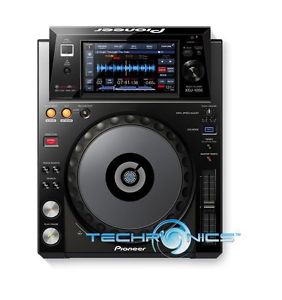
PIONEER XDJ-1000 HIGH PERFORMANCE TOUCHSCREEN DIGITAL MULTI-PLAYER DJ DECK
Estimated price for orientation: 600 $
Category: Pioneer Xdj1000 DJ Multi Player
Class:
Description Condition: New: A brand-new, unused, unopened, undamaged item in its original packaging (where packaging is applicable). Packaging should be the same as what is found in a retail store, unless the item is handmade or was packaged by the manufacturer in non-retail packaging, such as an unprinted box or plastic bag. See the seller's listing for full details. See all condition definitions- opens in a new window or tab ... Read moreabout the condition Brand: PIONEER Model: XDJ-1000 MPN: XDJ-1000 Manufacturer Part Number: XDJ-1000
Product DescriptionAdopting the same advanced layout, size, and ergonomic platter as the professional series CDJ-2000NXS, the XDJ-1000 offers a wealth of DJ performance functions and adds the convenience of touch screen, utilizing a large 7-inch full-color high resolution touch panel display for access and control of multiple features. Users can quickly see and execute a variety of commands that were once only accessed through physical buttons. With the convenience of its large touch display, users are provided with faster control, more information, and the ability to toggle through different screens to make DJ performance easier. The XDJ-1000 features a large JOG wheel, PRO DJ Link, rekordbox compatibility, Wi-Fi connectivity, and more. Pioneer XDJ1000 DJ Performance Multi Player Features Large 7-inch full color touch screen with intuitive GUINew Beat Jump/Loop Move functionIncludes rekordbox music management softwarePRO DJ LINK function expands scale of DJ performancesUSB-HID Control – Enabled by Serato Inc.’s “Serato DJ” software (more information will be published on the Pioneer support site pioneerdj.com/support/ once support for XDJ-1000 is available, planned for first half 2015).MIDI Control – The player supports MIDI for controlling other devices and software.My Settings – The function settings of a player can be saved to an iPhone, iPad or iPod touch or USB storage device. For additional convenience, the settings can also be made on the rekordbox App or desktop software, giving users the ability to switch to their settings when connecting to any XDJ-1000.Active Loop – Automatically starts loops when playback begins from a specified pointAuto Standby – The player saves energy by automatically switching to standby mode when no input is detected for a period of time.Touchscreen Display
The XDJ-1000 features a high quality 7-inch touch panel display giving users the ability to quickly access many of the most commonly used functions, including BEAT SYNC, HOT CUE, and a new function called BEAT JUMP/ LOOP MOVE.
Browse – Located at top left of the screen, Browse provides seven lines of track information and displays the album art, artist name, BPM and genre of the highlighted track. Music information including track number, time remaining, and tempo are also available in large font. Wave and Wave Zoom – The bottom of the display provides a glimpse of the entire song’s waveform, and users can utilize the Wave Zoom function to magnify the current playback location. Five levels of zoom are available for detailed visualization of the waveform. Keyword Search – In addition to using the integrated knob for scrolling through music tracks, users can type in a specific song name on a pop-up keyboard. Each press of a letter performs auto-fill for finding the corresponding song titles. Quantize – Utilizing a Quantizing feature, cue points and loops can be set perfectly on-beat. The Quantize feature ensures cue points are set accurately and automatically, correcting and synching beats during manual looping or real-time cueing to reduce off-beat mistakes. - Beat Jump/Loop Move – The Beat Jump function provide users the ability to jump back or forward to a number of beats from a playback position without breaking the rhythm of the music. The Beat Jump function allows users to hop around 1, 2, and 4 beats with a quick touch of the screen. With the Loop Move function, users can move the loop playback location by 1, 2 or 4 beats. Slip Mode – When activated, Slip Mode silently continues song playback during a loop, reverse or scratch and continues audible playback at the exact time that the loop, reverse or scratch ends, resulting in smoother transitions.
Description
| Condition: | New: A brand-new, unused, unopened, undamaged item in its original packaging (where packaging is applicable). Packaging should be the same as what is found in a retail store, unless the item is handmade or was packaged by the manufacturer in non-retail packaging, such as an unprinted box or plastic bag. See the seller's listing for full details. See all condition definitions- opens in a new window or tab ... Read moreabout the condition | Brand: | PIONEER |
| Model: | XDJ-1000 | MPN: | XDJ-1000 |
| Manufacturer Part Number: | XDJ-1000 |
Product DescriptionAdopting the same advanced layout, size, and ergonomic platter as the professional series CDJ-2000NXS, the XDJ-1000 offers a wealth of DJ performance functions and adds the convenience of touch screen, utilizing a large 7-inch full-color high resolution touch panel display for access and control of multiple features. Users can quickly see and execute a variety of commands that were once only accessed through physical buttons. With the convenience of its large touch display, users are provided with faster control, more information, and the ability to toggle through different screens to make DJ performance easier. The XDJ-1000 features a large JOG wheel, PRO DJ Link, rekordbox compatibility, Wi-Fi connectivity, and more. Pioneer XDJ1000 DJ Performance Multi Player Features Large 7-inch full color touch screen with intuitive GUINew Beat Jump/Loop Move functionIncludes rekordbox music management softwarePRO DJ LINK function expands scale of DJ performancesUSB-HID Control – Enabled by Serato Inc.’s “Serato DJ” software (more information will be published on the Pioneer support site pioneerdj.com/support/ once support for XDJ-1000 is available, planned for first half 2015).MIDI Control – The player supports MIDI for controlling other devices and software.My Settings – The function settings of a player can be saved to an iPhone, iPad or iPod touch or USB storage device. For additional convenience, the settings can also be made on the rekordbox App or desktop software, giving users the ability to switch to their settings when connecting to any XDJ-1000.Active Loop – Automatically starts loops when playback begins from a specified pointAuto Standby – The player saves energy by automatically switching to standby mode when no input is detected for a period of time.Touchscreen Display
The XDJ-1000 features a high quality 7-inch touch panel display giving users the ability to quickly access many of the most commonly used functions, including BEAT SYNC, HOT CUE, and a new function called BEAT JUMP/ LOOP MOVE.
Browse – Located at top left of the screen, Browse provides seven lines of track information and displays the album art, artist name, BPM and genre of the highlighted track. Music information including track number, time remaining, and tempo are also available in large font. Wave and Wave Zoom – The bottom of the display provides a glimpse of the entire song’s waveform, and users can utilize the Wave Zoom function to magnify the current playback location. Five levels of zoom are available for detailed visualization of the waveform. Keyword Search – In addition to using the integrated knob for scrolling through music tracks, users can type in a specific song name on a pop-up keyboard. Each press of a letter performs auto-fill for finding the corresponding song titles. Quantize – Utilizing a Quantizing feature, cue points and loops can be set perfectly on-beat. The Quantize feature ensures cue points are set accurately and automatically, correcting and synching beats during manual looping or real-time cueing to reduce off-beat mistakes. - Beat Jump/Loop Move – The Beat Jump function provide users the ability to jump back or forward to a number of beats from a playback position without breaking the rhythm of the music. The Beat Jump function allows users to hop around 1, 2, and 4 beats with a quick touch of the screen. With the Loop Move function, users can move the loop playback location by 1, 2 or 4 beats. Slip Mode – When activated, Slip Mode silently continues song playback during a loop, reverse or scratch and continues audible playback at the exact time that the loop, reverse or scratch ends, resulting in smoother transitions.
The XDJ-1000 features a high quality 7-inch touch panel display giving users the ability to quickly access many of the most commonly used functions, including BEAT SYNC, HOT CUE, and a new function called BEAT JUMP/ LOOP MOVE.
Browse – Located at top left of the screen, Browse provides seven lines of track information and displays the album art, artist name, BPM and genre of the highlighted track. Music information including track number, time remaining, and tempo are also available in large font. Wave and Wave Zoom – The bottom of the display provides a glimpse of the entire song’s waveform, and users can utilize the Wave Zoom function to magnify the current playback location. Five levels of zoom are available for detailed visualization of the waveform. Keyword Search – In addition to using the integrated knob for scrolling through music tracks, users can type in a specific song name on a pop-up keyboard. Each press of a letter performs auto-fill for finding the corresponding song titles. Quantize – Utilizing a Quantizing feature, cue points and loops can be set perfectly on-beat. The Quantize feature ensures cue points are set accurately and automatically, correcting and synching beats during manual looping or real-time cueing to reduce off-beat mistakes. - Beat Jump/Loop Move – The Beat Jump function provide users the ability to jump back or forward to a number of beats from a playback position without breaking the rhythm of the music. The Beat Jump function allows users to hop around 1, 2, and 4 beats with a quick touch of the screen. With the Loop Move function, users can move the loop playback location by 1, 2 or 4 beats. Slip Mode – When activated, Slip Mode silently continues song playback during a loop, reverse or scratch and continues audible playback at the exact time that the loop, reverse or scratch ends, resulting in smoother transitions.