Back to the main page Back to category DJ Lighting Single Units
musical instrument details
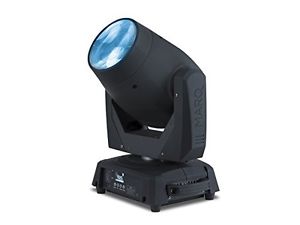
MARQ Gesture Beam 400 | 75W Intelligent LED Lighting with Moveable Head & Frost
Estimated price for orientation: 850 $
Category: DJ Lighting Single Units
Class:
Description Condition: New: A brand-new, unused, unopened, undamaged item in its original packaging (where packaging is applicable). Packaging should be the same as what is found in a retail store, unless the item is handmade or was packaged by the manufacturer in non-retail packaging, such as an unprinted box or plastic bag. See the seller's listing for full details. See all condition definitions- opens in a new window or tab ... Read moreabout the condition Color: NA MPN: Gesture Beam 400 Manufacturer: inMusic Brands Inc. EAN: 0694318018576 Brand: MARQ UPC: 694318018576
The Gesture Beam 400 is a moving head, intelligent light suited for large stage performances, mobile music shows, and private events. Get clear, crisp gobo light patterns from its 75-watt LED lamp and easy-to-use motorized focus operation. It projects a crisp, tight beam for precise aerial effects, frost focus for a more diffuse beam, and also offers a searchlight feature with stand-alone sky-scanning mode. Frequently Asked Questions Does the Marq Lighting Gesture Beam 400 have DMX capability? Yes it does! The Gesture Beam 400 has the traditional DMX IN and DMX OUT jacks built in. This will allow you to use these lights with a qualified DMX controller, and with the proper DMX Cables. How do I setup the Marq Lighting Gesture Beam 400 with a DMX controller? If you are going to use the Marq Lighting Gesture Beam 400 with a DMX controller, follow the steps suggested below: Connect a DMX cable from the DMX output on the DMX controller that you are using, and attach it to the DMX input on the Gesture Beam 400. Below is a picture showing this.
You can chain up to 32 Gesture Beam 400 units together by linking each through the built in DMX output to the DMX input of the following unit.
These will operate over 2 channel modes, 8 and 15. To see what each channel mode does please refer to pages 7-12 of the manual. Does the Marq Lighting Gesture Beam 400 have a sound active mode? The Gesture Beam 400 does have an automatic "sound active" mode. This allows the unit to operate independently and perform an "easy show" for you, free of a DMX controller. This is very easy to do, learn how by following the steps suggested below: Press the Menu button to access the internal options. Use the Down button to highlight the Auto Movement selection, and push Enter. Use the Down button to highlight Sound Active, and push Enter. You can now use the Up or Down buttons to turn this option On or Off, and press Enter to choose your selection. How do I setup the Marq Lighting Gesture Beam 400 in Slave mode? The Gesture Beam 400 has a slave mode so you can connect multiple Gesture Beam 400's together and have them sync up. The Slave mode for the Gesture Beam 400 has 4 different modes that will give you variations of colors and patterns and will stay in sync with the master Gesture Beam 400. These modes allow you to have a bit more fun with your standalone units while keeping them all in time. To learn how to do this, follow the steps suggested below: Press the Menu button to access the internal options. Use the Down button to highlight the Auto Movement selection, and push Enter. Use the Down button to highlight Run Mode, and push Enter. Use the Up or Down buttons to highlight DMX, and press Enter. Now use the Down button to highlight Slave Mode, press Enter, and use the Up or Down buttons to choose the Slave mode you want. Hit Enter to choose it.
What is the Powerlink feature? The Powerlink feature lets you link up to 6 Gesture Beam 400's together with power cables (IEC cables). One reason to do this may be if you have a shortage of wall outlets or power supplies to plug multiple units into. You can then power all of them when having just one Marq Lighting Gesture Beam 400 connected to a wall outlet. Insert the included power cable into the wall and then the other end into the Marq Lighting Gesture Beam 400 On the opposite power plug on the Marq Lighting Gesture Beam 400 you will see a power jack that works the opposite way. On this jack plug the opposite end of an IEC cable here. Now plug the other end of the power cable into the power jack of another Marq Lighting Gesture Beam 400. This will supply power to the Marq Lighting Gesture Beam 400. Why does the LED turn off when I make a change to the color, GOBO wheel or movement? By default, the Gesture Beam 400 ships with blackout features enabled. To disable this feature, put the Gesture Beam 400 in 15-channel mode, then set the DMX value of channel 15 between 60 and 69 for more than 2 seconds. The Gesture Beam 400 should now function without turning off the LED. Note: If the LED is continually off, check to make sure that you are not using the clockwise or counter-clockwise rotation values of either the Color Wheel (channel 8) or the Gobo Wheel (channel 9) while the blackout feature is enabled. To re-enable the blackout feature, set channel 15 to 50 - 59 for more than 2 seconds. Why are my GOBOs out of focus and how do I correct it? Focus is controlled via DMX on channel 11. Pick a point in the room and use channel 11 to focus the beam. Note: If using without a DMX controller, you can adjust the focus by using the front panel menu system. See the Gesture Beam 400 Quick Start Guide under Menu Options > Manual Test > Focus on page 7 for additional details. Why is the Pan and Tilt not moving? Check channel 5 to ensure that it is not set to 255. If set to 255, it is moving at the slowest possible setting the fixture provides which appears to be completely stopped. Why does the LED not get brighter when I move the dimmer to a larger value? Even though there is no mechanical shutter (all Gesture series products have electronic shutters), the shutter value must be moved to open on channel 7. The shutter values to allow the dimmer to function are either 4 - 7 or 216 - 255. All of my GOBOs are completely blurred out. What do I do? Ensure that the Frost effect is not turned on. To disable the Frost effect, the values on channel 10 should be between 0 and 127. My Gesture Beam 400 appears to be malfunctioning 30 feet in the air. What do I do? It is possible to reset the Gesture Beam 400 from the DMX controller (only if in 15 channel mode). On channel 15, send the Reset All DMX value between 150 - 169 for more than 2 seconds to reset the entire fixture. This is a soft reset that restores the Gesture Beam 400 to the power on state. Further Technical Support Whether you are a customer or dealer, if you already own a Marq product, or if you just have pre-sales questions, the Marq technical support team is available to help! Visit the link below to connect with any of the following support options: online community support, phone support, email support. http://www.marqlighting.com/support Technical Specs LIGHT Type: LED Power: 75 W Colors: 8 + white, split colors, scrolling Gobos 8 + open, gobo shake & scrolling 93” (23.5 mm) outside 75” (19 mm) image 04” (1.1 mm) max thickness Illuminance: 81,400 lux @ 3 m (9.8 ft.) Beam Angle: 5° Strobe Rate: 0–20 Hz + pulse and random Pan Ranges: 540°, 360°, 180° Tilt Ranges: 270°, 180°, 90° Focus: Motorized + frost Prism: 8-facet with rotation and indexing DMX Display: Full-color LCD Connections (1) 3-pin input for DMX (1) 3-pin output for DMX Channel Profiles: 8, 15 POWER Supply Switching (internal) Automatic voltage selection Connection Standard IEC (input) USA: Standard female Edison/NEMA (output, for linking multiple fixtures) Non-USA: Standard female IEC (output, for linking multiple fixtures) Linking: Up to 4 fixtures Consumption: 108 W, 36 V, 3 A @ 230 V, 50 Hz Input Voltage: 110–240 VAC, 50/60 Hz Fuse: 250 V, 4 A PHYSICAL / MECHANICAL Mounting: 1/4-turn bracket for “omega”-style clamp (not included) Dimensions(width x depth x height): 21.8” x 17.5” x 12.4” Weight: 22.7 lbs Box Contents Gesture Beam 400 Power Cable DMX Cable Quickstart Guide Safety & Warranty Manual
Description
| Condition: | New: A brand-new, unused, unopened, undamaged item in its original packaging (where packaging is applicable). Packaging should be the same as what is found in a retail store, unless the item is handmade or was packaged by the manufacturer in non-retail packaging, such as an unprinted box or plastic bag. See the seller's listing for full details. See all condition definitions- opens in a new window or tab ... Read moreabout the condition | Color: | NA |
| MPN: | Gesture Beam 400 | Manufacturer: | inMusic Brands Inc. |
| EAN: | 0694318018576 | Brand: | MARQ |
| UPC: | 694318018576 |
The Gesture Beam 400 is a moving head, intelligent light suited for large stage performances, mobile music shows, and private events. Get clear, crisp gobo light patterns from its 75-watt LED lamp and easy-to-use motorized focus operation. It projects a crisp, tight beam for precise aerial effects, frost focus for a more diffuse beam, and also offers a searchlight feature with stand-alone sky-scanning mode. Frequently Asked Questions Does the Marq Lighting Gesture Beam 400 have DMX capability? Yes it does! The Gesture Beam 400 has the traditional DMX IN and DMX OUT jacks built in. This will allow you to use these lights with a qualified DMX controller, and with the proper DMX Cables. How do I setup the Marq Lighting Gesture Beam 400 with a DMX controller? If you are going to use the Marq Lighting Gesture Beam 400 with a DMX controller, follow the steps suggested below: Connect a DMX cable from the DMX output on the DMX controller that you are using, and attach it to the DMX input on the Gesture Beam 400. Below is a picture showing this.
You can chain up to 32 Gesture Beam 400 units together by linking each through the built in DMX output to the DMX input of the following unit.
These will operate over 2 channel modes, 8 and 15. To see what each channel mode does please refer to pages 7-12 of the manual. Does the Marq Lighting Gesture Beam 400 have a sound active mode? The Gesture Beam 400 does have an automatic "sound active" mode. This allows the unit to operate independently and perform an "easy show" for you, free of a DMX controller. This is very easy to do, learn how by following the steps suggested below: Press the Menu button to access the internal options. Use the Down button to highlight the Auto Movement selection, and push Enter. Use the Down button to highlight Sound Active, and push Enter. You can now use the Up or Down buttons to turn this option On or Off, and press Enter to choose your selection. How do I setup the Marq Lighting Gesture Beam 400 in Slave mode? The Gesture Beam 400 has a slave mode so you can connect multiple Gesture Beam 400's together and have them sync up. The Slave mode for the Gesture Beam 400 has 4 different modes that will give you variations of colors and patterns and will stay in sync with the master Gesture Beam 400. These modes allow you to have a bit more fun with your standalone units while keeping them all in time. To learn how to do this, follow the steps suggested below: Press the Menu button to access the internal options. Use the Down button to highlight the Auto Movement selection, and push Enter. Use the Down button to highlight Run Mode, and push Enter. Use the Up or Down buttons to highlight DMX, and press Enter. Now use the Down button to highlight Slave Mode, press Enter, and use the Up or Down buttons to choose the Slave mode you want. Hit Enter to choose it.
What is the Powerlink feature? The Powerlink feature lets you link up to 6 Gesture Beam 400's together with power cables (IEC cables). One reason to do this may be if you have a shortage of wall outlets or power supplies to plug multiple units into. You can then power all of them when having just one Marq Lighting Gesture Beam 400 connected to a wall outlet. Insert the included power cable into the wall and then the other end into the Marq Lighting Gesture Beam 400 On the opposite power plug on the Marq Lighting Gesture Beam 400 you will see a power jack that works the opposite way. On this jack plug the opposite end of an IEC cable here. Now plug the other end of the power cable into the power jack of another Marq Lighting Gesture Beam 400. This will supply power to the Marq Lighting Gesture Beam 400. Why does the LED turn off when I make a change to the color, GOBO wheel or movement? By default, the Gesture Beam 400 ships with blackout features enabled. To disable this feature, put the Gesture Beam 400 in 15-channel mode, then set the DMX value of channel 15 between 60 and 69 for more than 2 seconds. The Gesture Beam 400 should now function without turning off the LED. Note: If the LED is continually off, check to make sure that you are not using the clockwise or counter-clockwise rotation values of either the Color Wheel (channel 8) or the Gobo Wheel (channel 9) while the blackout feature is enabled. To re-enable the blackout feature, set channel 15 to 50 - 59 for more than 2 seconds. Why are my GOBOs out of focus and how do I correct it? Focus is controlled via DMX on channel 11. Pick a point in the room and use channel 11 to focus the beam. Note: If using without a DMX controller, you can adjust the focus by using the front panel menu system. See the Gesture Beam 400 Quick Start Guide under Menu Options > Manual Test > Focus on page 7 for additional details. Why is the Pan and Tilt not moving? Check channel 5 to ensure that it is not set to 255. If set to 255, it is moving at the slowest possible setting the fixture provides which appears to be completely stopped. Why does the LED not get brighter when I move the dimmer to a larger value? Even though there is no mechanical shutter (all Gesture series products have electronic shutters), the shutter value must be moved to open on channel 7. The shutter values to allow the dimmer to function are either 4 - 7 or 216 - 255. All of my GOBOs are completely blurred out. What do I do? Ensure that the Frost effect is not turned on. To disable the Frost effect, the values on channel 10 should be between 0 and 127. My Gesture Beam 400 appears to be malfunctioning 30 feet in the air. What do I do? It is possible to reset the Gesture Beam 400 from the DMX controller (only if in 15 channel mode). On channel 15, send the Reset All DMX value between 150 - 169 for more than 2 seconds to reset the entire fixture. This is a soft reset that restores the Gesture Beam 400 to the power on state. Further Technical Support Whether you are a customer or dealer, if you already own a Marq product, or if you just have pre-sales questions, the Marq technical support team is available to help! Visit the link below to connect with any of the following support options: online community support, phone support, email support. http://www.marqlighting.com/support Technical Specs LIGHT Type: LED Power: 75 W Colors: 8 + white, split colors, scrolling Gobos 8 + open, gobo shake & scrolling 93” (23.5 mm) outside 75” (19 mm) image 04” (1.1 mm) max thickness Illuminance: 81,400 lux @ 3 m (9.8 ft.) Beam Angle: 5° Strobe Rate: 0–20 Hz + pulse and random Pan Ranges: 540°, 360°, 180° Tilt Ranges: 270°, 180°, 90° Focus: Motorized + frost Prism: 8-facet with rotation and indexing DMX Display: Full-color LCD Connections (1) 3-pin input for DMX (1) 3-pin output for DMX Channel Profiles: 8, 15 POWER Supply Switching (internal) Automatic voltage selection Connection Standard IEC (input) USA: Standard female Edison/NEMA (output, for linking multiple fixtures) Non-USA: Standard female IEC (output, for linking multiple fixtures) Linking: Up to 4 fixtures Consumption: 108 W, 36 V, 3 A @ 230 V, 50 Hz Input Voltage: 110–240 VAC, 50/60 Hz Fuse: 250 V, 4 A PHYSICAL / MECHANICAL Mounting: 1/4-turn bracket for “omega”-style clamp (not included) Dimensions(width x depth x height): 21.8” x 17.5” x 12.4” Weight: 22.7 lbs Box Contents Gesture Beam 400 Power Cable DMX Cable Quickstart Guide Safety & Warranty Manual
You can chain up to 32 Gesture Beam 400 units together by linking each through the built in DMX output to the DMX input of the following unit.
These will operate over 2 channel modes, 8 and 15. To see what each channel mode does please refer to pages 7-12 of the manual. Does the Marq Lighting Gesture Beam 400 have a sound active mode? The Gesture Beam 400 does have an automatic "sound active" mode. This allows the unit to operate independently and perform an "easy show" for you, free of a DMX controller. This is very easy to do, learn how by following the steps suggested below: Press the Menu button to access the internal options. Use the Down button to highlight the Auto Movement selection, and push Enter. Use the Down button to highlight Sound Active, and push Enter. You can now use the Up or Down buttons to turn this option On or Off, and press Enter to choose your selection. How do I setup the Marq Lighting Gesture Beam 400 in Slave mode? The Gesture Beam 400 has a slave mode so you can connect multiple Gesture Beam 400's together and have them sync up. The Slave mode for the Gesture Beam 400 has 4 different modes that will give you variations of colors and patterns and will stay in sync with the master Gesture Beam 400. These modes allow you to have a bit more fun with your standalone units while keeping them all in time. To learn how to do this, follow the steps suggested below: Press the Menu button to access the internal options. Use the Down button to highlight the Auto Movement selection, and push Enter. Use the Down button to highlight Run Mode, and push Enter. Use the Up or Down buttons to highlight DMX, and press Enter. Now use the Down button to highlight Slave Mode, press Enter, and use the Up or Down buttons to choose the Slave mode you want. Hit Enter to choose it.
What is the Powerlink feature? The Powerlink feature lets you link up to 6 Gesture Beam 400's together with power cables (IEC cables). One reason to do this may be if you have a shortage of wall outlets or power supplies to plug multiple units into. You can then power all of them when having just one Marq Lighting Gesture Beam 400 connected to a wall outlet. Insert the included power cable into the wall and then the other end into the Marq Lighting Gesture Beam 400 On the opposite power plug on the Marq Lighting Gesture Beam 400 you will see a power jack that works the opposite way. On this jack plug the opposite end of an IEC cable here. Now plug the other end of the power cable into the power jack of another Marq Lighting Gesture Beam 400. This will supply power to the Marq Lighting Gesture Beam 400. Why does the LED turn off when I make a change to the color, GOBO wheel or movement? By default, the Gesture Beam 400 ships with blackout features enabled. To disable this feature, put the Gesture Beam 400 in 15-channel mode, then set the DMX value of channel 15 between 60 and 69 for more than 2 seconds. The Gesture Beam 400 should now function without turning off the LED. Note: If the LED is continually off, check to make sure that you are not using the clockwise or counter-clockwise rotation values of either the Color Wheel (channel 8) or the Gobo Wheel (channel 9) while the blackout feature is enabled. To re-enable the blackout feature, set channel 15 to 50 - 59 for more than 2 seconds. Why are my GOBOs out of focus and how do I correct it? Focus is controlled via DMX on channel 11. Pick a point in the room and use channel 11 to focus the beam. Note: If using without a DMX controller, you can adjust the focus by using the front panel menu system. See the Gesture Beam 400 Quick Start Guide under Menu Options > Manual Test > Focus on page 7 for additional details. Why is the Pan and Tilt not moving? Check channel 5 to ensure that it is not set to 255. If set to 255, it is moving at the slowest possible setting the fixture provides which appears to be completely stopped. Why does the LED not get brighter when I move the dimmer to a larger value? Even though there is no mechanical shutter (all Gesture series products have electronic shutters), the shutter value must be moved to open on channel 7. The shutter values to allow the dimmer to function are either 4 - 7 or 216 - 255. All of my GOBOs are completely blurred out. What do I do? Ensure that the Frost effect is not turned on. To disable the Frost effect, the values on channel 10 should be between 0 and 127. My Gesture Beam 400 appears to be malfunctioning 30 feet in the air. What do I do? It is possible to reset the Gesture Beam 400 from the DMX controller (only if in 15 channel mode). On channel 15, send the Reset All DMX value between 150 - 169 for more than 2 seconds to reset the entire fixture. This is a soft reset that restores the Gesture Beam 400 to the power on state. Further Technical Support Whether you are a customer or dealer, if you already own a Marq product, or if you just have pre-sales questions, the Marq technical support team is available to help! Visit the link below to connect with any of the following support options: online community support, phone support, email support. http://www.marqlighting.com/support Technical Specs LIGHT Type: LED Power: 75 W Colors: 8 + white, split colors, scrolling Gobos 8 + open, gobo shake & scrolling 93” (23.5 mm) outside 75” (19 mm) image 04” (1.1 mm) max thickness Illuminance: 81,400 lux @ 3 m (9.8 ft.) Beam Angle: 5° Strobe Rate: 0–20 Hz + pulse and random Pan Ranges: 540°, 360°, 180° Tilt Ranges: 270°, 180°, 90° Focus: Motorized + frost Prism: 8-facet with rotation and indexing DMX Display: Full-color LCD Connections (1) 3-pin input for DMX (1) 3-pin output for DMX Channel Profiles: 8, 15 POWER Supply Switching (internal) Automatic voltage selection Connection Standard IEC (input) USA: Standard female Edison/NEMA (output, for linking multiple fixtures) Non-USA: Standard female IEC (output, for linking multiple fixtures) Linking: Up to 4 fixtures Consumption: 108 W, 36 V, 3 A @ 230 V, 50 Hz Input Voltage: 110–240 VAC, 50/60 Hz Fuse: 250 V, 4 A PHYSICAL / MECHANICAL Mounting: 1/4-turn bracket for “omega”-style clamp (not included) Dimensions(width x depth x height): 21.8” x 17.5” x 12.4” Weight: 22.7 lbs Box Contents Gesture Beam 400 Power Cable DMX Cable Quickstart Guide Safety & Warranty Manual