Back to the main page Back to category MIDI Keyboards and Controllers
musical instrument details
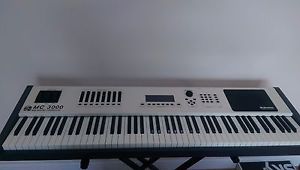
OBERHEIM VISCOUNT MC 3000 MASTER MIDI KEYBOARD USED (very good condition)
Estimated price for orientation: 550 $
Category: MIDI Keyboards and Controllers
Class:
Description
The MC3000 88-note master controller keyboard represents a joint venture between Oberheim and Viscount, and the result is a solidly professional-looking piece of hardware. It's resplendent in beige and black livery and is so substantial that a truck could probably drive right over it and the only thing you'd have to worry about would be how to remove the rubber scuff marks. OK, maybe I'm exaggerating, but believe me, this is one very chunky customer. I suspect that its design and colouring are intended to conjure up echoes of Oberheim's former glories, but I'd argue that the effect is a tad bland. That never stopped PCs from selling, I suppose!Channels, Bays & PortsThere are no fewer than eight separately addressable MIDI outputs on the MC3000's rear panel, offering access to a total of 128 MIDI channels. This fact will certainly endear it to those wanting a controller for stage use. Two MIDI inputs are also provided,each with a dedicated MIDI Thru port, and program changes and System Exclusive messages can be received from either of these inputs. The MC3000 can also use its MIDI Ins and Outs as a simple MIDI patchbay, with operation individually definable within each of its Programs, to enable a reasonably complex multi-keyboard rig to be brought under control.A healthy complement of pedal inputs is provided. There are eight in total, three being designated 'system' pedals, which will act across all keyboard zones, while the other five are assigned to duties in specific zones. All of the pedal inputs are able to handle both switch and expression pedal types, but I couldn't find any facility to define the polarity of the switching pedals, and guess what? My switching pedal was the wrong way round. Some manufacturers get around this by making their machines determine the state of attached pedals at power-on, but sadly that isn't the case here.An RS232 port is included for the connection of a mouse. The MC3000 is quite fussy about the type of mouse it will accept, requiring a three-button device with a PC/MS switch that must be set to the PC position. Oberheim have also provided an integral mouse mat to the right of the front panel. While on many instruments I would welcome the potential of a mouse for editing"The power and flexibility offered by the MC3000 is capable of making it a favourite of professional live performers."
purposes, I can't help feeling that it is somewhat out of place here. At no time during the course of editing (using the front-panel buttons and wheel) did I feel the need to bring the mouse into play. I hate to be so dismissive, because someone has obviously identified a requirement for this facility and gone to a lot of trouble to implement it, so it may just be down to my personal tastes. Future owners, please let me know.All that remains of the rear panel are the standard 'Euro' mains connector, power switch and the LCD contrast control, which obviously got lost on its way to the front panel -- hmm...Speaking of the front panel, it's a very workmanlike control surface. To the far left are a sprung pitch wheel and a pair of non-sprung modulation wheels. These wheels have a chunky appearance and a soft rubber texture, which makes them comfortable and tactile in use. However, they're placed to the rear of the keyboard, a position probably necessitated by the length of the keyboard, and I feel as if I'm stretching to get to them. Maybe I'd get used to it in time.Zones & LayersTo the right of the wheels is a bank of eight control sliders, with associated 'Zone Key' switches. When a Zone Key is lit, the corresponding zone on the keyboard is active. When a Zone Key flashes, the zone is in a 'standby' state, ready to be brought into play by pressing the switch. When a Zone Key is not lit, the zone is inactive. Simple enough, methinks.In the centre of the control surface is the LCD, underneath which lurk six 'software' function keys and the Write and Escapebuttons. The display, although not large by contemporary standards, is bright and clear. A system option allows it to be switched between 'normal' and 'reverse', where the display effectively goes into negative. I generally found the display more comfortable in reverse mode.To the right of the display are the cursor buttons, Increment/Decrement buttons, and 'Dynamic Encoder' wheel for entering data values. Further to the right are the numeric keypad and mode buttons for entering the MC3000's various play and edit modes. On the far right is the built-in mouse pad, which could arguably come in handy even if you don't plug a mouse into the MC3000 itself.The black and white bits at the front comprise the weighted 88-key A-to-C keyboard, with aftertouch sensitivity. The weighted action seems reasonably comfortable to these fingers, but this is probably the one aspect of a master keyboard that is inevitably down to the individual to evaluate. For what it's worth, I'd say that the feel is somewhat lighter than a typical piano response, which is probably a reasonable compromise, given that that the majority of these machines are unlikely to spend their entire lives triggering piano patches. Each of the instrument's eight zones can be assigned its own velocity and aftertouch response curve, from a ROM palette of 16 variations. As if that wasn't enough, a further 48 curves can be stored by the user, and these are subsequently selectable on a per-zone, per-Program basis. Any response curve can be automatically mirrored, typically for crossfading purposes.The machine powers up in Program mode, where MC3000 Programs are selected by way of the wheel, Inc/Dec buttons, or numeric keypad. Since Program mode is where average users will spend most of their time it's worth taking a look at the functions available from this screen: The LIST function displays up to 10 MC3000 Programs on screen, to make selection easier in some circumstances. VIEW shows a graphic representation of the current Program's keyboard zones. INFO yields details of the various parameters defined for each zone, such as output port, channel, volume and program change, and also shows the MIDI controller numbers currently assigned to the pedals and sliders. PRG allows a bank/program change message to be sent to any connected device, regardless of the program changes defined in the current MC3000 Program -- a kind of 'scratch pad'. SOLO keeps the currently selected zone active while deactivating all others.Chains & ProgramsThe current status of the output ports is displayed in the top right of the LCD. Active ports are displayed as a circle, while ports in standby mode are greyed out. When MIDI activity occurs on a port, the circle becomes a black dot. Inactive ports simply don't show up on the screen. This is all useful information, but it would be more useful if the port icons were numbered on screen for easy recognition. For long-term use I suspect I'd resort to a small sticker to provide a numbered overlay.A total of 128 Chains of Programs, each up to 256 steps long, may be programmed within the MC3000 -- ideal for live use. Chains can be named, and steps may be added, deleted, or inserted. Several methods of stepping through the Chain are available, including use of the first three attached pedals, function key F6, the 'Enter' button, the Inc or Dec buttons, the cursor keys, the numeric keypad, or an 'A0' note from the keyboard.Program editing is relatively simple, but it requires some thought with so many ports and possibilities to hand. A port, MIDI channel, low and high key are defined for each zone, along with a transposition amount, key mode (mono or poly), and portamento switch. Once this has been done, screens lead the user through bank/program selection and values for volume and pan. For those sound modules which allow it, reverb and chorus amounts can also be set here.Rather than relying solely on bank and Program numbers, each zone may have a Program-name list assigned to it, chosen from a built-in selection, or from one of 48 tables which can be defined by the user. As standard, the MC3000 offers a GM list and several others for popular machines, including Roland's JV2080 and the Alesis QSR. Once a list is assigned to a zone, selecting patch numbers from the MC3000's screen causes the corresponding patch name to be shown too. It's nice to see patch names as you work, but there's no way to perform name searches, or to automatically import user bank names, so the usefulness of this facility is somewhat limited.Each zone has an associated set of 'Aux' messages that do not really form part of the zone data itself, but allow messages to be sent to devices such as mixers or effects processors. The MIDI port and channel of these auxiliary messages are independent of the zone and, in addition to a program change, a user-defined controller message is also available. Finally, an option to attach a System Exclusive message to each zone is provided. These SysEx messages can be defined by the user, although a few useful examples are provided for good measure.Each of the eight control sliders can be set to generate a specific MIDI controller number and an initial value within each Program; this initial value will be transmitted when the Program is selected. The same is true of the pedals.The Order Of The UniverseMuch can be made of the MC3000's programmability, especially by using the facility for generating SysEx messages, but there are one or two ways of getting yourself into a real muddle if you're not careful. I set up a Program which sent a 'GM Mode On'message with zone A, but hadn't realised that this message would be sent after the program change and controller messages -- hence they were all negated following my sound module's response to the GM reset! There doesn't seem to be any way to determine the order of such events, although using lower-lettered zones is one, albeit inelegant, way around it. The kind of power offered by the MC3000 is a two-edged sword -- knowing your way around MIDI messages is essential to making full use of its MIDI capabilities.Several useful features lurk in Utility mode. MIDI bulk dumps are performed from here, ensuring that precious data can be stored to an external device for safekeeping. Various dump options permit the storage of specific data types, or you can make a simple dump of everything. A very flexible MIDI monitor is included, and this could save hours of frustration in complex MIDI rigs. The MC3000 allows for selection of individual ports and even provides filtering to remove control, SysEx, or program change messages from the displayed data.Utility mode also hosts pages where velocity and aftertouch curves are edited, Program name and port name tables are created, and tables of user-defined SysEx messages are built. A special Tools page enables checking of battery power and memory usage, and even includes an option to change mouse 'sensibility'. Try turning it down to zero and see if it asks you to turn on Blind Date...I've often criticised master keyboards for not providing the user with sufficient visual feedback, and I was pleased to see that the Sound Stuff:
Viscount OP1 Soundcard Programs Setting the right DAT recording level: SOS January 1995. Noise and how to avoid it: SOS May 1995. A Concise Guide to Compression & Limiting: SOS April 1996. The Mysteries of Metering: SOS May 1996.Minimising Mixer and Effects Noise: SOSJuly 1996.
MC3000's screen display has been carefully crafted to provide clear, consistent information. Things arguably go awry, though, in the use of rather cryptic abbreviations, which are sometimes necessary if everything is to be crammed into a screen of this size. Where space is at less of a premium the programmers have made good use of bold, informative text. The top Play page, for instance, displays the current Program number and name in large, clear characters, while also leaving room for 24 characters of descriptive (or memory jogging!) comment text underneath.I do feel that there could have been more use of graphic diagrams on the MC3000's screen, to show routings and connections. The MIDI patchbay screen takes a little time to get to grips with, and it would be nice to see a screen dedicated to showing output activity, along with port names and visual clues to velocity, last message type, and other such useful information. It is possible to collate all of this data by visiting various screens, but the MC3000 fails to pull it all together. I'm being a little cruel here, since I'm not aware of any other manufacturer having achieved this, at least to my satisfaction. As it is, the screen is reasonably helpful in showing the status of, and activity at, each of the eight output ports.As a whole, the MC3000 package holds together very well. I managed to get myself confused long before this keyboard ran out of possibilities, which says a lot about the depth of control on offer -- or maybe about my state of mind!I might have wished for the ability to load and replay MIDI song files, and a floppy drive would have meant that the keyboard was self-sufficient in terms of storage and backup facilities. Dedicated sequencer controls would have been the icing on the cake. But I recognise that these are all features which add to manufacturing cost, and the current price seems reasonable for what is on offer.
Description
The MC3000 88-note master controller keyboard represents a joint venture between Oberheim and Viscount, and the result is a solidly professional-looking piece of hardware. It's resplendent in beige and black livery and is so substantial that a truck could probably drive right over it and the only thing you'd have to worry about would be how to remove the rubber scuff marks. OK, maybe I'm exaggerating, but believe me, this is one very chunky customer. I suspect that its design and colouring are intended to conjure up echoes of Oberheim's former glories, but I'd argue that the effect is a tad bland. That never stopped PCs from selling, I suppose!Channels, Bays & PortsThere are no fewer than eight separately addressable MIDI outputs on the MC3000's rear panel, offering access to a total of 128 MIDI channels. This fact will certainly endear it to those wanting a controller for stage use. Two MIDI inputs are also provided,each with a dedicated MIDI Thru port, and program changes and System Exclusive messages can be received from either of these inputs. The MC3000 can also use its MIDI Ins and Outs as a simple MIDI patchbay, with operation individually definable within each of its Programs, to enable a reasonably complex multi-keyboard rig to be brought under control.A healthy complement of pedal inputs is provided. There are eight in total, three being designated 'system' pedals, which will act across all keyboard zones, while the other five are assigned to duties in specific zones. All of the pedal inputs are able to handle both switch and expression pedal types, but I couldn't find any facility to define the polarity of the switching pedals, and guess what? My switching pedal was the wrong way round. Some manufacturers get around this by making their machines determine the state of attached pedals at power-on, but sadly that isn't the case here.An RS232 port is included for the connection of a mouse. The MC3000 is quite fussy about the type of mouse it will accept, requiring a three-button device with a PC/MS switch that must be set to the PC position. Oberheim have also provided an integral mouse mat to the right of the front panel. While on many instruments I would welcome the potential of a mouse for editing
purposes, I can't help feeling that it is somewhat out of place here. At no time during the course of editing (using the front-panel buttons and wheel) did I feel the need to bring the mouse into play. I hate to be so dismissive, because someone has obviously identified a requirement for this facility and gone to a lot of trouble to implement it, so it may just be down to my personal tastes. Future owners, please let me know.All that remains of the rear panel are the standard 'Euro' mains connector, power switch and the LCD contrast control, which obviously got lost on its way to the front panel -- hmm...Speaking of the front panel, it's a very workmanlike control surface. To the far left are a sprung pitch wheel and a pair of non-sprung modulation wheels. These wheels have a chunky appearance and a soft rubber texture, which makes them comfortable and tactile in use. However, they're placed to the rear of the keyboard, a position probably necessitated by the length of the keyboard, and I feel as if I'm stretching to get to them. Maybe I'd get used to it in time.Zones & LayersTo the right of the wheels is a bank of eight control sliders, with associated 'Zone Key' switches. When a Zone Key is lit, the corresponding zone on the keyboard is active. When a Zone Key flashes, the zone is in a 'standby' state, ready to be brought into play by pressing the switch. When a Zone Key is not lit, the zone is inactive. Simple enough, methinks.In the centre of the control surface is the LCD, underneath which lurk six 'software' function keys and the Write and Escapebuttons. The display, although not large by contemporary standards, is bright and clear. A system option allows it to be switched between 'normal' and 'reverse', where the display effectively goes into negative. I generally found the display more comfortable in reverse mode.To the right of the display are the cursor buttons, Increment/Decrement buttons, and 'Dynamic Encoder' wheel for entering data values. Further to the right are the numeric keypad and mode buttons for entering the MC3000's various play and edit modes. On the far right is the built-in mouse pad, which could arguably come in handy even if you don't plug a mouse into the MC3000 itself.The black and white bits at the front comprise the weighted 88-key A-to-C keyboard, with aftertouch sensitivity. The weighted action seems reasonably comfortable to these fingers, but this is probably the one aspect of a master keyboard that is inevitably down to the individual to evaluate. For what it's worth, I'd say that the feel is somewhat lighter than a typical piano response, which is probably a reasonable compromise, given that that the majority of these machines are unlikely to spend their entire lives triggering piano patches. Each of the instrument's eight zones can be assigned its own velocity and aftertouch response curve, from a ROM palette of 16 variations. As if that wasn't enough, a further 48 curves can be stored by the user, and these are subsequently selectable on a per-zone, per-Program basis. Any response curve can be automatically mirrored, typically for crossfading purposes.The machine powers up in Program mode, where MC3000 Programs are selected by way of the wheel, Inc/Dec buttons, or numeric keypad. Since Program mode is where average users will spend most of their time it's worth taking a look at the functions available from this screen: The LIST function displays up to 10 MC3000 Programs on screen, to make selection easier in some circumstances. VIEW shows a graphic representation of the current Program's keyboard zones. INFO yields details of the various parameters defined for each zone, such as output port, channel, volume and program change, and also shows the MIDI controller numbers currently assigned to the pedals and sliders. PRG allows a bank/program change message to be sent to any connected device, regardless of the program changes defined in the current MC3000 Program -- a kind of 'scratch pad'. SOLO keeps the currently selected zone active while deactivating all others.Chains & ProgramsThe current status of the output ports is displayed in the top right of the LCD. Active ports are displayed as a circle, while ports in standby mode are greyed out. When MIDI activity occurs on a port, the circle becomes a black dot. Inactive ports simply don't show up on the screen. This is all useful information, but it would be more useful if the port icons were numbered on screen for easy recognition. For long-term use I suspect I'd resort to a small sticker to provide a numbered overlay.A total of 128 Chains of Programs, each up to 256 steps long, may be programmed within the MC3000 -- ideal for live use. Chains can be named, and steps may be added, deleted, or inserted. Several methods of stepping through the Chain are available, including use of the first three attached pedals, function key F6, the 'Enter' button, the Inc or Dec buttons, the cursor keys, the numeric keypad, or an 'A0' note from the keyboard.Program editing is relatively simple, but it requires some thought with so many ports and possibilities to hand. A port, MIDI channel, low and high key are defined for each zone, along with a transposition amount, key mode (mono or poly), and portamento switch. Once this has been done, screens lead the user through bank/program selection and values for volume and pan. For those sound modules which allow it, reverb and chorus amounts can also be set here.Rather than relying solely on bank and Program numbers, each zone may have a Program-name list assigned to it, chosen from a built-in selection, or from one of 48 tables which can be defined by the user. As standard, the MC3000 offers a GM list and several others for popular machines, including Roland's JV2080 and the Alesis QSR. Once a list is assigned to a zone, selecting patch numbers from the MC3000's screen causes the corresponding patch name to be shown too. It's nice to see patch names as you work, but there's no way to perform name searches, or to automatically import user bank names, so the usefulness of this facility is somewhat limited.Each zone has an associated set of 'Aux' messages that do not really form part of the zone data itself, but allow messages to be sent to devices such as mixers or effects processors. The MIDI port and channel of these auxiliary messages are independent of the zone and, in addition to a program change, a user-defined controller message is also available. Finally, an option to attach a System Exclusive message to each zone is provided. These SysEx messages can be defined by the user, although a few useful examples are provided for good measure.Each of the eight control sliders can be set to generate a specific MIDI controller number and an initial value within each Program; this initial value will be transmitted when the Program is selected. The same is true of the pedals.The Order Of The UniverseMuch can be made of the MC3000's programmability, especially by using the facility for generating SysEx messages, but there are one or two ways of getting yourself into a real muddle if you're not careful. I set up a Program which sent a 'GM Mode On'message with zone A, but hadn't realised that this message would be sent after the program change and controller messages -- hence they were all negated following my sound module's response to the GM reset! There doesn't seem to be any way to determine the order of such events, although using lower-lettered zones is one, albeit inelegant, way around it. The kind of power offered by the MC3000 is a two-edged sword -- knowing your way around MIDI messages is essential to making full use of its MIDI capabilities.Several useful features lurk in Utility mode. MIDI bulk dumps are performed from here, ensuring that precious data can be stored to an external device for safekeeping. Various dump options permit the storage of specific data types, or you can make a simple dump of everything. A very flexible MIDI monitor is included, and this could save hours of frustration in complex MIDI rigs. The MC3000 allows for selection of individual ports and even provides filtering to remove control, SysEx, or program change messages from the displayed data.Utility mode also hosts pages where velocity and aftertouch curves are edited, Program name and port name tables are created, and tables of user-defined SysEx messages are built. A special Tools page enables checking of battery power and memory usage, and even includes an option to change mouse 'sensibility'. Try turning it down to zero and see if it asks you to turn on Blind Date...I've often criticised master keyboards for not providing the user with sufficient visual feedback, and I was pleased to see that the
MC3000's screen display has been carefully crafted to provide clear, consistent information. Things arguably go awry, though, in the use of rather cryptic abbreviations, which are sometimes necessary if everything is to be crammed into a screen of this size. Where space is at less of a premium the programmers have made good use of bold, informative text. The top Play page, for instance, displays the current Program number and name in large, clear characters, while also leaving room for 24 characters of descriptive (or memory jogging!) comment text underneath.I do feel that there could have been more use of graphic diagrams on the MC3000's screen, to show routings and connections. The MIDI patchbay screen takes a little time to get to grips with, and it would be nice to see a screen dedicated to showing output activity, along with port names and visual clues to velocity, last message type, and other such useful information. It is possible to collate all of this data by visiting various screens, but the MC3000 fails to pull it all together. I'm being a little cruel here, since I'm not aware of any other manufacturer having achieved this, at least to my satisfaction. As it is, the screen is reasonably helpful in showing the status of, and activity at, each of the eight output ports.As a whole, the MC3000 package holds together very well. I managed to get myself confused long before this keyboard ran out of possibilities, which says a lot about the depth of control on offer -- or maybe about my state of mind!I might have wished for the ability to load and replay MIDI song files, and a floppy drive would have meant that the keyboard was self-sufficient in terms of storage and backup facilities. Dedicated sequencer controls would have been the icing on the cake. But I recognise that these are all features which add to manufacturing cost, and the current price seems reasonable for what is on offer.
| "The power and flexibility offered by the MC3000 is capable of making it a favourite of professional live performers." |
|