Back to the main page Back to category Speaker Drivers and Horns
musical instrument details
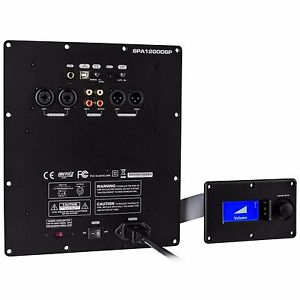
Dayton Audio SPA1200DSP 1200W Subwoofer Amplifier wl DSP
Estimated price for orientation: 550 $
Category: Speaker Drivers and Horns
Class:
Description Condition: New: A brand-new, unused, unopened, undamaged item in its original packaging (where packaging is applicable). Packaging should be the same as what is found in a retail store, unless the item is handmade or was packaged by the manufacturer in non-retail packaging, such as an unprinted box or plastic bag. See the seller's listing for full details. See all condition definitions- opens in a new window or tab ... Read moreabout the condition Brand: Dayton Audio MPN: SPA1200DSP Country/Region of Manufacture: Taiwan UPC: 848791002076
Dayton Audio's SPA1200DSP true 1,200 watt digital switching plate amplifier features advanced signal processing control that every audio enthusiast wants. This power and flexibility is accessible via PC-GUI software, our innovative single-knob LCD control panel, or an iPhone feature management app.Feature Control Panel KeyPower ON LED: Green LED when amp is operating normallyStandby (STB) LED: Red when amp is in energy saving "stand by" stateLimit LED (Yellow): Lit when Limiter is activeFeature Setup: Single knob digital actuator with single/double-click enabled with rotary scrolling to navigate the amp's extensive feature menu.Feature controller display (128 x 64 pixel): Liquid Crystal Matrix (LCM) displays all of the feature menu and status.Amp System Block Diagram
DSP Processing Block DiagramControlling your subwoofer via PC GUI
Read Setting Read all the settings from ampSave Settings to File Save current settings to PCLoad Settings from File Load previous saved setting to AMPReset to Default Setting Reset the AMP to factory defaultUSB Link Indicator: When communication via USB with amp is successful, the GUI's "LED" indicator will light blue. Otherwise, the "LED" stays dark.Processing Selection: Selecting any icon can effect change in near-real time (NRT) to the amp's audio outputs.Main Control Screen: Control each DSP processing parameters: Threshold Power, Attack Time, Release, along with 5 digital PEQ bands.Sub In-Out Monitor: Monitor the input signal and sub output signal levels.Tools Drop Down Menu: Utilities for amp DSP management, plus Wi-Fi settings.NOTE: The GUI's graphical trace is NRT editable. Bands can be shaped by cursor or direct input and/or sliders.Detailed tool tips (shown a-d above):5 Band Digital PEQ a) Band On/Off: Bypass or enable by clicking the colorized 1 ~ 5 buttons.
b) Center Frequency (CF): Adjust Center Frequency of each EQ band, 20 ~ 200Hz. Steps: 1Hz.
c) Gain: Adjust the EQ gain (apparent volume), -12 ~ +6dB. Steps: 1dB.
d) Q (EQ Width): Adjust the "Q" value, 0.4 ~ 11. Steps: 0.1Q.Limiter: Adjust, optimize, save, recall. a) Threshold: Adjust the limiter "threshold power", 0 ~ -12dB. Steps: 0.1dB
b) Attack: Adjust limiter "attack time". This controls the allowed amount of time signals may be over threshold power. Range of adjustment is 0.1 ~ 100ms (milliseconds). Steps: 0.1ms
c) Release: Adjust limiter's "release time". When limiter is triggered, this control adjusts the time allowed to restore full power. Adjustable range 100 ~ 5000ms. Steps: 0.1ms.Custom algorithms apply intelligent multi-band room equalization (iEQ™)The included 20Hz-capable iEQ microphone allows estimation of your room's natural frequency response characteristics and precisely applies PEQ filters to compensate for inevitable response anomalies. Plug the microphone's 3.5mm "male" fitting into the amp panel's "female" jack labeled "Mic In" for this procedure.Measurement of room acoustics requires moving your EQ mic through the room's listening and/or viewing "sweet spots", typically affixed to a photo tri-pod for best acoustical results. Only three different positions are required, as testing actually captures 12 measurements per location (automatically averaging each result).Starting iEQ: Selecting the GUI's button starts custom calibration test tones. After moving your mic to three different listening locations and estimations are finished, the system screen will display the final measured and calculated post-equalized frequency response results.Controlling the Subwoofer via the Control Panel
Volume, Phase, Low-Pass Filter and all other controls are also accessible via the included rotary control.Volume (shown above) is selected by a single click, upon which simple rotation allows 1dB adjustment.A "double-click" brings you back to the main menu. Subsequent rotation of the controller from the main menu navigates you through a series of setup menus.Each of the "Function frames" at left correspond to the major feature controls on the amp. Each feature control uses the same single/double-click navigation.Note all detailed sub-features on the next page.Scroll around your amp and get familiar with its simple click and double click feature rotation. Sub Remote Control iPhone App now available:Specifications: • Power output: 1,200 watts RMS into 4 ohms, THD+N <0.1% • Signal to noise ratio: 102 dB (A-weighted) • Input impedance: 22,000 ohms • Power requirements: 110~120/220~240 VAC selectable, 50/60 Hz • Amplifier dimensions: 10.75" H x 9.5" W x 2.875" D; Amplifier cutout: 9.625" H x 8.25" W • Control panel dimensions: 3.5" H x 5.75" W x 1.25"; Control panel cutout: 2.5" H x 4.75" W.
Description
| Condition: | New: A brand-new, unused, unopened, undamaged item in its original packaging (where packaging is applicable). Packaging should be the same as what is found in a retail store, unless the item is handmade or was packaged by the manufacturer in non-retail packaging, such as an unprinted box or plastic bag. See the seller's listing for full details. See all condition definitions- opens in a new window or tab ... Read moreabout the condition | Brand: | Dayton Audio |
| MPN: | SPA1200DSP | Country/Region of Manufacture: | Taiwan |
| UPC: | 848791002076 |
Dayton Audio's SPA1200DSP true 1,200 watt digital switching plate amplifier features advanced signal processing control that every audio enthusiast wants. This power and flexibility is accessible via PC-GUI software, our innovative single-knob LCD control panel, or an iPhone feature management app.Feature Control Panel KeyPower ON LED: Green LED when amp is operating normallyStandby (STB) LED: Red when amp is in energy saving "stand by" stateLimit LED (Yellow): Lit when Limiter is activeFeature Setup: Single knob digital actuator with single/double-click enabled with rotary scrolling to navigate the amp's extensive feature menu.Feature controller display (128 x 64 pixel): Liquid Crystal Matrix (LCM) displays all of the feature menu and status.Amp System Block Diagram
DSP Processing Block DiagramControlling your subwoofer via PC GUI
Read Setting Read all the settings from ampSave Settings to File Save current settings to PCLoad Settings from File Load previous saved setting to AMPReset to Default Setting Reset the AMP to factory defaultUSB Link Indicator: When communication via USB with amp is successful, the GUI's "LED" indicator will light blue. Otherwise, the "LED" stays dark.Processing Selection: Selecting any icon can effect change in near-real time (NRT) to the amp's audio outputs.Main Control Screen: Control each DSP processing parameters: Threshold Power, Attack Time, Release, along with 5 digital PEQ bands.Sub In-Out Monitor: Monitor the input signal and sub output signal levels.Tools Drop Down Menu: Utilities for amp DSP management, plus Wi-Fi settings.NOTE: The GUI's graphical trace is NRT editable. Bands can be shaped by cursor or direct input and/or sliders.Detailed tool tips (shown a-d above):5 Band Digital PEQ a) Band On/Off: Bypass or enable by clicking the colorized 1 ~ 5 buttons.
b) Center Frequency (CF): Adjust Center Frequency of each EQ band, 20 ~ 200Hz. Steps: 1Hz.
c) Gain: Adjust the EQ gain (apparent volume), -12 ~ +6dB. Steps: 1dB.
d) Q (EQ Width): Adjust the "Q" value, 0.4 ~ 11. Steps: 0.1Q.Limiter: Adjust, optimize, save, recall. a) Threshold: Adjust the limiter "threshold power", 0 ~ -12dB. Steps: 0.1dB
b) Attack: Adjust limiter "attack time". This controls the allowed amount of time signals may be over threshold power. Range of adjustment is 0.1 ~ 100ms (milliseconds). Steps: 0.1ms
c) Release: Adjust limiter's "release time". When limiter is triggered, this control adjusts the time allowed to restore full power. Adjustable range 100 ~ 5000ms. Steps: 0.1ms.Custom algorithms apply intelligent multi-band room equalization (iEQ™)The included 20Hz-capable iEQ microphone allows estimation of your room's natural frequency response characteristics and precisely applies PEQ filters to compensate for inevitable response anomalies. Plug the microphone's 3.5mm "male" fitting into the amp panel's "female" jack labeled "Mic In" for this procedure.Measurement of room acoustics requires moving your EQ mic through the room's listening and/or viewing "sweet spots", typically affixed to a photo tri-pod for best acoustical results. Only three different positions are required, as testing actually captures 12 measurements per location (automatically averaging each result).Starting iEQ: Selecting the GUI's button starts custom calibration test tones. After moving your mic to three different listening locations and estimations are finished, the system screen will display the final measured and calculated post-equalized frequency response results.Controlling the Subwoofer via the Control Panel
Volume, Phase, Low-Pass Filter and all other controls are also accessible via the included rotary control.Volume (shown above) is selected by a single click, upon which simple rotation allows 1dB adjustment.A "double-click" brings you back to the main menu. Subsequent rotation of the controller from the main menu navigates you through a series of setup menus.Each of the "Function frames" at left correspond to the major feature controls on the amp. Each feature control uses the same single/double-click navigation.Note all detailed sub-features on the next page.Scroll around your amp and get familiar with its simple click and double click feature rotation. Sub Remote Control iPhone App now available:Specifications: • Power output: 1,200 watts RMS into 4 ohms, THD+N <0.1% • Signal to noise ratio: 102 dB (A-weighted) • Input impedance: 22,000 ohms • Power requirements: 110~120/220~240 VAC selectable, 50/60 Hz • Amplifier dimensions: 10.75" H x 9.5" W x 2.875" D; Amplifier cutout: 9.625" H x 8.25" W • Control panel dimensions: 3.5" H x 5.75" W x 1.25"; Control panel cutout: 2.5" H x 4.75" W.
DSP Processing Block DiagramControlling your subwoofer via PC GUI
Read Setting Read all the settings from ampSave Settings to File Save current settings to PCLoad Settings from File Load previous saved setting to AMPReset to Default Setting Reset the AMP to factory defaultUSB Link Indicator: When communication via USB with amp is successful, the GUI's "LED" indicator will light blue. Otherwise, the "LED" stays dark.Processing Selection: Selecting any icon can effect change in near-real time (NRT) to the amp's audio outputs.Main Control Screen: Control each DSP processing parameters: Threshold Power, Attack Time, Release, along with 5 digital PEQ bands.Sub In-Out Monitor: Monitor the input signal and sub output signal levels.Tools Drop Down Menu: Utilities for amp DSP management, plus Wi-Fi settings.NOTE: The GUI's graphical trace is NRT editable. Bands can be shaped by cursor or direct input and/or sliders.Detailed tool tips (shown a-d above):5 Band Digital PEQ a) Band On/Off: Bypass or enable by clicking the colorized 1 ~ 5 buttons.
b) Center Frequency (CF): Adjust Center Frequency of each EQ band, 20 ~ 200Hz. Steps: 1Hz.
c) Gain: Adjust the EQ gain (apparent volume), -12 ~ +6dB. Steps: 1dB.
d) Q (EQ Width): Adjust the "Q" value, 0.4 ~ 11. Steps: 0.1Q.Limiter: Adjust, optimize, save, recall. a) Threshold: Adjust the limiter "threshold power", 0 ~ -12dB. Steps: 0.1dB
b) Attack: Adjust limiter "attack time". This controls the allowed amount of time signals may be over threshold power. Range of adjustment is 0.1 ~ 100ms (milliseconds). Steps: 0.1ms
c) Release: Adjust limiter's "release time". When limiter is triggered, this control adjusts the time allowed to restore full power. Adjustable range 100 ~ 5000ms. Steps: 0.1ms.Custom algorithms apply intelligent multi-band room equalization (iEQ™)The included 20Hz-capable iEQ microphone allows estimation of your room's natural frequency response characteristics and precisely applies PEQ filters to compensate for inevitable response anomalies. Plug the microphone's 3.5mm "male" fitting into the amp panel's "female" jack labeled "Mic In" for this procedure.Measurement of room acoustics requires moving your EQ mic through the room's listening and/or viewing "sweet spots", typically affixed to a photo tri-pod for best acoustical results. Only three different positions are required, as testing actually captures 12 measurements per location (automatically averaging each result).Starting iEQ: Selecting the GUI's button starts custom calibration test tones. After moving your mic to three different listening locations and estimations are finished, the system screen will display the final measured and calculated post-equalized frequency response results.Controlling the Subwoofer via the Control Panel
Volume, Phase, Low-Pass Filter and all other controls are also accessible via the included rotary control.Volume (shown above) is selected by a single click, upon which simple rotation allows 1dB adjustment.A "double-click" brings you back to the main menu. Subsequent rotation of the controller from the main menu navigates you through a series of setup menus.Each of the "Function frames" at left correspond to the major feature controls on the amp. Each feature control uses the same single/double-click navigation.Note all detailed sub-features on the next page.Scroll around your amp and get familiar with its simple click and double click feature rotation. Sub Remote Control iPhone App now available:Specifications: • Power output: 1,200 watts RMS into 4 ohms, THD+N <0.1% • Signal to noise ratio: 102 dB (A-weighted) • Input impedance: 22,000 ohms • Power requirements: 110~120/220~240 VAC selectable, 50/60 Hz • Amplifier dimensions: 10.75" H x 9.5" W x 2.875" D; Amplifier cutout: 9.625" H x 8.25" W • Control panel dimensions: 3.5" H x 5.75" W x 1.25"; Control panel cutout: 2.5" H x 4.75" W.