Back to the main page Back to category Audio or MIDI Interfaces
musical instrument details
SSL X-Patch
Estimated price for orientation: 1 200 $
Category: Audio or MIDI Interfaces
Class:
Description
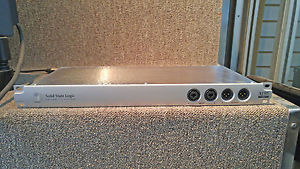
- Will ship to U.S., Europe and more. For shipping cost, please contact us with adresse and postal/zip code.-PLEASE ASK ANY QUESTIONS YOU MAY HAVE PRIOR TO BIDDING ON THIS ITEM--IF SHIPPED WITHIN CANADA, APPLICABLE TAXES WILL BE CHARGED, SO PLEASE WAIT FOR US TO SEND YOU AN INVOICE BEFORE MAKING YOUR PAYMENT-Canadian residents please add the following amounts for taxes based on province of residence:Newfoundland: 13%PEI: 14%Nova Scotia: 13%New Brunswick: 13%Quebec: 14.98%Ontario: 13%Manitoba: 5%Saskatchewan: 5%Alberta: 5%British Columbia: 12%NWT/NU: 5%YT: 5%-WE WILL ONLY SHIP TO THE ADDRESS THAT IS ASSIGNED TO YOUR PAYPAL ACCOUNT--WE WILL NEED YOUR PHONE NUMBER TO COMPLETE THE TRANSACTION--SHIPPING DOES NOT INCLUDE DUTIES OR STATE TAXES. THIS IS THE RESPONSIBILITY OF THE BUYER.***Steve's Music Store has been in business since 1965***ow that most of us have moved into the domain of the DAW, integrating analogue outboard has become something of a problem. Yes, if you have a large enough interface you can patch favourite outboard between spare interface outputs and inputs, and then use the DAW's internal routing to assign the outboard to specific channels or buses, but this only really works for single processes. If you have a lot of outboard and want to create more complex signal-processing chains — preamp into equaliser into compressor, for example — something with a little more flexibility and independence from the DAW's routing facilities might be desirable. Enter the SSL X‑Patch...Extending Solid State Logic's 'X' range of products (the others being the X‑Rack and X‑Desk), the X‑Patch is based on the same technology employed at the heart of the Matrix console. In this stand‑alone, 1U, rackmounting form, the X‑Patch provides a 16x16 SuperAnalogue routing matrix that can be controlled remotely via Ethernet. A bespoke browser application, called 'Logictivity Remote Studio' provides setup, configuration and 128‑preset storage/recall functionality.The X‑Patch can be used as a simple, zero‑latency, analogue signal router, or in a more complex and convoluted 're‑entrant' manner to create chains of preamps and other analogue processors, which can then be inserted into DAW signal paths. Commonly used outboard chains can be stored as preset configurations to make their future construction trivially simple and instant. For really big systems, up to six X‑Patch units can be controlled together from a single X‑Patch 'Logictivity' browser application, via a standard Ethernet hub.Interestingly, the X‑Patch has also been designed to serve as a live performance tool for guitarists. Once configured, the X‑Patch can be used completely independently of the Logictivity browser application, with configurations being switched via MIDI. So by hooking up a standard MIDI foot controller, you can use the X‑Patch as a stand-alone analogue routing and switching system, allowing easy re-patching of on‑stage effect-pedal processing and/or amplifier selection — and SSL claim that this solution works out to a fraction of the cost of comparable professional on-stage effects-selection systems.D‑sub connectors provide a compact way of sending 16 signals in and out of the X-Patch.The X‑Patch comes in the form of a smart, 1U, rackmounting box, finished in the usual SSL silver and extending about 230mm behind the rack ears. The front panel has no controls — not even an indicator to identify the current routing preset. There's an illuminated power‑standby 'lozenge' switch and four sockets, the first pair of which are 'combi' XLRs for inputs one and two, while the second pair are male XLRs for outputs one and two. All four XLR connections are parallel duplicates of the rear-panel connections (you can use front or rear XLRs for each channel, but not both), while the unbalanced quarter‑inch input sockets provide high-impedance (1MΩ) DI inputs to accept guitar signals. Plugging into these jack sockets overrides the rear-panel XLRs completely. The X‑Patch is intended for balanced line-level signals only: it won't pass phantom power, and it isn't intended to handle mic‑level signals.The rear panel is a little busier, hosting four 25‑way D‑Sub connectors, each wired in the usual Tascam format to provide eight balanced signals — a total of 16 inputs and 16 outputs. The unit is configurable for +4dBu and ‑10dBV operating levels. There's also a pair of MIDI sockets (In and Thru) and an RJ45 Ethernet port. Another standard five‑pin DIN socket accepts DC power from an external line‑lump universal PSU. I don't know whether it's possible to blow up the unit by plugging the power cable into a MIDI socket — the handbook does contain a warning about it — but it seems short‑sighted to have designed a unit with that connection possibility when there are so many alternative connectors available! Also included in the box is a standard IEC mains cable, the external universal power-supply unit (100‑240V AC), an installation guide and the software CD.Software installation is trivially simple on both Mac and PC, but Java 5 or higher is needed for the Mac (it's already included in OS 10.4 and higher). The current software version while reviewing was V1.04 and the X‑Patch firmware was V1.01.Once the software has been installed and the X‑Patch hooked up to the computer's network, the first time the software is run you have to go through a process of finding the X‑Patch. This is as simple as clicking a 'Find' button, at which point the software interrogates the network to find connected X‑Patch units. X‑Patches are identified by their serial numbers, but a Setup menu allows them to be named uniquely, which is useful. The same menu also allows the IP address of each unit to be set manually, instead of by DHCP. The same menu page also enables activation of the MIDI port and setting of its receive channel, and the operating level can be configured independently between +4dBu and ‑10dBV for each channel in and out.On this 'Channels' page, each I/O port can also be named (up to 12 characters) and the routing 'rules' established. There are three options: Unlinked, Device and Insert
Description
- Will ship to U.S., Europe and more. For shipping cost, please contact us with adresse and postal/zip code.-PLEASE ASK ANY QUESTIONS YOU MAY HAVE PRIOR TO BIDDING ON THIS ITEM--IF SHIPPED WITHIN CANADA, APPLICABLE TAXES WILL BE CHARGED, SO PLEASE WAIT FOR US TO SEND YOU AN INVOICE BEFORE MAKING YOUR PAYMENT-Canadian residents please add the following amounts for taxes based on province of residence:Newfoundland: 13%PEI: 14%Nova Scotia: 13%New Brunswick: 13%Quebec: 14.98%Ontario: 13%Manitoba: 5%Saskatchewan: 5%Alberta: 5%British Columbia: 12%NWT/NU: 5%YT: 5%-WE WILL ONLY SHIP TO THE ADDRESS THAT IS ASSIGNED TO YOUR PAYPAL ACCOUNT--WE WILL NEED YOUR PHONE NUMBER TO COMPLETE THE TRANSACTION--SHIPPING DOES NOT INCLUDE DUTIES OR STATE TAXES. THIS IS THE RESPONSIBILITY OF THE BUYER.***Steve's Music Store has been in business since 1965***ow that most of us have moved into the domain of the DAW, integrating analogue outboard has become something of a problem. Yes, if you have a large enough interface you can patch favourite outboard between spare interface outputs and inputs, and then use the DAW's internal routing to assign the outboard to specific channels or buses, but this only really works for single processes. If you have a lot of outboard and want to create more complex signal-processing chains — preamp into equaliser into compressor, for example — something with a little more flexibility and independence from the DAW's routing facilities might be desirable. Enter the SSL X‑Patch...Extending Solid State Logic's 'X' range of products (the others being the X‑Rack and X‑Desk), the X‑Patch is based on the same technology employed at the heart of the Matrix console. In this stand‑alone, 1U, rackmounting form, the X‑Patch provides a 16x16 SuperAnalogue routing matrix that can be controlled remotely via Ethernet. A bespoke browser application, called 'Logictivity Remote Studio' provides setup, configuration and 128‑preset storage/recall functionality.The X‑Patch can be used as a simple, zero‑latency, analogue signal router, or in a more complex and convoluted 're‑entrant' manner to create chains of preamps and other analogue processors, which can then be inserted into DAW signal paths. Commonly used outboard chains can be stored as preset configurations to make their future construction trivially simple and instant. For really big systems, up to six X‑Patch units can be controlled together from a single X‑Patch 'Logictivity' browser application, via a standard Ethernet hub.Interestingly, the X‑Patch has also been designed to serve as a live performance tool for guitarists. Once configured, the X‑Patch can be used completely independently of the Logictivity browser application, with configurations being switched via MIDI. So by hooking up a standard MIDI foot controller, you can use the X‑Patch as a stand-alone analogue routing and switching system, allowing easy re-patching of on‑stage effect-pedal processing and/or amplifier selection — and SSL claim that this solution works out to a fraction of the cost of comparable professional on-stage effects-selection systems.D‑sub connectors provide a compact way of sending 16 signals in and out of the X-Patch.The X‑Patch comes in the form of a smart, 1U, rackmounting box, finished in the usual SSL silver and extending about 230mm behind the rack ears. The front panel has no controls — not even an indicator to identify the current routing preset. There's an illuminated power‑standby 'lozenge' switch and four sockets, the first pair of which are 'combi' XLRs for inputs one and two, while the second pair are male XLRs for outputs one and two. All four XLR connections are parallel duplicates of the rear-panel connections (you can use front or rear XLRs for each channel, but not both), while the unbalanced quarter‑inch input sockets provide high-impedance (1MΩ) DI inputs to accept guitar signals. Plugging into these jack sockets overrides the rear-panel XLRs completely. The X‑Patch is intended for balanced line-level signals only: it won't pass phantom power, and it isn't intended to handle mic‑level signals.The rear panel is a little busier, hosting four 25‑way D‑Sub connectors, each wired in the usual Tascam format to provide eight balanced signals — a total of 16 inputs and 16 outputs. The unit is configurable for +4dBu and ‑10dBV operating levels. There's also a pair of MIDI sockets (In and Thru) and an RJ45 Ethernet port. Another standard five‑pin DIN socket accepts DC power from an external line‑lump universal PSU. I don't know whether it's possible to blow up the unit by plugging the power cable into a MIDI socket — the handbook does contain a warning about it — but it seems short‑sighted to have designed a unit with that connection possibility when there are so many alternative connectors available! Also included in the box is a standard IEC mains cable, the external universal power-supply unit (100‑240V AC), an installation guide and the software CD.Software installation is trivially simple on both Mac and PC, but Java 5 or higher is needed for the Mac (it's already included in OS 10.4 and higher). The current software version while reviewing was V1.04 and the X‑Patch firmware was V1.01.Once the software has been installed and the X‑Patch hooked up to the computer's network, the first time the software is run you have to go through a process of finding the X‑Patch. This is as simple as clicking a 'Find' button, at which point the software interrogates the network to find connected X‑Patch units. X‑Patches are identified by their serial numbers, but a Setup menu allows them to be named uniquely, which is useful. The same menu also allows the IP address of each unit to be set manually, instead of by DHCP. The same menu page also enables activation of the MIDI port and setting of its receive channel, and the operating level can be configured independently between +4dBu and ‑10dBV for each channel in and out.On this 'Channels' page, each I/O port can also be named (up to 12 characters) and the routing 'rules' established. There are three options: Unlinked, Device and Insert