Back to the main page Back to category Live and Studio Mixers
musical instrument details
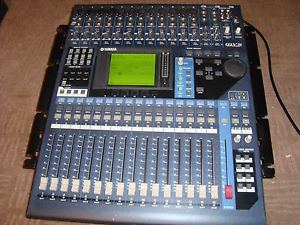
Yamaha 01v96 v2 with ADAT MY-AT Board. with rack ears, perfect working order
Estimated price for orientation: 900 $
Category: Live and Studio Mixers
Class:
Description Condition: Used: An item that has been used previously. The item may have some signs of cosmetic wear, but is fully operational and functions as intended. This item may be a floor model or store return that has been used. See the seller’s listing for full details and description of any imperfections. See all condition definitions- opens in a new window or tab ... Read moreabout the condition
Here is our beloved Yamaha 01v96 v2, probably the most trustable and reliable digital mixer, ever.It has been used only in studio, no gigs or shows whatsoever, and that's why its in excellent conditions.Cosmetically like new, no signs of wear, no scratches on surface, no dead pixels. The motorized faders go smoothly automated and manually.It has been upgraded with MY-AT16 Adat board, so it has 3 ADAT inputs and another 3 ADAT outputs (8 channels each).Rack ears included, and will be shipped with double box protection to avoid any kind of damages on shipping.It is a big mixer and heavyweighted, so keep in mind that shipping costs are not cheap on these!All the 01V96 input connectors are top-mounted for easy access in any application. The first 12 analog channels feature high-performance head amplifiers for microphone or line input that deliver a pristine signal to the mixing console's precision 24-bit/96-kHz A/D converters. The 48-volt phantom power for condenser microphones is switchable in 4-channel groups, while trim controls and pad switches facilitate optimum level matching with the source, and channel inserts make it easy to insert external analog processing gear into the pre-A/D signal path. Inputs 13 through 16 accept balanced/unbalanced line-level signals singly (each input has an independent trim control) or in pairs for stereo input. When you need more, Yamaha offers a range of Mini-YGDAI expansion cards that can simply be plugged into the 01V96 expansion slot to provide additional I/O in a variety of formats: ADAT, AES/EBU, TDIF or analog.The 01V96 offers a main stereo program bus, eight individual mixing buses, two solo buses, and eight auxiliary buses ” a total of 20 in all. This gives you plenty of signal-routing options to adapt to just about any mixing requirements.Surround is becoming an important part of modern sound production. The 01V96 audio mixer features 6.1, 5.1 and 3-1 surround panning modes so you can create surround mixes without having to sacrifice features or performance in other areas.The 16 channel strips on the 01V96 panel provide access to the most essential operations for the corresponding channels. Depending on the currently selected layer, the channel strips will control channels 1 through 16, channels 17 through 32, or the eight AUX sends and eight buses (the "Master Layer"). Also, the channel faders will function according to the settings in the FADER MODE section. In addition to a 100-millimeter motor fader, each channel strip includes a channel ON/OFF key, a SOLO key, and a SEL key that assigns the channel as the console's "selected channel." Detailed panning and EQ control for the currently selected channel is available via the SELECTED CHANNEL controls. The master STEREO fader is also a 100-mm motor type, with its own ON and SEL keys.The SELECTED CHANNEL controls include the hands-on panning and EQ controls for the currently selected channel, with analog-style buttons and knobs for direct, easy access to the parameters. Need to adjust the high-mid frequency a little? Just tap the HIGH MID key and turn the FREQUENCY knob until you get the sound you want.All available inputs, outputs, effects, and channel inserts can be assigned to any of the console's channels or outputs via the 01V96V2's remarkably versatile, easy-to-use digital patching system. For example, any of the effect processors can be assigned to an auxiliary bus for send-type operation, or inserted directly into any input channel as required. A direct out function also allows the signal from any of the input channels to be routed directly to any digital or analog output. The eight auxiliary buses can also be patched to anywhere in the system. Centralized control means you'll never have to run around to physically re-patch cables whenever you need to reconfigure the system, while patch setups you might want to use again can be stored in the 01V96 ”patch library” for instant recall at any time.When the Fader Solo Release function is active, touching any fader releases the current "solo" ed channel(s). In addition, the Pre-fader with Pan Mode allows you to monitor the post-pan pre-fader signal.You could use external digital effect processors with the 01V96, but what's the point when it already features built-in top-performance 24-bit/96kHz effect processors? Also, you run the risk of lower audio quality if you have to convert down to a lower sampling rate for effect processing ” which is exactly what's going to happen if you use hardware or software processors that don't offer 24-bit/96kHz performance anywhere in your signal chain. That's why Yamaha included a comprehensive range of 96-kHz compatible stereo effects in the 01V96. You can use two effects simultaneously at 88.2/96-kHz, and up to four effects at lower sampling frequenciesAll input channels on the 01V96 feature flexible, independent compression and gating/ducking processors for dynamics control. All bands on the 4-band parametric channel equalizers are fully sweepable from 20 Hz to 20 kHz, with bandwidth variable from 0.1 to 10 and a ±18dB gain range for extraordinary equalization flexibility. The channel delays also go well beyond the norm, with a maximum delay of 452 milliseconds (96 kHz mode). Even the stereo bus, eight mix buses, and eight aux buses have individual compression and EQ!Optional ADD-ON EFFECTS can be added to the original collection of preset effects. The available ADD-ON EFFECTS packages include the Channel Strip Package which contains compressor and EQ modellings, the Master Strip Package which includes modellings of "good old" analog tape decks, the Reverb Package which includes the latest REV-X algorithm reverb and more. You can edit these effects from the 01V96, as well as from your personal computer via the graphic user interface of STUDIO MANAGER Version 2. The combination of the 01V96 Version 2 and ADD-ON EFFECTS offers a totally integrated production environment which completes all effect processing only with on-board effects.
The FADER MODE keys allow the 01V96 faders to be instantaneously switched between fader and auxiliary level control. Since the faders feature fast, precise motor-drive mechanisms, they immediately respond by moving to the appropriate settings for the selected mode.One of the advantages of digital control is that it allows extraordinary power and flexibility to be packed into minimum space. The 01V96 has 17 physical 100-millimeter motor faders. The first 16 can be instantly switched to handle input channels 1 through 16, 17 through 32, auxiliary sends 1 through 8 and buses 1 through 8, or user-assignable configuration via the console's LAYER switches.In the user-assignable layer, a new added feature in version 2, you can create a mixed fader configuration of input and output channels, or you can use the faders as Fader Group Masters. There's also a ST IN layer switch that switches between the stereo 1/2 or 3/4 inputs for the stereo layer controls. Having all controls right in front of you at all times not only saves space, it also means that all operations can be carried out without having to move away from the monitoring "sweet spot."From a group master fader, you can simultaneously control the overall level (input or output) of slave faders assigned to the master fader, while maintaining the relative balance of channel levels. In addition, a group master fader can be assigned to a fader in the user assignable layer.The Mute Group Master function is also available with Version 2. By assigning a User Defined Key as a Mute Group Master switch, clicking the key mutes or unmutes all input or output channels in the Mute group.Complete console setups can be memorized and instantly recalled via the 01V96 SCENE MEMORY controls. Memory is provided for up to 99 scenes. In addition to recalling scenes from the panel controls you can recall them remotely via MIDI program change messages, providing a handy degree of automation capability. The current scene number ” 01 through 99 ” is shown on the LCD panel. Additional scene memories can be managed via a computer running the supplied STUDIO MANAGER software.With version 2, you can copy and paste channel or parameter settings from the current scene into other scenes. This feature can be useful if you have already programmed several scenes, but want to edit certain parameters in all scenes.The new 01V96 display is a high-resolution 320 x 240 dot LCD panel that provides easy visual access to all of the consoles functions and parameters. Many parameters are displayed graphically so you can see what's happening at a glance ” EQ curves and compression parameters are especially "readable" in this format.The DISPLAY ACCESS keys determine which type of data will be shown on the LCD panel ” a total of 12 selectable categories. This approach minimizes the need to scroll through on-screen lists when you need access to a particular type of data.Large cursor, INC/DEC, and enter keys are complemented by a data entry dial that lets you spin in desired values quickly and easily. The data entry dial also doubles as a shuttle/scrub dial for recorder or DAW control.Setting up EQ, compression, and other parameters for a mix from scratch can be a daunting task, so Yamaha has provided an extensive selection of presets in a range of "libraries" that can simply be selected and used unmodified, or edited to suit specific requirements. Libraries are provided for effects, compression, gating, EQ, I/O patching, and channel setups. Of course, your own setups can be added to the libraries for instant recall whenever they are needed.These 8 keys can be assigned to control any functions you choose. You could, for example, use them to recall input patch setups, to arm MTR tracks for recording, or to handle locator functions. And, when the REMOTE layer is selected, the USER DEFINED KEYS are automatically assigned to Pro Tools control functions by default.As a new feature with Version 2, the Instant Group Assignment function enables you to also use these keys to quickly set up fader groups and mute groups.The 01V96 has been designed to seamlessly integrate with leading digital audio workstations to create a complete production and mixing environment. Extensive support is provided for Digidesign's Pro Tools system as well as Steinberg's Nuendo 2.0 and Cubase SX ” for full control of mixing and processing parameters by using the 01V96 selected channel section, as well as transport/track-arming control and access to editing functions ” directly from the 01V96 control surface. There's also a "General DAW" mode that provides compatibility with other workstations. The rear panel is home to balanced analog stereo and monitor outputs as well as four balanced "omni" outputs. The optical IN and OUT connectors for the 01V9V2's built-in ADAT interface are also located on the rear panel. There are also digital 2-track inputs and outputs featuring coaxial connectors. On-board sample rate conversion allows CD players and other digital sources connected to the digital input to be monitored or routed to an input channel without having to be synchronized to the system clock. A range of synchronization and control options are available via word clock inputs and outputs, MIDI connectors, and a USB "TO HOST" connector which can be used for computer control via the supplied Studio Monitor software. The rear panel also has an expansion slot which will accept a wide range of Yamaha mini-YGDAI expansion cards that can add up to 16 additional channels in a variety of formats.Although the 01V96 handles 96 kHz audio as standard, most of the currently available digital recorders and workstations can handle 96 kHz audio only in double channel mode (using two tracks to make one). In this configuration the 01V96 uses one channel per (96-kHz) track, but twice the number of I/O connections must be used. MY8-AT/TD/AE cards work in double channel mode to handle 16 channels of 44.1/48-kHz audio or up to 8 channels of 96 kHz audio in double channel mode. With the latest equipment that handles 96-kHz audio as standard (in double speed mode like the 01V96) you can make standard connections using the MY8-AE96 card. The MY8-AE96 card can work either in double speed or double channel mode.The 01V96 comes with an industry-standard ADAT optical digital I/O interface built right in ” no options necessary. The ADAT "Lightpipe" optical I/O is standard on a wide range of current digital sound gear, so you can simply plug in via optical cables for 8 digital inputs and 8 digital outputs that will handle your digital signals without compromise. Additional optical I/O capacity can be added via the 01V96 expansion slot, as necessary.
Description
| Condition: | Used: An item that has been used previously. The item may have some signs of cosmetic wear, but is fully operational and functions as intended. This item may be a floor model or store return that has been used. See the seller’s listing for full details and description of any imperfections. See all condition definitions- opens in a new window or tab ... Read moreabout the condition |
Here is our beloved Yamaha 01v96 v2, probably the most trustable and reliable digital mixer, ever.It has been used only in studio, no gigs or shows whatsoever, and that's why its in excellent conditions.Cosmetically like new, no signs of wear, no scratches on surface, no dead pixels. The motorized faders go smoothly automated and manually.It has been upgraded with MY-AT16 Adat board, so it has 3 ADAT inputs and another 3 ADAT outputs (8 channels each).Rack ears included, and will be shipped with double box protection to avoid any kind of damages on shipping.It is a big mixer and heavyweighted, so keep in mind that shipping costs are not cheap on these!
All the 01V96 input connectors are top-mounted for easy access in any application. The first 12 analog channels feature high-performance head amplifiers for microphone or line input that deliver a pristine signal to the mixing console's precision 24-bit/96-kHz A/D converters. The 48-volt phantom power for condenser microphones is switchable in 4-channel groups, while trim controls and pad switches facilitate optimum level matching with the source, and channel inserts make it easy to insert external analog processing gear into the pre-A/D signal path. Inputs 13 through 16 accept balanced/unbalanced line-level signals singly (each input has an independent trim control) or in pairs for stereo input. When you need more, Yamaha offers a range of Mini-YGDAI expansion cards that can simply be plugged into the 01V96 expansion slot to provide additional I/O in a variety of formats: ADAT, AES/EBU, TDIF or analog.The 01V96 offers a main stereo program bus, eight individual mixing buses, two solo buses, and eight auxiliary buses ” a total of 20 in all. This gives you plenty of signal-routing options to adapt to just about any mixing requirements.Surround is becoming an important part of modern sound production. The 01V96 audio mixer features 6.1, 5.1 and 3-1 surround panning modes so you can create surround mixes without having to sacrifice features or performance in other areas.The 16 channel strips on the 01V96 panel provide access to the most essential operations for the corresponding channels. Depending on the currently selected layer, the channel strips will control channels 1 through 16, channels 17 through 32, or the eight AUX sends and eight buses (the "Master Layer"). Also, the channel faders will function according to the settings in the FADER MODE section. In addition to a 100-millimeter motor fader, each channel strip includes a channel ON/OFF key, a SOLO key, and a SEL key that assigns the channel as the console's "selected channel." Detailed panning and EQ control for the currently selected channel is available via the SELECTED CHANNEL controls. The master STEREO fader is also a 100-mm motor type, with its own ON and SEL keys.The SELECTED CHANNEL controls include the hands-on panning and EQ controls for the currently selected channel, with analog-style buttons and knobs for direct, easy access to the parameters. Need to adjust the high-mid frequency a little? Just tap the HIGH MID key and turn the FREQUENCY knob until you get the sound you want.All available inputs, outputs, effects, and channel inserts can be assigned to any of the console's channels or outputs via the 01V96V2's remarkably versatile, easy-to-use digital patching system. For example, any of the effect processors can be assigned to an auxiliary bus for send-type operation, or inserted directly into any input channel as required. A direct out function also allows the signal from any of the input channels to be routed directly to any digital or analog output. The eight auxiliary buses can also be patched to anywhere in the system. Centralized control means you'll never have to run around to physically re-patch cables whenever you need to reconfigure the system, while patch setups you might want to use again can be stored in the 01V96 ”patch library” for instant recall at any time.When the Fader Solo Release function is active, touching any fader releases the current "solo" ed channel(s). In addition, the Pre-fader with Pan Mode allows you to monitor the post-pan pre-fader signal.You could use external digital effect processors with the 01V96, but what's the point when it already features built-in top-performance 24-bit/96kHz effect processors? Also, you run the risk of lower audio quality if you have to convert down to a lower sampling rate for effect processing ” which is exactly what's going to happen if you use hardware or software processors that don't offer 24-bit/96kHz performance anywhere in your signal chain. That's why Yamaha included a comprehensive range of 96-kHz compatible stereo effects in the 01V96. You can use two effects simultaneously at 88.2/96-kHz, and up to four effects at lower sampling frequenciesAll input channels on the 01V96 feature flexible, independent compression and gating/ducking processors for dynamics control. All bands on the 4-band parametric channel equalizers are fully sweepable from 20 Hz to 20 kHz, with bandwidth variable from 0.1 to 10 and a ±18dB gain range for extraordinary equalization flexibility. The channel delays also go well beyond the norm, with a maximum delay of 452 milliseconds (96 kHz mode). Even the stereo bus, eight mix buses, and eight aux buses have individual compression and EQ!Optional ADD-ON EFFECTS can be added to the original collection of preset effects. The available ADD-ON EFFECTS packages include the Channel Strip Package which contains compressor and EQ modellings, the Master Strip Package which includes modellings of "good old" analog tape decks, the Reverb Package which includes the latest REV-X algorithm reverb and more. You can edit these effects from the 01V96, as well as from your personal computer via the graphic user interface of STUDIO MANAGER Version 2. The combination of the 01V96 Version 2 and ADD-ON EFFECTS offers a totally integrated production environment which completes all effect processing only with on-board effects.
The FADER MODE keys allow the 01V96 faders to be instantaneously switched between fader and auxiliary level control. Since the faders feature fast, precise motor-drive mechanisms, they immediately respond by moving to the appropriate settings for the selected mode.One of the advantages of digital control is that it allows extraordinary power and flexibility to be packed into minimum space. The 01V96 has 17 physical 100-millimeter motor faders. The first 16 can be instantly switched to handle input channels 1 through 16, 17 through 32, auxiliary sends 1 through 8 and buses 1 through 8, or user-assignable configuration via the console's LAYER switches.In the user-assignable layer, a new added feature in version 2, you can create a mixed fader configuration of input and output channels, or you can use the faders as Fader Group Masters. There's also a ST IN layer switch that switches between the stereo 1/2 or 3/4 inputs for the stereo layer controls. Having all controls right in front of you at all times not only saves space, it also means that all operations can be carried out without having to move away from the monitoring "sweet spot."From a group master fader, you can simultaneously control the overall level (input or output) of slave faders assigned to the master fader, while maintaining the relative balance of channel levels. In addition, a group master fader can be assigned to a fader in the user assignable layer.The Mute Group Master function is also available with Version 2. By assigning a User Defined Key as a Mute Group Master switch, clicking the key mutes or unmutes all input or output channels in the Mute group.Complete console setups can be memorized and instantly recalled via the 01V96 SCENE MEMORY controls. Memory is provided for up to 99 scenes. In addition to recalling scenes from the panel controls you can recall them remotely via MIDI program change messages, providing a handy degree of automation capability. The current scene number ” 01 through 99 ” is shown on the LCD panel. Additional scene memories can be managed via a computer running the supplied STUDIO MANAGER software.With version 2, you can copy and paste channel or parameter settings from the current scene into other scenes. This feature can be useful if you have already programmed several scenes, but want to edit certain parameters in all scenes.The new 01V96 display is a high-resolution 320 x 240 dot LCD panel that provides easy visual access to all of the consoles functions and parameters. Many parameters are displayed graphically so you can see what's happening at a glance ” EQ curves and compression parameters are especially "readable" in this format.The DISPLAY ACCESS keys determine which type of data will be shown on the LCD panel ” a total of 12 selectable categories. This approach minimizes the need to scroll through on-screen lists when you need access to a particular type of data.Large cursor, INC/DEC, and enter keys are complemented by a data entry dial that lets you spin in desired values quickly and easily. The data entry dial also doubles as a shuttle/scrub dial for recorder or DAW control.Setting up EQ, compression, and other parameters for a mix from scratch can be a daunting task, so Yamaha has provided an extensive selection of presets in a range of "libraries" that can simply be selected and used unmodified, or edited to suit specific requirements. Libraries are provided for effects, compression, gating, EQ, I/O patching, and channel setups. Of course, your own setups can be added to the libraries for instant recall whenever they are needed.These 8 keys can be assigned to control any functions you choose. You could, for example, use them to recall input patch setups, to arm MTR tracks for recording, or to handle locator functions. And, when the REMOTE layer is selected, the USER DEFINED KEYS are automatically assigned to Pro Tools control functions by default.As a new feature with Version 2, the Instant Group Assignment function enables you to also use these keys to quickly set up fader groups and mute groups.The 01V96 has been designed to seamlessly integrate with leading digital audio workstations to create a complete production and mixing environment. Extensive support is provided for Digidesign's Pro Tools system as well as Steinberg's Nuendo 2.0 and Cubase SX ” for full control of mixing and processing parameters by using the 01V96 selected channel section, as well as transport/track-arming control and access to editing functions ” directly from the 01V96 control surface. There's also a "General DAW" mode that provides compatibility with other workstations. The rear panel is home to balanced analog stereo and monitor outputs as well as four balanced "omni" outputs. The optical IN and OUT connectors for the 01V9V2's built-in ADAT interface are also located on the rear panel. There are also digital 2-track inputs and outputs featuring coaxial connectors. On-board sample rate conversion allows CD players and other digital sources connected to the digital input to be monitored or routed to an input channel without having to be synchronized to the system clock. A range of synchronization and control options are available via word clock inputs and outputs, MIDI connectors, and a USB "TO HOST" connector which can be used for computer control via the supplied Studio Monitor software. The rear panel also has an expansion slot which will accept a wide range of Yamaha mini-YGDAI expansion cards that can add up to 16 additional channels in a variety of formats.Although the 01V96 handles 96 kHz audio as standard, most of the currently available digital recorders and workstations can handle 96 kHz audio only in double channel mode (using two tracks to make one). In this configuration the 01V96 uses one channel per (96-kHz) track, but twice the number of I/O connections must be used. MY8-AT/TD/AE cards work in double channel mode to handle 16 channels of 44.1/48-kHz audio or up to 8 channels of 96 kHz audio in double channel mode. With the latest equipment that handles 96-kHz audio as standard (in double speed mode like the 01V96) you can make standard connections using the MY8-AE96 card. The MY8-AE96 card can work either in double speed or double channel mode.The 01V96 comes with an industry-standard ADAT optical digital I/O interface built right in ” no options necessary. The ADAT "Lightpipe" optical I/O is standard on a wide range of current digital sound gear, so you can simply plug in via optical cables for 8 digital inputs and 8 digital outputs that will handle your digital signals without compromise. Additional optical I/O capacity can be added via the 01V96 expansion slot, as necessary.
The FADER MODE keys allow the 01V96 faders to be instantaneously switched between fader and auxiliary level control. Since the faders feature fast, precise motor-drive mechanisms, they immediately respond by moving to the appropriate settings for the selected mode.One of the advantages of digital control is that it allows extraordinary power and flexibility to be packed into minimum space. The 01V96 has 17 physical 100-millimeter motor faders. The first 16 can be instantly switched to handle input channels 1 through 16, 17 through 32, auxiliary sends 1 through 8 and buses 1 through 8, or user-assignable configuration via the console's LAYER switches.In the user-assignable layer, a new added feature in version 2, you can create a mixed fader configuration of input and output channels, or you can use the faders as Fader Group Masters. There's also a ST IN layer switch that switches between the stereo 1/2 or 3/4 inputs for the stereo layer controls. Having all controls right in front of you at all times not only saves space, it also means that all operations can be carried out without having to move away from the monitoring "sweet spot."From a group master fader, you can simultaneously control the overall level (input or output) of slave faders assigned to the master fader, while maintaining the relative balance of channel levels. In addition, a group master fader can be assigned to a fader in the user assignable layer.The Mute Group Master function is also available with Version 2. By assigning a User Defined Key as a Mute Group Master switch, clicking the key mutes or unmutes all input or output channels in the Mute group.Complete console setups can be memorized and instantly recalled via the 01V96 SCENE MEMORY controls. Memory is provided for up to 99 scenes. In addition to recalling scenes from the panel controls you can recall them remotely via MIDI program change messages, providing a handy degree of automation capability. The current scene number ” 01 through 99 ” is shown on the LCD panel. Additional scene memories can be managed via a computer running the supplied STUDIO MANAGER software.With version 2, you can copy and paste channel or parameter settings from the current scene into other scenes. This feature can be useful if you have already programmed several scenes, but want to edit certain parameters in all scenes.The new 01V96 display is a high-resolution 320 x 240 dot LCD panel that provides easy visual access to all of the consoles functions and parameters. Many parameters are displayed graphically so you can see what's happening at a glance ” EQ curves and compression parameters are especially "readable" in this format.The DISPLAY ACCESS keys determine which type of data will be shown on the LCD panel ” a total of 12 selectable categories. This approach minimizes the need to scroll through on-screen lists when you need access to a particular type of data.Large cursor, INC/DEC, and enter keys are complemented by a data entry dial that lets you spin in desired values quickly and easily. The data entry dial also doubles as a shuttle/scrub dial for recorder or DAW control.Setting up EQ, compression, and other parameters for a mix from scratch can be a daunting task, so Yamaha has provided an extensive selection of presets in a range of "libraries" that can simply be selected and used unmodified, or edited to suit specific requirements. Libraries are provided for effects, compression, gating, EQ, I/O patching, and channel setups. Of course, your own setups can be added to the libraries for instant recall whenever they are needed.These 8 keys can be assigned to control any functions you choose. You could, for example, use them to recall input patch setups, to arm MTR tracks for recording, or to handle locator functions. And, when the REMOTE layer is selected, the USER DEFINED KEYS are automatically assigned to Pro Tools control functions by default.As a new feature with Version 2, the Instant Group Assignment function enables you to also use these keys to quickly set up fader groups and mute groups.The 01V96 has been designed to seamlessly integrate with leading digital audio workstations to create a complete production and mixing environment. Extensive support is provided for Digidesign's Pro Tools system as well as Steinberg's Nuendo 2.0 and Cubase SX ” for full control of mixing and processing parameters by using the 01V96 selected channel section, as well as transport/track-arming control and access to editing functions ” directly from the 01V96 control surface. There's also a "General DAW" mode that provides compatibility with other workstations. The rear panel is home to balanced analog stereo and monitor outputs as well as four balanced "omni" outputs. The optical IN and OUT connectors for the 01V9V2's built-in ADAT interface are also located on the rear panel. There are also digital 2-track inputs and outputs featuring coaxial connectors. On-board sample rate conversion allows CD players and other digital sources connected to the digital input to be monitored or routed to an input channel without having to be synchronized to the system clock. A range of synchronization and control options are available via word clock inputs and outputs, MIDI connectors, and a USB "TO HOST" connector which can be used for computer control via the supplied Studio Monitor software. The rear panel also has an expansion slot which will accept a wide range of Yamaha mini-YGDAI expansion cards that can add up to 16 additional channels in a variety of formats.Although the 01V96 handles 96 kHz audio as standard, most of the currently available digital recorders and workstations can handle 96 kHz audio only in double channel mode (using two tracks to make one). In this configuration the 01V96 uses one channel per (96-kHz) track, but twice the number of I/O connections must be used. MY8-AT/TD/AE cards work in double channel mode to handle 16 channels of 44.1/48-kHz audio or up to 8 channels of 96 kHz audio in double channel mode. With the latest equipment that handles 96-kHz audio as standard (in double speed mode like the 01V96) you can make standard connections using the MY8-AE96 card. The MY8-AE96 card can work either in double speed or double channel mode.The 01V96 comes with an industry-standard ADAT optical digital I/O interface built right in ” no options necessary. The ADAT "Lightpipe" optical I/O is standard on a wide range of current digital sound gear, so you can simply plug in via optical cables for 8 digital inputs and 8 digital outputs that will handle your digital signals without compromise. Additional optical I/O capacity can be added via the 01V96 expansion slot, as necessary.