Back to the main page Back to category Audio or MIDI Interfaces
musical instrument details
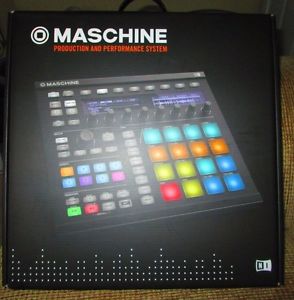
Native Instruments Maschine MK2 Groove Production Studio, Black
Estimated price for orientation: 650 $
Category: Audio or MIDI Interfaces
Class:
Description Condition: New: A brand-new, unused, unopened, undamaged item in its original packaging (where packaging is applicable). Packaging should be the same as what is found in a retail store, unless the item is handmade or was packaged by the manufacturer in non-retail packaging, such as an unprinted box or plastic bag. See the seller's listing for full details. See all condition definitions- opens in a new window or tab ... Read moreabout the condition Interface Type: USB Interface Type: USB Audio Interface Mic/Line Input: Mic/Preamp TRS 1/4" Form Factor: Portable Model: Maschine MK2 Black Brand: Native Instruments Additional Inputs/Outputs: MIDI I/O MPN: Does Not Apply Features: Bus-Powered UPC: 4042477219499
Color:Black With the Native Instruments Maschine groove production software and controller, you've got the undeniable vibe of working with a hardware drum machine, combined with the virtually unlimited creative potential software provides. Whether you're sampling and slicing beats from vinyl, creating electronic remixes, or performing live, Maschine is awesome to work with. You've got 16 velocity-sensitive, color-coded pads for triggering sounds and patterns. And you've got nine knobs for realtime control of virtually any parameter in the Maschine software - it's the ideal way to combine hardware control over software.
Easily browse, load, tweak, play, arrange, and automate all sampler, plug-in and effect parametersControl and sequence all of your external hardware instruments, or switch to MIDI mode to control other softwareMulticolored pads allow you to assign colors to the groups, sounds, patterns, and scenes, and see the pads and group buttons light up in the same colorsPads feature increased sensitivity for much more precisionThe redesigned Master section allows you to select modes with the toggle buttons and click through values without the need to look at the screen
Description
| Condition: | New: A brand-new, unused, unopened, undamaged item in its original packaging (where packaging is applicable). Packaging should be the same as what is found in a retail store, unless the item is handmade or was packaged by the manufacturer in non-retail packaging, such as an unprinted box or plastic bag. See the seller's listing for full details. See all condition definitions- opens in a new window or tab ... Read moreabout the condition | Interface Type: | USB Interface |
| Type: | USB Audio Interface | Mic/Line Input: | Mic/Preamp TRS 1/4" |
| Form Factor: | Portable | Model: | Maschine MK2 Black |
| Brand: | Native Instruments | Additional Inputs/Outputs: | MIDI I/O |
| MPN: | Does Not Apply | Features: | Bus-Powered |
| UPC: | 4042477219499 |
Color:Black With the Native Instruments Maschine groove production software and controller, you've got the undeniable vibe of working with a hardware drum machine, combined with the virtually unlimited creative potential software provides. Whether you're sampling and slicing beats from vinyl, creating electronic remixes, or performing live, Maschine is awesome to work with. You've got 16 velocity-sensitive, color-coded pads for triggering sounds and patterns. And you've got nine knobs for realtime control of virtually any parameter in the Maschine software - it's the ideal way to combine hardware control over software.
Easily browse, load, tweak, play, arrange, and automate all sampler, plug-in and effect parametersControl and sequence all of your external hardware instruments, or switch to MIDI mode to control other softwareMulticolored pads allow you to assign colors to the groups, sounds, patterns, and scenes, and see the pads and group buttons light up in the same colorsPads feature increased sensitivity for much more precisionThe redesigned Master section allows you to select modes with the toggle buttons and click through values without the need to look at the screen